1
PDI-P26, 32, 40 TV Installation Guide
Page 51 of 52
Communication Systems Inc.
Better Solutions Are Within Reach™INSTALLATION and OPERATING INSTRUCTIONS
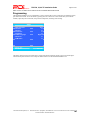
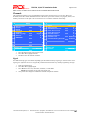
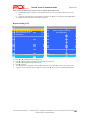
Menu sections
Categories
TV Display (when DVD
is not inserted)
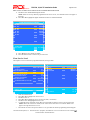
Options (continued)
4:3/Pb, 4:3/Lb, 16:9, Wide squeeze
Angle
On, Off
OSD Lang
English, French, Spanish, German, Italian
On
Off
On
Off
On
Off
Captions
General Setup Page
Options
Screen Saver
Last Memory
Media Center
USB, SD/MMC, MS
Stereo, L-Mono, R-Mono,
Mix-Mono
Meter. Use ▲ and ▼
buttons to adjust
Dual Mono
Dolby Digital Setup
Dynamic
Audio Setup Page
HDCD
Off
1x
2x
Quality
Sharpness, Brightness, Contrast
DivX VOD
OK
Video Setup Page
Audio
Subtitle
Preference Page (w/o DVD
inserted)
Password Setup Page
Disc Menu
English, French, Spanish, Chinese, Japanese, Korean,
Russian, Thai
French, Spanish, Chinese, Japanese, Korean, Russian,
Thai, Off
English, French, Spanish, Chinese, Japanese, Korean,
Russian, Thai
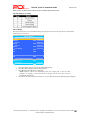
Parental
Kids Saf, G, PG, PG-13, PGR, R, NC-17, Adult
Default
Reset
Password Mode
On, Off
Password
Change
Exit Setup Menu
Description
Adjusts the aspect ratio of the image or video.
Allows for other angles of a scene in a video to be viewed
(if other angles have been recorded on the DVD)
Changes the languages of the Setup menus
Turns captions ON or OFF
Turns screensaver ON or OFF
When set to ON, the module will start to play the disc
where it was last stopped.
Switches to another type of media that is inserted into the
module.
Dual Mode and Dynamic allow the difference between
high and low sounds to be adjusted for each of the four
settings: Stereo, L-Mono, R-Mono, and Mix-Mono
A filter can be set for HDCDs
Adjust 3 setting meters:
-20 to 20
Video On Demand service that allows video to be rented
and purchased.
Change the language spoken on a video(if the DVD offers
the language)
Set the language in which subtitles will be displayed(if the
DVD offers the language)
Changes the languages of menus of the DVD menus(if the
DVD offers the language)
The password will be required if an inserted movie is at a
level that is equal to or higher than what is set.
Resets module to factory settings
If set to On, the password will be required in order to
change the Parental options or watch a movie that is at a
rating level equal to or higher than what is set in the
Parental category.*
Allows for a new password to be set
Close Setup menu
*The default password from the factory is ‘0000’
PDi Communication Systems, Inc. 40 Greenwood Lane Springboro, Ohio 45066 USA PH +1-937-743-6010 PH +1-937-743-5664
Document Number: PD196I127R1.DOC