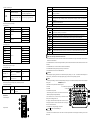
1
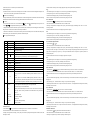
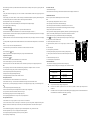
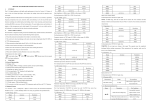
4. Before measuring low resistance, you should make the test leads short-circuit at first, and then press “REL”. By this way, you can get the actual 4.12 Transistor Test (hFE) value of the resistance. 1. Switch the knob to hFE range. Note: 2. Define the transistor is NPN or PNP type, then insert the emitter, base and collector separately in the relative hole. 1 Firstly users should select the highest range, if the value of resistance is unknown beforehand, and then select the proper range based on 5. METER MAINTENANCE displaying value. 2. The LCD displays “OL” when the resistance is over the selected range. The knob should be adjusted to a higher range. When measuring value is The meter is a precise instrument. Random changes to the circuit are not allowed. over 1MΩ, the reading will take a few seconds to be stable. It’s normal for high resistance measurement. Note: 3. When input terminal is in open circuit, LCD will display “OL”. 1. Don’t input the voltage value higher than DC 1000V or AC 750V rms. 4. Before measuring in line resistor, make sure that the power is off and all capacitors are discharged completely. 2. Don’t input voltage at current, resistance, diode and continuity range. 5. Do not input any voltage at resistance range. 3. Don’t make any measurements when the battery isn’t installed or the back cover isn’t fixed. 4. Before replacing fuse, please remove the test leads from the measuring point and turn off the power. 4.8 Diode and Continuity test: 1. Switch the knob to “Ω ” range, and press “DC/AC” key to select diode measurement mode. 5. Keep the meter away from water, dust and shock. 2. Insert the black test lead in “COM” terminal and the red one in “V/Ω/Hz” terminal (the polarity of red lead is “+”) 6. Don't expose the meter under high temperature, high humidity, combustible, explosive and strong magnetic place. 3. Forward measurement: connect red test lead to the positive polarity and the black test lead to the cathode polarity of the diode. LCD will display 7. Wipe the case with a damp cloth and detergent. Do not use abrasives and alcohol to clean the meter. the approx. value of forward voltage drop. 8. If do not operate for a long time, you should take out the battery to avoid leakage damage. 4. Backward measurement: connect red test lead to the cathode polarity and the black test lead to positive polarity of the diode. LCD will display 9. When “ “OL”. 9-1. Follow picture 2, and remove the holster at first. 5. The complete diode testing includes forward and backward measurement, if the result doesn't meet the descriptions above, it means the diode is 9-2.Unlock the battery door and remove the cover; broken. 9-3. Replace the old battery with the new one. For longer using life, it's better to use alkaline 6. Press “DC/AC” key to select the Continuity measurement mode. battery. 7. Connect test leads to two points of tested circuit, if the resistance is less than (30±10) Ω, the buzzer sounds. 9-4. Fix the battery door. Note: 9-5, Follow the picture to put on the holster. 1. Don’t input voltage at “ ” range. ” symbol is displayed, you should replace the battery according to the following steps: 10. Fuse change: When replacing fuse, please use fuse with same type and specification. 2. Make sure the power is off and all capacitors are discharged. Any AC signal will make the buzzer sounds. 10-1. Follow picture 2, and remove the holster at first, then unlock the battery door and remove the 4.9 Capacitance measurement cover; 1.Switch the knob to “ 10-2. Take out the fuse and put on a new one. ”range; 2. Insert the black lest lead in “COM” terminal and the red one in “V/Ω/Hz” terminal.; 10-3. Fix the battery door, and put on the holster. 3. If the LCD doesn’t display “0”, press “REL” to clear the reading; 6. TROUBLE SHOOTING 4. Connect the capacitor to “COM” and “VΩHz” terminal. (Note: the red test leads is for positive pole+).LCD ○ displays capacitance value. Note: If the meter does not work properly, please check the meter as following steps: (If the problems still cannot be solved, please refer to repairing center or contact the local dealers.) 1. Don’t input voltage or current to the “VΩHz” terminal when measuring the capacitance or the capacitor still in the “Cx” terminal. 2. In order to assure the accuracy, please press “REL” to clear the reading before testing. Fault Turn on the power Replace battery Replace battery No current or temperature input Replace fuse Error Value Replace battery No reading on LCD 4. The capacitor must be completely discharged before testing. 5. The reading of 400uF range will take more than 15 seconds to be stable. signal appears 4.10 Frequency measurement 1. Insert the black lest lead in “COM” terminal and the red one in “V/Ω/Hz” terminal.; Solution 3. There is only the auto range mode under the capacitance range. 2. Switch the knob to “Hz” range,connect the test leads or shielded cable to the signal source or the load which is tested. 3.Press “Hz/DUTY” key to choose frequency/duty cycle measurement,LCD will display the frequency or duty cycle of the tested signal source. Note: 1. There is only the auto range mode under the frequency range; 2. The meter can still work if the input current is higher than 10V rms, but the accuracy is not guaranteed; 3. In noisy environment, it's better to use shield cable to measure a low signal; 4. When measuring high voltage circuit, do not touch the high voltage circuit; 5. Don’t input voltage higher than 250V DC or AC peak value, or it may damage the meter. 4.11 Temperature measurement 1. Switch the knob to “℃ / ℉” range, and press “DC/AC” key to choose ℃ or ℉ measurement. 2. Insert the cold terminal (free end) of thermocouple in “TEMP”socket,and put the working terminal (temperature measuring end) of thermocouple on the surface or inside the object to be tested. Then you can read temperature from the screen, and the data is in Centigrade. Note: 1. If insert the thermocouple oppositely, it will display the wrong value. When the temperature is rising, the value will be down. 2. When the input terminal is open circuit, it will display the environment temperature. 3. Don’t change the temperature probe randomly, or the accuracy will not be guaranteed. 4. Don’t input voltage at temperature range. The specifications are subject to changes without prior notice. The content of this manual is regarded as correct. If users find out any mistakes or omissions, please kindly contact the manufacturer. The manufacturer will not be responsible for accidents and damage caused by improper operations. The functions described in this User Manual shall not be considered as the reason for any special usages. 201187/V0.0