1
Using the Instantel Image
10
Attribute Trademarks with the Appropriate Symbols
Always mark trademarks with the appropriate symbols in a head, as well as on first occurrence in text. It
is not necessary to repeat the designation throughout the document. The same standards apply to
attributing trademarks on a Web page since each Web page has the potential to be viewed individually,
even if it's part of a multi-page section or site. Attribute trademarks on first occurrence within sidebars,
charts, tables, graphics, diagrams, marketing slides, banners, "Related information" links, and other links
on a Web page, because these elements have greater potential to be read or placed independently.
Note: If a trademark that has already appeared in a head appears in a subhead (as on a data sheet), don't
attribute it again. Only attribute a trademark in a subhead if it's the first time the trademark appears.
However, always use the trademark in bold font to distinguish it from the rest of the text, as well as
conforming to all of the other rules.
How to Incorporate Trademark Symbols into Documents
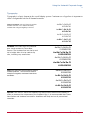
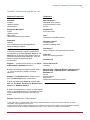
See the following table to locate ™ and ® symbols on your keyboard or in the menu options for the
software applications listed. If you use a different application, check the user manual or the on-screen
"Help" menu (if available) for information regarding trademark symbols. Always use superscript for the
symbols by using the appropriate command. If the formatted ™ and ® symbols aren't available to you,
simply use parentheses to denote the trademark designation: (TM) or (R).
Inserting the trademark symbol in documentation:
Application
TM
®
Lotus Notes®/Microsoft® Word
for Apple Macintosh
Hold the Option key while
selecting “2”
Hold the Option key while
selecting “r”
Microsoft Word for Windows®
Go to the Insert pull-down menu
and choose Symbol; select from
the table and click Insert
Go to the Insert pull-down menu
and choose Symbol’ select â from
the table and click Insert
Adobe® FrameMaker® for
Windows
Press Control-Q, release, and
then press the asterisk key
Press Control-Q, and then press”(“
(opening parenthesis)
HTML
™
®
Microsoft Excel for Windows
Hold down the Alt key while
pressing “0153”
Hold down the Alt key while
pressing “0174”
Lotus Notes is a trademark of International Business Machines Corporation in the United States, other countries, or both. Microsoft and Windows are either
registered trademarks or trademarks of Microsoft Corporation in the United States and/or other countries. Adobe and FrameMaker are either trademarks or
registered trademarks of Adobe Systems Incorporated in the United States and/or other countries.
Dealer Program