1
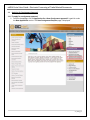
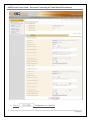
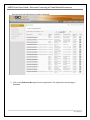
eMDA Portal User Guide ‐ Electronic Processing of Trade Related Documents The New Consignment Request page 2. Enter information on the following fields: I want to make a new application using UCR # Search for the UCR to which your consignment request will be attached to by clicking on This will open the UCR Search pop up window. Which MDA you wish to apply for? Select from the dropdown list, the appropriate MDA you want to direct your request to. What is the eDoc you want to apply for? Select from the dropdown list the eDoc you want to attach to the request. What is the process you want to apply for? . 3. Click . The New Consignment Request Input page is displayed. These displays (non editable) items are shown on the upper section of the page. Field Description Application Ref No. Indicates the unique reference number assigned to the application Application Date Indicates the date when the application was created. Application Status Indicates status of the application Application Version No. Indicates the version of the application. By Default, the Header tab is shown. All fields will be automatically filled out and are not editable except for Referenced Permit/Exemption No field: 3 | P a g e