1
Chapter 4. Application Functions
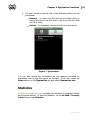
4. For each threat in the list one of the following action can be
performed:
Restore – to return the file back to the folder where it
was moved from (use this action only if you are sure that
the file is safe);
Delete – to completely remove the file from the device.
Figure 7. Quarantine
You can also review the information on the memory occupied by
quarantine and on the free space on SD-card. To do this, press the
Menu button on the Quarantine tab and select Quarantine size.
Statistics
Dr.Web for Android Light compiles the statistics of detected threats
and program actions. To view the statistics, on the Dr.Web - Security
Center screen tap Statistics.
User Manual
23