1
I
Syslem requirement:
hilroductiotr:
Iini air mouse and keybrdtnd.
leyboard, air mouse, and racl-h*cfib
designed small and portable, it-Eqrdk
t
.
.
- Windows 2000/XP/ vista/ 7/win CE
- Linux
ddrireless
appliance, is
people who need to be apartfraEdcuxuter
and
yet con trol it f or thei r training, lEd-t. tE-Erbctu ri n g.
llulti media home theater, peoplccaraa-tsry ctEir or sofa
-rsread of
even in bed to enjoy the fi lm, musb. srf hud
change its channel ahysicallyRemote of other home electric applianca. sucfi as DVD PIAYER, CD
PLAYER, TV, Air Conditioner, with the featureof lR leaming, Mini
Air Mouse and Keyboard can quickly learn original @de from other
home electric appliance remote.
i
-
Android
- Mac
How to use
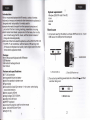
1. Lift up back case from the bottom, and take USB
Receiverout,
I
?.ckage!
lriniAir Mouse
USA R€CEII/ER
and Keyboard with lR Remote
USB Receiver
USB cable for recharge the unit
ljser manual
Feature and specifications:
1. Lift back case up
rR.F 2.4G connection
rechargeable lithium-ion battery
rbacklit for operation in darken room
rPlug and play
tUltra sensitive 3 axial Gyro-sensor- in-aircursor control using
natural hand motions
tBattery capacity: SOOmA
rcharge voltage: DC 5V/300mA
ctandby time: 400 hours
TQWERTY keyboard
rQuick learning original code from other remote
rSize: 1 26.5mm*56.5mm''l 3mm
rweight:8'l.59
1
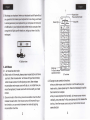
lnsrt
USB rceiver into USB port on the computer
2. Take USB Receiver out
2. Turn unit on by switching power button to on, Blue
one time then go out.
t r
@m_r
3. Bottom view
LED-willflash


![特長の補足[PDF]](http://vs1.manualzilla.com/store/data/006564922_2-ba0cff9f334c2b21d4b6b5aa16849c7f-150x150.png)