1
I
l
I
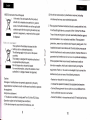
3- Recharge
yourkeytffiGrlEt torrt€ftoard
backlit flash without
b in low charge, and need
yqJr computer with min i end
any operation that ffi
Frlcttrd
to rechargemnnect yow t€rb-d b
of USB cable to yor keltsd and adrs end to co m pute r, th en
orange led witl light upuith stdtqt, and go out when it is fully
prgss lo
acliE
E
Mou* lcfi
[4ouse righi
recharged.
Ir6El
Hl-
&
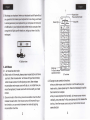
4. Bottom view
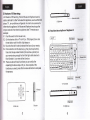
4. Air Mouse
4.1 air mouse hastwo
mode:
a: Static mode: in this mode, please press mouse button and move
you hand, then mousecursor will move with your hand motion,
when mouse cursor arrive the placeyou want, then release
mouse button and mouse cursorwill stay on, no matter how you
move the keyboard, mouse cursorwill not move with your hand
motion.
b. Dynamic mode:in this mode, press mouse button one time then
release mouse button, then mouse cursol wi ll move with you r
hand motion, you can switch between two mode by tapping,
mouse button one time.
Binds key
Fn+Esc to change
operation direction
5- Front view
4.2 Change mouse operation directions:
when you feel mouse curso-r direction is not the same as your
hand motion, please press key Fn+ Esc simultaneously to swiich
the direction,for example:
when you wave keyboard horizontally, but mouse cursor moves
vertically, now press key Fn+Esc simultaneously then release the
two key, then the mouse cursor and your hand motion move in
same direction


![特長の補足[PDF]](http://vs1.manualzilla.com/store/data/006564922_2-ba0cff9f334c2b21d4b6b5aa16849c7f-150x150.png)