1
TOMOGRAPHIC EXPOSURE
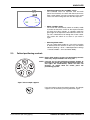
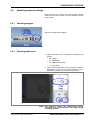
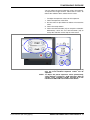
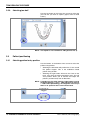
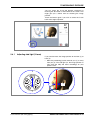
You can adjust the preset exposure values (kV and mA).
To improve the image contrast, reduce the kV value. To
reduce the radiation dose, reduce the mA value.
•
To adjust the exposure values for this exposure:
1. Touch the exposure value field.
2. Use the minus or plus button to reduce or increase the
value.
3. Touch the accept button.
4. Touch the forward button (4a) to accept the selection.
Alternatively, touch the fast forward button (4b) to
accept the selection and to skip the next screen.
2
3
1
4b
4a
NOTE In combined programs (cross-sectional + longitudinal)
only the cross-sectional exposure values can be
adjusted.
NOTE To adjust the preset exposure values permanently,
select Settings > Program > 2100 Programs. Refer to
section 12.2.1 “Programs (2100)” on page 65 in the
Planmeca ProMax 2D User’s Manual for details.
User’s Manual (2D Tomography)
Planmeca ProMax 2D S3 with ProTouch 15