1
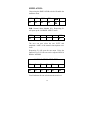
2. Press the RCL ‘F2’ key.
Select Recall
‘F2’ Key Pressed
STO
RCL
CLR
F1
F2
F3
F4
F5
F6
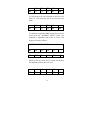
3. Press the 1 ‘F1’, 2 ‘F2’, or 3 ‘F3’ key to print the stored results.
Select Stored Memory to Print from register 1
1
2
3
F1
F2
F3
‘F1’ Key Pressed
F4
F5
F6
D. Clearing the Memory
The stored information may be cleared. All three registers will be cleared
simultaneously.
1. Press the MEM ‘F 3‘ key from the Main Menu.
2. Press the CLR ‘F’ key.
To Clear the Memory
CLR ‘F3’ Key Pressed
STO
RCL
CLR
F1
F2
F3
F4
F5
F6
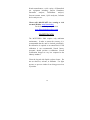
3. The display will momentarily indicate MEMORY CLEARED.
Memory Cleared
MEMORY
CLEARED
F1
F2
MEMORY
MENU
F3
F4
F5
F6