1
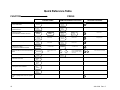
Quick Reference Table
FUNCTION
PRESS
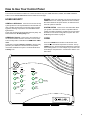
CONTROL PANEL
REMOTE HANDHELD TOUCHPAD
To arm the system
-- Doors & Windows
ARM
Doors &
Windows
ARM
Doors &
Windows
To arm the system
-- Motion Sensors
ARM
Motion
Sensors
ARM
Motion
Sensors
To arm the system
-- Doors/Windows & Motion Sensors
ARM
Doors &
Windows
To activate No Entry Delay
ARM
Doors &
Windows
To activate the Latchkey feature
ARM
Motion
Sensors
ARM
Doors &
Windows
ARM
Motion
Sensors
Press Twice
ARM
Doors &
Windows
Press Twice
ARM
Motion
Sensors
Press Twice
ARM
Motion
Sensors
Press Twice
To disarm the system
Doors/Windows & Motion Sensors
DISARM
+ Access Code
DISARM
+ Access Code
To send an alarm to the Central Monitoring
Station
EMERGENCY
Press & hold for 3 seconds
To check the system status
SYSTEM
STATUS
To set doors to Chime
CHIME
Doors
To set Special Motion Chime
CHIME
Special
Motion
To set lights to time activated
LIGHTS
Time
Activated
To set lights to sensor activated
LIGHTS
Sensor
Activated
KEYCHAIN TOUCHPAD
Press Twice
Press Twice
If Programmed
Press 3 Times
Press both EMERGENCY
buttons. Press & hold for
3 seconds.
Press & hold for 3 seconds
SYSTEM
STATUS
To open a garage door or turn on special
lights
15
466-1302 Rev. C