1
How to Use Your Control Panel
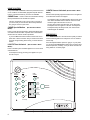
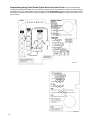
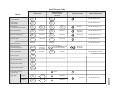
The Control Panel interface consists of 3 columns of buttons. They are: HOME SECURITY, CODE, and HOME CONTROL.
There is a non-medical EMERGENCY button located on the far right.
HOME SECURITY
SYSTEM STATUS. Press twice to hear information
ARM Doors & Windows. Press once to turn the security system protection on for all protected doors and windows.
If a door or window is open when you arm the system, it will
be bypassed, meaning not protected. The SYSTEM STATUS
light will be lit.
Press twice to eliminate the preprogrammed entry delay. The
ARM Doors & Windows button blinks when No Entry Delay is
on.
about your system. If the button is lit, there is a problem with
the system. If the button is blinking, an alarm has occurred.
Press the button to hear what is wrong with the system. See
“System Tests & Trouble Beeps” on page 14. Press SYSTEM
STATUS then the 7 - 8 button to turn all lights on. Press SYSTEM STATUS then the 9 - 0 button to turn all lights off. (Not
for use with Basic Model)
ARM Motion Sensors. Press once to turn protection on
CODE
for all intrusion Motion Sensors. Use when no one is home.
This is usually used in combination with ARM Doors & Windows.
There are 5 CODE buttons located on the left side of the Control Panel. Each button represents 2 numbers. The top CODE
button is 1 - 2 which means that this button is pressed when
entering either 1 or 2. For example, if your access code is 12-3-4 you must press the 1 - 2 button twice and the 3 - 4 button
twice.
Press twice to activate Latchkey. Latchkey is used to notify
parents if children do not arrive home at a predetermined time
and disarm the system. The ARM Motion Sensors button
blinks when Latchkey is on.
DISARM. Press once and enter your access code using
the CODE buttons to turn security protection off. Some sensors, for example smoke detectors and panic devices, are still
active even when the system is disarmed.
If your system includes 24-hour protection sensors on items
such as gun or jewelry cases, you must subdisarm the Control
Panel before accessing these areas to avoid causing an
alarm. To subdisarm the system when it is already disarmed,
enter the master access code. The DISARM button will flash
when the Control Panel is subdisarmed.
CODE
HOME
SECURITY
HOME
CONTROL
1-2
ARM
Doors &
Windows
CHIME
Doors
3-4
ARM
Motion
Sensors
CHIME
Special
Motion
EMERGENCY
5-6
LIGHTS
Time
Activated
DISARM
7-8
LIGHTS
Sensor
Activated
SYSTEM
STATUS
9-0
Test Weekly
8988G12B.DS4
7