1
Connecting to a Power over Ethernet Network
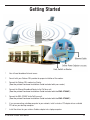
Step 1: Connect one end of an Ethernet cable (included with your package) to the LAN port on the DWL-2700AP
and the other end of the Ethernet cable to the port labeled P+DATA OUT on the PoE base unit.
Step 2: Connect another Ethernet cable from the DATA IN port on the PoE base unit to your router/switch or to
a PC.
Step 3: Attach the power adapter to the connector on the PoE base unit. Attach the power cord to the power
adapter and into an electrical outlet.
D-Link DWL-2700AP User Manual
13