1
ACS1009A
ACS2209A
ACS4001A
ACS4201A
DVI-D-CatX-KVM-Extender
Single and DualHead
Manual
http://www.blackbox.com
DVI-D CAT X KVM-EXTENDER
Welcome to the DVI-D Cat X KVM-Extender
Family!
Thank you for purchasing an DVI-D Cat X KVM-Extender! We appreciate your business,
and we think you’ll appreciate the many ways that your enhanced RGB Graphic system will
save you money, time, and effort.
That’s because our DVI-D Cat X KVM-Extender is all about breaking away from the
traditional model of attaching a new display to DVI graphic source. Using the DVI-D Cat X
KVM-Extender, you can remotely locate monitor, keyboard and mouse up to 140m away
from your CPU.
Wherever long distances are required, e.g. airports, industrial plants, call- centres or in
distributed computer centres, the DVI-D Cat X KVM-Extender is the best way, to solve all
problems in remotely locating your console. 4 different types are available: Singlehead and
Dualhead devices for PS2 keyboard/mouse and Singlehead and Dualhead devices for USB
keyboard/mouse.
This manual will tell you all about your new DVI-D Cat X KVM-Extender, including how to
install, operate, and troubleshoot it. For an introduction to the Converter, see Chapter 2. The
Converter product codes covered in this manual are:
ACS1009A: KVM-Extender Singlehead DVI-D, PS2-Keyboard/Mouse
ACS2209A: KVM-Extender Dualhead DVI-D, PS2-Keyboard/Mouse
ACS4001A: KVM-Extender Singlehead DVI-D, USB-Keyboard/Mouse
ACS4201A: KVM-Extender Dualhead DVI-D, USB-Keyboard/Mouse
2
DVI-D CAT X KVM-EXTENDER
Copyrights and Trademarks
©2007. All rights reserved. This information may not be reproduced in any manner without
the prior written consent of the manufacturer.
Information in this document is subject to change without notice and the manufacturer shall
not be liable for any direct, indirect, special, incidental or consequential damages in
connection with the use of this material.
All trademark and trade names mentioned in this document are acknowledged to be the
property of their respective owners.
Disclaimer
While every precaution has been taken in the preparation of this manual, the manufacturer
assumes no responsibility for errors or omissions. Neither does the manufacturer assume any
liability for damages resulting from the use of the information contained herein. The
manufacturer reserves the right to change the specifications, functions, or circuitry of the
product without notice.
The manufacturer cannot accept liability for damage due to misuse of the product or due to
any other circumstances outside the manufacturer’s control (whether environmental or
installation related). The manufacturer shall not be responsible for any loss, damage, or injury
arising directly, indirectly, or consequently from the use of this product.
Cautions and Notes
The following symbols are used in this guide:
CAUTION. This indicates an important operating instruction
that should be followed to avoid any potential damage to
hardware or property, loss of data, or personal injury.
NOTE. This indicates important information to help you make the best use of
this product.
3
DVI-D CAT X KVM-EXTENDER
.
4
DECLARATION OF CONFORMITY
EUROPEAN UNION DECLARATION OF CONFORMITY
This is to certify that, when installed and used according to the instructions in this
manual, together with the specified cables and the maximum cable length <3m, the
Units:
ACS1009A, ACS2209A
ACS4001A, ACS4201A
are shielded against the generation of radio interferences in accordance with the
application of Council Directive 89/336/EEC as well as these standards:
EN 55022:
EN 55024:
IEC 61000-4-2:
IEC 61000-4-3:
IEC 61000-4-4:
EN 61000-3-2
EN 61000-3-3
1999
1999
2001
2001
2001
2001
2002
Class A
The device was tested in a typical configuration with PC.
This equipment has been found to comply with the limits for a Class A digital device,
pursuant to Part 15 of the FCC Rules. These limits are designed to provide reasonable
protection against harmful interference when the equipment is operated in a commercial
environment. This equipment generates, uses, and can radiate radio frequency energy and, if
not installed and used in accordance with the instruction manual, may cause harmful
interference to radio communications. Operation of this equipment in a residential area is
likely to cause harmful interference in which case the user will be required to correct the
interference at his own expense.
5
DVI-D CAT X KVM-EXTENDER
Safety Precautions and Installation Guidelines
To ensure reliable and safe long-term operation, please note the following installation
guidelines:
•
Do not use CATx-devices to link between buildings – please use fiber devices.
•
Only use in dry, indoor environments.
•
Do not use CATx-devices to link between buildings – please use fiber devices.
•
If the building has 3-phase AC power, try to ensure that equipment connected to the
Local and Remote units is on the same phase.
•
Try not to route a CATx link cable alongside power cables.
•
The Remote unit, Local unit and any power supplies can get warm. Do not locate them
in an enclosed space without any airflow.
•
Do not place a power supply directly on top of a unit.
•
Do not obstruct a unit’s ventilation existing holes.
To safeguard against personal injury and avoid possible
damage to equipment or property, please observe the
following:
6
•
Only use power supplies originally supplied with the
product or manufacturer-approved replacements. Do not
attempt to dismantle or repair any power supply. Do not
use a power supply if it appears to be defective or has a
damaged case.
•
Connect all power supplies to grounded outlets. In each
case, ensure that the ground connection is maintained
from the outlet socket through to the power supply’s AC
power input.
•
Do not attempt to modify or repair this product, or make
a connection from the CATx link interface (RJ45) to any
other products, especially telecommunications or
network equipment.
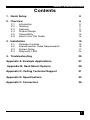
INHALTSVERZEICHNIS
Contents
1. Quick Setup
8
2. Overview
9
2.1
2.2
2.3
2.4
2.5
2.6
Introduction
Glossary
Features
Product Range
Compatibility
How to Use This Guide
3. Installation
3.1
3.2
3.3
3.4
Package Contents
Interconnection Cable Requirements
System Setup
Diagnostic LEDs
9
9
11
12
13
14
15
15
16
17
24
4. Troubleshooting
25
Appendix A: Example Applications
27
Appendix B: Rack Mount Options
29
Appendix D: Calling Technical Support
31
Appendix E: Specifications
33
Appendix F: Connectors
35
7
DVI-D CAT X KVM-EXTENDER
1. Quick Setup
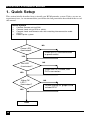
This section briefly describes how to install your KVM extender system. Unless you are an
experienced user, we recommend that you follow the full procedures described in the rest of
this manual.
Install system
1.
2.
3.
4.
Connect Remote unit to KVM.
Connect Local unit to CPU or switch.
Connect Local and Remote units with matching interconnection cable
(CATx).
Power up the system.
NO
Power LED
illuminated?
YES
Link LED
illuminated ?
NO
Check the CATx cable, and
CATx connectors
YES
Video OK
LED ?
illuminated ?
YES
Done
8
Check p.s.u.’s and connection
to power outlet
NO
Check settings of graphic card
or boot CPU
OVERVIEW
2.
Overview
2.1
Introduction
A CatX KVM Extender is mainly used, to extend the maximum distance between a CPU
and his Keyboard / Monitor / Mouse considerably. In addition they are beneficial in
installations in electromagnetic hazardous environments (EMI). Normal Keyboard-/
Monitor-/ Mouse extender cables (and Extender using traditional cables) cannot go so far
and EMI interferences may reduce the maximum distance and/or reliability. Using a
DVI-D Cat X Extender system, these limitations are past. Retain your CPU in a secure
rack cabinet or data center while accessing from a 140m remotely located place.
A basic KVM extension system comprises a Local unit (transmitter) and a Remote unit
(receiver). The Local unit connects directly to the computer (or a KVM switch system) using
the supplied cable(s). The user console (keyboard, mouse and monitor) attaches to the
Remote unit. The Remote and Local units communicate video and data information along the
interconnecting cable. Local units offer dual access, allowing the connection of a second user
console close to the computer.
2.2
Glossary
The following terms are used in this guide:
CATx
Any Category 5, 5e, 6 or higher cable, solid wires type AWG24.
KVM
Keyboard, Video and Mouse.
Console
Keyboard, Mouse and Monitor
Dual Access
A system allowing connection of Local and Remote user consoles.
Singlehead
An extender system that supports one monitor + Keyboard/Mouse
Dualhead
An extender system that supports two monitors + Keyboard/Mouse
DVI
Digital Video standard, installed by Digital Display Working Group
(www.ddwg.org) R, G, B, CLOCK in a data stream with up to
3x 1,6 Gbit/sec. Signals are TMDS Level.
PSU
The desktop power supply connected to the Local/Remote unit.
HID
Human Interface Devices are units, which are used for human access
to the CPU. They are a USB-device class of its own (e.g. Memory
Devices etc.). Besides of keyboard and mouse also touchscreen, light
pen, fingerprint sensor, graphic tablets etc. are HID devices
9
DVI-D CAT X KVM-EXTENDER
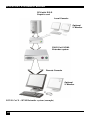
CPU with DVI-D
Graphic card
Local Console
Optional
2. Monitor
DVI-D Cat X KVMExtender system
Remote Console
Optional
2. Monitor
DVI-D Cat X – KVM Extender system (example)
10
OVERVIEW
2.3
Features
All members of the DVI-D Cat X - DVI KVM Extender Series offer the following features:
•
Support for DVI-D Graphic cards (all devices)
•
Support for PS2-Keyboard and PS2-Mouse (ACS1009A and ACS2209A)
•
Support for USB-Keyboard and USB-Mouse (ACS4001A and ACS4201A)
Devices with USB- connectors support ONLY Keyboard and Mouse. It’s
possible, that other HID devices (Human Interface Device) like touchscreens, graphics tablets, barcode readers or similar are supported – but
there is no guarantee for this! The DVI-D Cat X KVM-Extender is NOT
suitable for use with other USB devices like Scanner, WEB- Cams, data
sticks etc.
The device never supports more than two devices – Keyboard and Mouse
or Keyboard and Touchscreen, etc. but not e.g. Keyboard, Mouse and
Touchscreen simultaneously. A Hub is allowed but does not raise the
number of supported devices
•
Maximum resolution: DVI-D: 1600x1200@60Hz over all allowed distances
all lower resolutions with refresh rates of at least 75Hz
•
Supporting 18 Bit color depth = 256,000 colors
•
Status indicator LEDs on each device.
•
Small footprint chassis.
•
Rack mount options available.
•
CPU cables + Adapters included.
11
DVI-D CAT X KVM-EXTENDER
2.4
Product Range
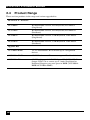
There are four products in the range and various upgrade kits:
DVI-D Cat X - Extender
ACS1009A
KVM-Extender 1x DVI, PS2-Keyboard, PS2-Mouse
(Singlehead)
ACS2209A
KVM-Extender 2x DVI, PS2-Keyboard, PS2-Mouse s
(Dualhead)
ACS4001A
KVM-Extender 1x DVI, USB-Keyboard, USB-Mouse
(Singlehead)
ACS4201A
KVM-Extender 2x DVI, USB-Keyboard, USB-Mouse
(Dualhead)
Upgrade Kits
ACS1009A-RMK
19”/1U Rackmount- Kit to mount up to 4 Singlehead
devices
ACS2209A-RMK
19”/1U Rackmount- Kit to mount up to 4 Dualhead devices
ACS2209A-PS
19”/1U rackmountable P.S.U. Input: 100..240VAC/0.5A;
Output 5VDC/7A to source up to 3 units Singlehead or
Dualhead. Requires one unit space in RMK (ACS1009ARMK/ACS2209A-RMK)
12
OVERVIEW
2.5
Compatibility
Interface Compatibility
•
Digital Video (DVI-D): Digital Video standard, installed by Digital Display Working
Group (www.ddwg.org) R, G, B, CLOCK in a data stream with up to
3x 1,6 Gbit/sec. Signals are TMDS Level.
•
PS/2 Keyboard: Compatible with all standard keyboards. Certain keyboards with
enhanced features may also be supported with custom firmware.
•
PS/2 Mouse: Compatible with all standard 2-button, 3-button and wheel mice.
•
USB Keyboard: Compatible with all standard keyboards. Certain keyboards with
enhanced features may also be supported with custom firmware. Keyboards with built-in
hub are also supported – but there are never more than two HDI devices supported.
•
USB Mouse: Compatible with all standard 2-button, 3-button and wheel mice.
Devices with USB- connectors support ONLY Keyboard and Mouse. It’s
possible, that other HID devices (Human Interface Device) like touchscreens, graphics tablets, barcode readers or similar are supported – but
there is no guarantee for this! The DVI-D Cat X KVM-Extender is NOT
suitable for use with other USB devices like Scanner, WEB- Cams, data
sticks etc.
The device never supports more than two devices – Keyboard and Mouse
or Keyboard and Touchscreen, etc. but not e.g. Keyboard, Mouse and
Touchscreen simultaneously. A Hub is allowed but does not rais the
number of supported devices
13
DVI-D CAT X KVM-EXTENDER
2.6 How to Use This Guide
This guide describes the installation and configuration of the DVI-D Cat X – Extender Series.
Although the connection and operation of the system is relatively straightforward, you should
consider the following before getting started:
Connection & Compatibility
If you have purchased an Extender Kit, this will contain all the cables required to connect the
Local unit to your PC or KVM switch. Please see also: Package Contents (page 15)
For information about connection and installation, see Interconnection Cable
Requirements, page 16.
DDC Information
Normally it is not necessary to make any adjustments to the DVXi- Extender. However, in
some circumstances, it may be necessary to redefine the source of DDC Information for the
CPU. By default, the DVI-D Cat X KVM-Extender uses its own internal DDC table. If this
setting does not satisfy your requirements, the DDC table can either be switched to the locally
or remotely attached screen.
To modify the DDC-Setup, please ask Technical support for additional information.
Compatibility
Devices with PS2 connectors are NOT compatible to devices with USB connectors.
14
INSTALLATION
3. Installation
For first-time users, we recommend that you carry out a test placement, confined to a single
room, before commencing full installation. This will allow you to identify and solve any
cabling problems, and experiment with the KVM extender system more conveniently.
3.1 Package Contents
You should receive the following items in your extender package (all types):
•
DVI-D Cat X KVM-Extender- pair (Local Unit + Remote Unit)
•
2x 5V DC universal power supply for the DVI-D Cat X - Extender
•
2x US type power cord
•
User manual (Quick Setup)
ACS1009A and ACS2209A (additionally):
•
KVM CPU cable set (1.8m) with one side: PS/2 (6-pin mini-DIN male) keyboard and
mouse connector and DVI-I video (DVI-I dual link male) connector – other side: DVI-I
video (DVI-I dual link male) connector
•
PS2-Keyboard-/ Mouse adapter to connect K/M to the Local Unit (keyboard can be
plugged in directly, without using an adapter)
ACS4001A and ACS4201A (additionally):
•
DVI-I (1,8m) video cable (DVI-I dual link male-to-male)
•
USB (1,8m) cable (USB type A to type B)
ACS2209A and ACS4201A (additionally):
•
DVI-I (1,8m) video cable (DVI-I dual link male-to-male)
If anything is missing, please contact Technical Support (see Appendix F – Calling
Technical Support).
15
DVI-D CAT X KVM-EXTENDER
3.2 Interconnection Cable Requirements
To connect the Local and Remote units you will need:
•
DVI, PS2-Keyboard, PS2-Mouse: Connect the supplied KVM CPU cable set to your
CPU (KVM.- Switch, etc.). Please ensure that the connection is tension-free! Devices
ACS1009A + ACS2209A
•
DVI, USB-Keyboard, USB-Mouse: Connect the supplied KVM CPU cable set to your
CPU (KVM.- Switch, etc.). Please ensure that the connection is tension-free! Devices
ACS4001A + ACS4201A
•
DVI: Connect the supplied DVI CPU cable set to your CPU (KVM.- Switch, etc.).
Please ensure that the connection is tension-free! Devices ACS2209A + ACS4201A
•
CATx Cable: Recommended cable: S/UTP (CatX) according EIA/TIA 56A, TSB 36 or
Digital STP 17-03170. Four pairs AWG 24. connection according EIA/TIA 568A
(10BaseT). Use of cables from a higher category (Cat5e, Cat6, Cat7) is possible.
The use of unshielded CATx Cable is possible, because of the higher electromagnetic
noise/sensitivity the device class may not be reached.
The use of flexible Cables (Patch cable) Type AWG26/8 is possible. Because of the
higher loss of the stranded cables, the maximum distance is reduced to approx. half the
value of solid cables.
A point to point connection is required. Having one or more patch panels
in the line is possible and allowed. Not allowed is a connection from the
CATx link interface (RJ45) to any other products, especially
telecommunications or network equipment.
•
Power Supply
Connect the supplied 5V/DC power supplies to the Plug terminal on the rear of both
Local and Remote units.
16
INSTALLATION
3.3 System Setup
To install your DVI-D Cat X – Extender system:
1.
Switch off all devices.
2.
Connect your keyboard, monitor(s) and mouse to the Remote unit (depending on device
type). Please ensure, to not swap Mouse- and Keyboard connector. The Keyboard
connector is purple and the Mouse connector is green.
3.
Using the supplied CPU KVM cable(s), connect the keyboard, monitor(s) and mouse
connectors on the computer (or KVM switch). Please ensure, to not swap Mouse- and
Keyboard connector. The Keyboard connector is purple and the Mouse connector is
green.
4.
Connect the interconnect cable to the INTERCONNECT socket(s)
5.
Connect the 5V power supply to power the unit.
Only use the power supply originally supplied with this
equipment or a manufacturer-approved replacement.
6.
For a dual access system, connect the monitor for the Local console to the appropriate
port on the Local unit. The port may also be used to feed into a KVM switch.
To the local (PS2-) Keyboard-/ Mouse port you can attach a Keyboard directly or
Mouse/ Keyboard together, using the delivered adapter.
To attach a local (USB-) Keyboard/Mouse, please use additional USB port(s) at your
CPU or use a USB Hub inbetween CPU and local unit’s USB connector.
7.
Power up the system.
17
DVI-D CAT X KVM-EXTENDER
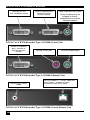
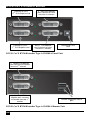
Connect to CPU:
DVI, keyboard, mouse
local DVI-Monitor port
Connect to Local
console monitor
Local keyboard/ mouse port
Solely Keyboard may be
plugged in directly,
keyboard/mouse through
equipped adapter
DVI-D Cat X KVM-Extender Type ACS1009A Local Unit
remote DVI-Monitor
port– connect to
Remote console
monitor
Remote mouse port
Remote keyboard port
DVI-D Cat X KVM-Extender Type ACS1009A Remote Unit
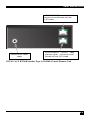
Connect to 5V Power
supply
INTERCONNECT – carries video and
data signals – connect to Local/
remote unit with CATx cable
DVI-D Cat X KVM-Extender Type ACS1009A Local/ Remote Unit
18
INSTALLATION
Connect to CPU:
2nd DVI-Graphic card
Connect to CPU:
1st DVI-Graphic card,
keyboard, mouse
2nd local DVI-Monitor
port Connect to Local
console 2nd monitor
local DVI-Monitor port
Connect to Local
console monitor
Local keyboard/ mouse port
Solely Keyboard may be
plugged in directly,
keyboard/mouse through
equipped adapter
DVI-D Cat X KVM-Extender Type ACS2209A Local Unit
2nd remote DVI-Monitor
port Connect to Remote
console 2nd monitor
1st remote DVIMonitor port– connect
to Remote console 1st
monitor
Remote mouse port
Remote keyboard port
DVI-D Cat X KVM-Extender Type ACS2209A Remote Unit
19
DVI-D CAT X KVM-EXTENDER
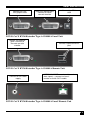
INTERCONNECT – carries 2nd video –
connect to Local/Remote unit with
CATx cable
Connect to 5V Power
supply
INTERCONNECT – carries 1st video
and data signals – connect to Local/
Remote unit with CATx cable
DVI-D Cat X KVM-Extender Type ACS2209A Local/ Remote Unit
20
INSTALLATION
Connect to CPU:
DVI graphic card
local DVI-Monitor port
Connect to Local
console monitor
Connect to CPU:
USB
DVI-D Cat X KVM-Extender Type ACS4001A Local Unit
remote DVI-Monitor
port– connect to
Remote console
monitor
Remote keyboard/mouse
port
DVI-D Cat X KVM-Extender Type ACS4001A Remote Unit
Connect to 5V Power
supply
INTERCONNECT – carries video and
data signals – connect to Local/
remote unit with CATx cable
DVI-D Cat X KVM-Extender Type ACS4001A Local/ Remote Unit
21
DVI-D CAT X KVM-EXTENDER
Connect to CPU:
2 DVI-Graphic card
nd
Connect to CPU:
1 DVI-Graphic card
st
2nd local DVI-Monitor
port Connect to Local
console 2nd monitor
local 1st DVI-Monitor
port Connect to Local
console 1st monitor
Connect to CPU:
USB
DVI-D Cat X KVM-Extender Type ACS4201A Local Unit
2nd remote DVI-Monitor
port Connect to Remote
console 2nd monitor
1st remote DVIMonitor port– connect
to Remote console 1st
monitor
Remote keyboard/ mouse
port
DVI-D Cat X KVM-Extender Type ACS4201A Remote Unit
22
INSTALLATION
INTERCONNECT – carries 2nd video –
connect to Local/Remote unit with
CATx cable
Connect to 5V Power
supply
INTERCONNECT – carries 1st video
and data signals – connect to Local/
Remote unit with CATx cable
DVI-D Cat X KVM-Extender Type ACS4201A Local/ Remote Unit
23
DVI-D CAT X KVM-EXTENDER
3.4
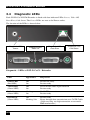
Diagnostic LEDs
Each DVI-D Cat X KVM-Extender is fitted with four indicator LEDs: Power, Video OK,
Data Error, Link Status: The Power LEDs are next to the Power socket.
The location of the LEDs is shown below:
Diagnostic LED
Power
Diagnostic LED
Video OK
Diagnostic LED
Data Error
Diagnostic LED
Link Status
Diagnostic - LEDs at DVI-D Cat X - Extender
LED
Appearance
Diagnostics
Power LED
(Red LED)
Off
On
Device not ready
Device ready
Video Okay
(Green LED)
Off
On
No or invalid video signal detected
Device ready
Link Status
(Green LED)
blinking
On
No CATX connection
Device ready
Data Error
(Green LED)
Off
blinking / On
Device ready
Errors through data transmission over CATX Cable
(Cable too long, too high attenuation or too much
EMI interferences )
24
TROUBLESHOOTING
4.
Troubleshooting
There isn’t a picture.
Check the power supply connection at the Local unit. Is the Power (Red LED) at
the Local unit illuminated (see page 24)? If not, the internal power-supply may be
damaged or there may be an internal error.
Check the power supply connection at the remote unit. Is the Power (Red LED) at
the Remote unit illuminated (see page 24)? If not, the internal power-supply may be
damaged or there may be an internal error.
Check that the Interconnection cable is connected at the Local Unit and the Remote
Unit. Is the Link Status LED illuminated (see page 24)? If not, there may be a
problem with the Interconnection cable:
Are there Errors through data transmission over CATX Cable (Cable too long, too
high attenuation or too much EMI interference )? Is the Data Error LED
illuminated or blinking (see page 24)? If yes, check cable length and environment.
Video Okay LED is dark: CPU does not provide a video signal – Check settings of
the graphic card. Try out, connecting a monitor to the local output, to see, whether
there is a signal or not.
PS2-Keyboard
The PC boots fine with no error messages but the keyboard does not work at all
Wrong cable plugged in, keyboard and mouse cables reversed.
Try a different model of keyboard. If the new keyboard works then original one
may be incompatible
Check that the Interconnection cable is connected at the Local Unit and the Remote
Unit. Is the Link Status LED illuminated (see page 24)?
PS2-Mouse
A mouse cursor appears on the screen, but the mouse does not work
Wrong cable plugged in, keyboard and mouse cables reversed.
Try a different model of mouse
You have connected the Local unit while the CPU was running. Therefore you have
connected first the keyboard cable and then the mouse cable. Disconnect the
keyboard cable and connect it again. Please reboot you CPU if the mouse is still not
running.
The system does not detect a PS/2 mouse, or the application cannot find the mouse.
Wrong cable plugged in, keyboard and mouse cables reversed.
Ensure that the Local Unit is connected to the PC keyboard port to provide power.
25
DVI-D CAT X KVM-EXTENDER
USB-Keyboard/USB-Mouse
Your USB-keyboard/USB-mouse does not work
Although we tried to design the devices as transparent as possible, we can’t ensure
that all devices are running. Please ask Technical Support for a list of tested
devices.
USB-HID device
Your USB-HID device does not work
Although our interface supports HID devices, we can’t ensure that every connected
device is running. In case of a malfunction please contact our technical support.
Other USB-devices
Your USB- device does not work
You have connected a non-HID device. There are supported HID devices only. All
other devices are dismissed
26
APPENDIX A: EXAMPLE APPLICATIONS
Appendix A: Example Applications
This section illustrates some specific applications using the DVI-D Cat X - Extenders:
•
DVI-D Cat X KVM-Extender with optional, secondary screen.
DVI-D Cat X KVM-Extender with optional, secondary screen
27
DVI-D CAT X KVM-EXTENDER
•
4 CPU’s – local outputs managed through a KVM- Switch and a single console. Remote
Consoles up to 140m away.
DVI-D Cat X KVM-Extender – local Consoles through a KVM- Switch
28
APPENDIX B: RACK MOUNT OPTIONS
Appendix B: Rack Mount Options
DVI-D Cat X KVM- Extender units can be mounted in a 19” rack using the mounting kit:
DVI-D Cat X- Rackmount Kit. Two different versions are available – one each for
Singlehead and for Dualhead devices.
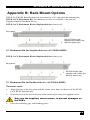
DVI-D Cat X- Rackmount Kit for Singlehead devices consists of:
Base plate
M2,5x5 Philips type
countersunk screws (8x)
M2,5x2 spacer (8x)
Drei Blindplatten
19” Rackmount Kit for Singlehead devices (ACS1009A-RMK)
DVI-D Cat X- Rackmount Kit for Singlehead devices consists of:
Base plate
M2,5x5 Philips type
countersunk screws (8x)
M2,5x2 spacer (8x)
Drei Blindplatten
19” Rackmount Kit for Dualhead devices (ACS2209A-RMK)
To mount a unit:
1.
Align the holes on the base plate with the vacant screw holes on the base of the DVI-D
Cat X KVM- Extender unit.
2.
Fasten the base of the unit to the plate of the mounting kit using the supplied screws.
Only use the supplied, short screws, to prevent damages on
the PCB’s
3.
Close the remaining gaps with blanking plates.
29
DVI-D CAT X KVM-EXTENDER
The kit allows you to mount a different count of devices
(1…4 devices):
30
APPENDIX C: CALLING TECHNICAL SUPPORT
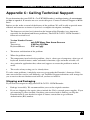
Appendix C: Calling Technical Support
If you determine that your DVI-D –Cat X KVM Extender is malfunctioning, do not attempt
to alter or repair it. It contains no user-serviceable parts. Contact Technical Support at Black
Box!
Before you do, make a record of the history of the problem. We will be able to provide more
efficient and accurate assistance if you have a complete description, including:
•
The firmware-revision level printed on the bottom of the Extender (very important,
especially for keyboard and mouse problems); The DVI-D CAT X - KVM extender’s
firmware revision level:
Version Number Format:
Board:
xxLO/RE Myyy Pzzz Auuu Gvvvvvv
Transceiver:
C/M/S xx Pyy Mzz
Keyboard/Mouse:
P/U xx Vyyy
•
The nature and duration of the problem.
•
When the problem occurs.
•
The components involved in the problem—that is, what type of computers, what type of
keyboard, brand of mouse, make and model of monitor, type and make of cable, etc.
•
Any particular application that, when used, appears to create the problem or make it
worse.
•
The results of any testing you’ve already done.
To solve some problems, it might be necessary to upgrade the Extender’s firmware. If this
turns out to be the case for your difficulty, our Technical Support technicians will arrange for
you to receive the new firmware and will tell you how to install it.
Shipping and Packaging
If you need to transport or ship your DVI-D CAT X - KVM Extender:
•
Package it carefully. We recommend that you use the original container.
•
If you are shipping it for repair, please include the Unit’s external power supplies. If you
are returning it, please include everything you received with it. Before you ship the
Extender back to your dealer for repair or return, contact him to get a Return
Authorization (RA) number.
31
DVI-D CAT X KVM-EXTENDER
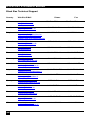
Black Box Technical Support
Country
Web Site/E-Mail
US
www.blackbox.com
[email protected]
724-746-5500
724-746-0746
Austria
www.black-box.at
[email protected]
+43 1 256 98 56
+43 1 256 98 56
Belgium
+32 2 725 85 50
www.blackbox.be
[email protected]
[email protected]
[email protected]
+32 2 725 92 12
Denmark
www.blackbox.dk
[email protected]
+45 56 63 30 10
+45 56 65 08 05
Finland
www.blackbox.fi
[email protected]
+358 201 888 800
+358 201 888 808
France
www.blackbox.fr
[email protected]
+33 820 07 09 11
+33 820 05 07 09
Germany
www.black-box.de
[email protected]
+49 811 5541 110
+49 811 5541 499
Ireland
www.blackbox.co.uk
[email protected]
+353 1 662 2466
+353 1 662 2477
Italy
www.blackbox.it
[email protected]
+39 02 27 404 700
+39 02 27 400 219
Netherlands www.blackbox.nl
[email protected]
+31 30 241 7799
+31 30 241 4746
Norway
www.blackboxnorge.no
[email protected]
+47 55 300 710
+47 55 300 701
Spain
www.blackbox.es
[email protected]
+34 916590732
+34 916239784
Sweden
www.blackboxab.se
[email protected]
+46 8 44 55 890
+46 08 38 04 30
Switzerland
www.black-box.ch
[email protected]
+41 55 451 70 71
+41 55 451 70 75
UK
www.blackbox.co.uk
[email protected]
+44 118 965 6000
+44 118 965 6001
32
Phone
Fax
APPENDIX D: SPECIFICATIONS
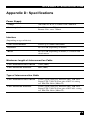
Appendix D: Specifications
Power Supply
Voltage
100-240VAC-0.5A-47-63Hz/5VDC-2000 mA
Power required
Local Unit : max. 750mA
Remote Unit : max. 750mA
Interface
(Depending on type of device)
Video source/Monitor
DVI-D up to 1600x1200@60Hz
Keyboard
PS2 or USB (depending on model)
Mouse
PS2 or USB (depending on model) 2-/3-button and
wheel mouse
Maximum Length of Interconnection Cable
CATx Installation cable AWG24
120m (400ft)
CATx Patchcable AWG26/8
60m (200ft)
Type of Interconnection Cable
CATx Installation cable AWG24
S/UTP (CatX) cable acc. EIA/TIA 56A, TSB 36 or
Digital STP 17-03170. Four pairs AWG 24. wiring
acc. EIA/TIA 568A (10BaseT).
CATx Patchcable AWG26/8
S/UTP (CatX) cable acc. EIA/TIA 56A, TSB 36 or
Digital STP 17-03170. Four pairs AWG 26/8. wiring
acc. EIA/TIA 568A (10BaseT)..
33
DVI-D CAT X KVM-EXTENDER
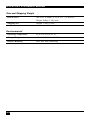
Size and Shipping Weight
DVI-D Cat X
103 x 143 x 29mm (4”x5.6”x1.1”) (2 devices)
Weight: 0,6kg (1.3lb) each
Shipping box
Weight: 1,6 kg (3.5lb)
Environmental
Operating Temperature
41 to 113°F (5 to 45 °C)
Storage Temperature
-13 to 140°F (-25 to 60 °C)
Relative Humidity
max. 80% non-condensing
34
APPENDIX E: CONNECTORS
Appendix E: Connectors
DVI-D Cat X KVM-Extender Connector Pinouts
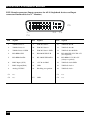
DVI-I female connector (Output connector for ALL devices and Input connector
Dualhead devices 2nd Monitor)
1
8
C1
C2
C5
17
C4
Pin
Signal
24
Pin
Signal
C3
Pin
Signal
1
T.M.D.S data 2-
9
T.M.D.S data 1-
17
T.M.D.S data 0-
2
T.M.D.S data 2+
10
T.M.D.S data 1+
18
T.M.D.S data 0+
3
T.M.D.S data 2 GND
11
T.M.D.S data 1 GND
19
T.M.D.S data 0 GND
4
n.c.
12
n.c.
20
n.c.
5
n.c.
13
n.c.
21
n.c.
6
DDC Input (SCL)
14
+5V high impedance
22
T.M.D.S clock GND
7
DDC Output(SDA)
15
GND
23
T.M.D.S clock +
8
Internal use.
16
Hot Plug recognition
24
T.M.D.S clock -
C1
Internal use.
C3
Internal use.
C2
n.c.
C4
Internal use.
C5
GND
35
DVI-D CAT X KVM-EXTENDER
DVI-I female connector (Input connector for ALL Singlehead devices and Input
connector Dualhead devices 1st Monitor)
C5
17
C4
Pin
Signal
24
Pin
Signal
C3
Pin
Signal
1
T.M.D.S data 2-
9
T.M.D.S data 1-
17
T.M.D.S data 0-
2
T.M.D.S data 2+
10
T.M.D.S data 1+
18
T.M.D.S data 0+
3
T.M.D.S data 2 GND
11
T.M.D.S data 1 GND
19
T.M.D.S data 0 GND
4
PS2-KBD CLK
12
PS2-MOUSE CLK
20
PS2-MOUSE VCC-IN +5V
(not required)
5
PS2-KBD DATA
13
PS”-MOUSE-DATA
21
PS2-KBD VCC-IN +5V
(always required)
6
DDC Input (SCL)
14
+5V In for DDC
22
T.M.D.S clock GND
7
DDC Output(SDA)
15
GND
23
T.M.D.S clock +
8
Analog VSYNC
16
Hot Plug recognition
24
T.M.D.S clock -
C3
n.c.
C4
n.c.
C1
n.c.
C2
n.c.
36
C5
GND
APPENDIX E: CONNECTORS
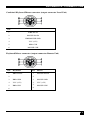
Combined Keyboard/Mouse connector (output connector Local Unit)
Pin
1
KBD-DATA
2
MOUSE-DATA
3
KBD/MOUSE-GND
4
VCC (+5V)
5
KBD-CLK
6
MOUSE-CLK
Keyboard/Mouse connector (output connector Remote Unit)
Pin
1
Keyboard
KBD-DATA
2
KBD-GND
4
6
1
Mouse
MOUSE-DATA
2
3
5
Pin
3
MOUSE-GND
VCC (+5V)
4
VCC (+5V)
KBD-CLK
5
MOUSE-CLK
6
37
DVI-D CAT X KVM-EXTENDER
Keyboard/Mouse Adapter to connect Keyboard/Mouse to Local Unit
Pin
Connector (device)
Pin
Keyboard
1
KBD-DATA
1
KBD-DATA
2
MOUSE-DATA
2
3
KBD-GND
3
KBD -GND
4
VCC (+5V)
4
5
KBD-CLK
5
6
MOUSE-CLK
6
Mouse
2
1
MOUSE-DATA
3
MOUSE-GND
VCC (+5V)
4
VCC (+5V)
KBD -CLK
6
5
Power
38
Pin
Pin
Signal
inner
+5V
outer
GND
MOUSE-CLK
NOTES