1
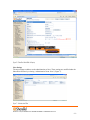
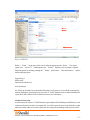
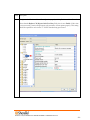
This action brings up the “Users” “Edit Users” screen (Figure 10).
Figure 10 – Adding/Editing Users
Define the “First Name” and “Last Name” as you deem appropriate. ShoreWare Director will auto-assign
the next available “Number” (i.e. extension), but you can modify it to any available extension. Define the
“License Type” as needed, in this example we chose “Extension and Mailbox” although it’s not necessary
to have a mailbox. Define the proper “User Group” and set the “Home Port” to “Any IP Phone.”
Note: If you configured the “License Type” for “Extension-Only,” you cannot select “Any IP
Phone” but instead must set the “Home Port” for the “SoftSwitch” selection. Save your changes,
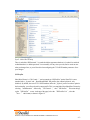
then scroll down to the “SIP Password:” section (Figure 11).
960 Stewart Drive Sunnyvale, CA 94085 USA Phone +1.408.331.3300 +1.877.80SHORE Fax +1.408.331.3333 www.ShoreTel.com
- 14 -