1
J1708 Message Filter
The J1708 message filter will pass through up to 4 different MIDs. Only
messages with the same MID as set in an active filter will be sent to the PC.
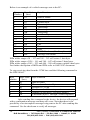
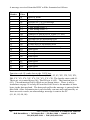
The format for the setting of J1708 filtering is as follows:
Set Filter Active
Byte
Byte
Function
Number Value
1
2
3
4
5
6
7
01
03
01
X9
XX
00
CS
Start of frame
Control bytes
ID byte 1 = J1708 message
Set filter 9 = Set filter active
Value of MID to filter On
Data bytes
Checksum
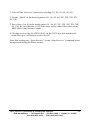
Set Filter Off
Byte
Byte
Number Value
Function
1
2
3
4
6
7
Start of frame
Control bytes
ID byte 1 = J1708 message
Set filter 8 = Set filter inactive
Data bytes
Checksum
01
02
01
X8
00
CS
X = filter number 1 to 4
X = filter number 1 to 4
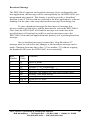
Setting all filters off will stop all data from the J1708 bus. When all filters
are set off you must either send the receive J1708 command to start receiving
all bus messages or use the Set Filter Active command to enable a filter.
14
HDV100A3 Command & Response Manual
B+B SmartWorx -- 707 Dayton Rd. -- PO Box 1040 -- Ottawa, IL 61350
PH (815) 433-5100 -- FAX (815) 433-5104