1
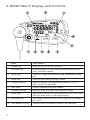
2. BetaProbe TI Display and Controls
Item
Description
1
Power Key
Used to turn the unit on and off
2
Min/Max Key
Used to toggle the main display value between min,
max, and trend modes
3
Setup Key
Used to change the various set-up parameters of the
unit
4
Enter Key
Used to enter data in set-up modes
5
Primary Display
Used to display the temperature values in °C or °F.
Also used in set-up mode.
6
Icon Area
Used in regular and setup modes
7
Stability Display
Used to show the trend and stability of data.
8
Arrow Keys
Secondary functions of the MAX/MIN and SETUP keys.
Used for data entry in the setup modes.
9
Backlight Key
Secondary function of the ENTER key, turns backlight
on or off.
Low Battery Display
Flashes when the battery needs to be changed.
10
4