1
3. Operation
Insertion Depth and Usage
The Standard 12 inch BetaProbe TI can be used with insertion depths
of as little as 4 inches up to 10 inches. For all probes, be sure the last
two inches of probe closest to the head of the device are not inserted
into temperature source. Over insertion of probe may damage the
head of the BetaProbe TI.
For best results, allow ample time for the probe to stabilize before
recording measurements. The stability display is helpful for this.
Power
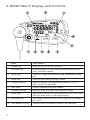
Push the power button momentarily to turn the unit on or off.
Normal Operation
Controlling the Backlight
Press the enter button to turn the backlight on or off.
Controlling the Primary Data Display
Use the MIN/MAX key to toggle the numeric display between the
current reading, minimum, maximum and 1 minute trend values in
either °C or °F as calculated since power up or since the last reset of
the values. Press and hold the Min/Max key for 2 seconds until "CLR"
is displayed to reset the MIN/MAX/TREND values.
5