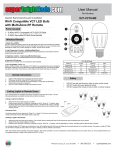
1
User Manual
Part Number:
MCBRF-VCT7
Important: Read all instructions prior to installation.
RGB LED Controller with Wireless RF Remote
Parts Included
1 - LED Controller
1 - Wireless Remote
1 - CR2025 3V Battery
Specifications
Color Temp. Grade
Dimming
PWM Grade
Color Temp. Shortcut
Brightness Shortcut
Overload Protection
Overheat Protection
Working Voltage
Battery
Remote frequency
Remote control distance
Rated Output Current
IP Rating
FCC ID
7 levels
7 levels
256 Steps
3 shortcuts
3 shortcuts
Yes
Yes
DC 5-24V
3V CR2025
433.92MHz
>15m at open area
2 x 7A
IP68
2ACJPRM03
Wireless Remote Functions
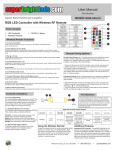
1. Turn On/Standby
Press 'I' key to turn on unit or press 'O' key to turn off. Retains last setting between
power off and power on.
2. Color Temperature Adjust
To control color temperature, press 'C /T+' key to increase color temperature
by increasing the cool white channel output power and decreasing warm
white channel output power. Press ' C /T-' key to lower color temperature
by increasing warm white channel output power and decreasing cool white
channel output power. The overall brightness will remain unchanged when
adjusting color temperature.
3. Brightness Adjust
Press 'BRIGHT+' key to increase brightness and 'BRIGHT-' to decrease
brightness. The color temperature will remain unchanged when adjusting
brightness.
4. Brightness Shortcut
Press one of the shortcut buttons to set the relative shortcut brightness level.
3 shortcut keys '10%' , '50%' and '100%' are available.
5. Color Temperature Shortcut
Controller Installation
7. Power Supply Wiring
The controller/power supply operates at 5-24VDC. The red wire is positive(+)
and the black wire is negative(-) as indicated on the controller housing. Make
sure the power voltage matches the LED strip requirement. Incorrect voltage
may damage the LED strip.
To Power
Supply
To LED
Strip
8. LED Output Wiring
The black cable on the output side should be connected to LED positive, the white
cable should be connected to cool white LED's negative and the yellow cable
connected to warm white LED's negative.
9. Status Indicator
This is a full color status indicator. It displays all working statuses of the controller. It
indicates different events as following:
Blue: normal working.
Short single white flash: new command executed.
Long single white flash: reach mode or color cycle edge.
Long single yellow flash: reach speed or brightness limit.
Red flash: overload protected.
Yellow flash: overheat protected.
Remote Pairing Options
10. Using Remote
Prepare the wireless remote for use by removing the battery insulator. The remote
uses a 3V CR2025 battery. Note: The wireless remote operates using radio
Press one of the shortcut buttons to directly select the relative color
frequency(RF). The remote’s use is not restricted by normal obstructions such as
temperature. 3 shortcut keys 'Warm, 'Neutral' and 'Cold' are available. 'Warm'
walls, doors, etc. Do not install controller in metal enclosures.
and 'Cold' is pure warm or cool output, 'Neutral' is half warm and half cool
output.
6. Wireless Remote LED Indicator
Flashes blue when remote is operating to indicate that the remote is
functioning properly.
11. Pairing New Remote
The remote controller and main unit are 1 to 1 paired as default. Further more,
one main unit can be paired to 5 remotes and every remote can be paired to any
controller.
Please do the following steps to pair a new remote to the controller.
1.) Remote power of the controller and restore power again after 5 seconds.
2.) Press remote 'C/T+' and 'C/T-' key together in 5 seconds after power is restored.
After this operation, the main unit indicator will flash white 3 times, the master
unit now recognizes the new remote. Only 5 latest paired remote controllers can be
recognized by main unit.
4400 Earth City Expy, St. Louis MO 63045
866-590-3533
[email protected]
User Manual
Part Number:
MCBRF-VCT7
Important: Read all instructions prior to installation.
RGB LED Controller with Wireless RF Remote
Advanced Features
12. Waterproof
This controller is fully waterproof with IP68 standard, and can be used under water
within the depth of 30 meters. Note: The remote receiving sensitivity will decrease
when the controller is installed in a wet environment.
13. Protection
This controller has full protection for ouput short circuit, overload, and overheat. The
controller will automatically recover from protection when working status is good.
Please ensure the LED loads are in rated range, outputs are not shorted and the
controller unit is in a good heat dissipation environment to avoid damage.
FCC Statement
This device complies with part 15 of the FCC Rules.
Operation is subject to the following two conditions: (1)
This device may not cause harmful interference, and
(2) This device must accept any interference received,
including interference that may cause undesired
operation. Any changes or modifications in construction
of this device which are not expressly approved by the
party responsible for compliance could void the user’s
authority to operate the equipment.
4400 Earth City Expy, St. Louis MO 63045
866-590-3533
[email protected]