1
5.4.1 Emergency Shutdown Procedure .......................................................................................... 25
5.5
Summary of Operation ............................................................................................................. 26
6 Maintenance Instructions ................................................................ 30
6.1
6.2
6.3
6.4
6.5
Checking the Door Safety Interlocks ......................................................................................... 30
Checking the X-ray Radiation Levels ......................................................................................... 31
Checking the Emergency stop .................................................................................................. 31
Cleaning Water Filters ............................................................................................................. 32
Refilling water reservoir .......................................................................................................... 33
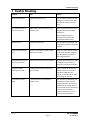
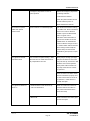
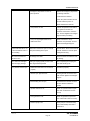
7 Trouble Shooting ............................................................................. 34
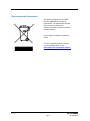
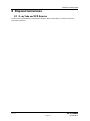
8 Disposal Instructions ....................................................................... 37
8.1
X-ray Tube and CCD Detector ................................................................................................... 37
9 Additional Information ..................................................................... 38
9.1
Drawings ............................................................................................................................... 38
Table of Figures
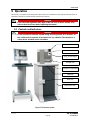
Figure 1 PX Scanner system ................................................................................................................... 20
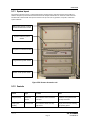
Figure 2 PX Scanner electronics rack ....................................................................................................... 21
Figure 3 Touch panel display: eject and insert buttons ............................................................................... 26
Figure 4 Overview of the desktop ............................................................................................................ 27
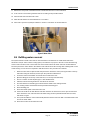
Figure 5 Water filters ............................................................................................................................. 33
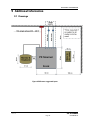
Figure 6 PXScanner suggested layout ...................................................................................................... 38
PX Scanner
Version 4.3
Page 7
USER MANUAL