1
PRO TIMER IV SUPER
U S E R M A N U A L / O P E R AT I N G I N S T R U C T I O N S
(Standard Mode continued...)
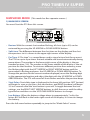
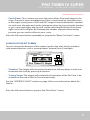
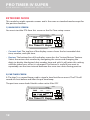
The par time screen looks like this when set to 1 - par time is now enabled.
COMPETITION ELECTRONICS
REVIEW-SHOT REVIEW-SPLIT
PAR TIME PAR NO LOW BAT
Pro Timer IV Super
JUMP
REVIEW-TIME
DELAY
-PAR
START
SPLIT
FACTOR
SHOT
+PAR
TIME
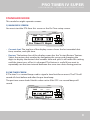
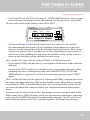
• Par Time settings: Set the PAR to a value of 1-6 to enable the standard par
time mode. Up to 6 par times can be entered in different memory locations.
Use the UP / DOWN ARROW buttons to select the memory location number,
then navigate the cursor LEFT to select the desired digit(s) to be changed. Time
intervals are in seconds. You may start the PT4 from this screen to save time
when frequently selecting different par times in this mode. Values are saved
automatically.
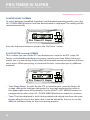
3) START DELAY SCREEN
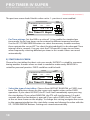
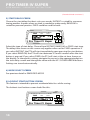
Choose the start delay that best suits your needs. INSTANT is suited for someone
timing another shooter where no time is needed to make ready, RANDOM is
suited for personal practice. FIXED could be used for both.
COMPETITION ELECTRONICS
START
-PAR
REVIEW-SHOT REVIEW-SPLIT
PAR TIME PAR NO LOW BAT
Pro Timer IV Super
FACTOR
SPLIT
+PAR
REVIEW-TIME
DELAY
SHOT
JUMP
TIME
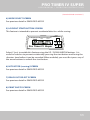
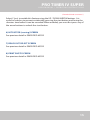
• Select the type of start delay: Choose from INSTANT, RANDOM, or FIXED start
tone. The delay time shown on the screen only applies when set for FIXED
operation. If you select INSTANT, the PT4 will start immediately upon pressing
the start button. If you select RANDOM, the PT4 will start between 3.5 and 6
seconds after the start button is pressed. If you select FIXED, the PT4 will start
at the set time shown on the display. To change this setting, navigate the cursor
to the appropriate digit on the start delay screen and change the value with the
UP / DOWN ARROW buttons. Settings are stored automatically.
10