1
PRO TIMER IV SUPER
U S E R M A N U A L / O P E R AT I N G I N S T R U C T I O N S
STANDARD MODE
This mode has eight separate screens:
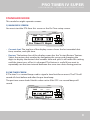
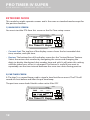
1) MAIN DATA SCREEN
You must start the PT4 from this screen or the Par Time setup screen.
COMPETITION ELECTRONICS
REVIEW-SHOT REVIEW-SPLIT
PAR TIME PAR NO LOW BAT
Pro Timer IV Super
JUMP
REVIEW-TIME
DELAY
-PAR
START
SPLIT
FACTOR
SHOT
+PAR
TIME
• Current shot: The top line of the display screen shows the last recorded shot
time, number, and split time.
• Review: The bottom line of the display screen has the “Instant Review” feature.
Select the review shot number by navigating the cursor and changing the
digits to display the desired shot number time and split. It will retain this setting
until the timer turns off or it is changed. This feature is useful if you want to
repeatedly see the time interval between the same two shots during practice.
2) PAR TIME SCREEN
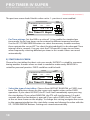
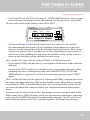
A “Par time” is a second beep used to signal a time limit for an event. The PT4 will
record all shots before and after the par time beep.
The par time screen looks like this when set to 0 for OFF- no second beep will
sound.
COMPETITION ELECTRONICS
START
Pro Timer IV Super
-PAR
REVIEW-SHOT REVIEW-SPLIT
PAR TIME PAR NO LOW BAT
FACTOR
SPLIT
+PAR
REVIEW-TIME
DELAY
SHOT
JUMP
TIME
9