1
Appendix A
Installing Lattice Starter Software from CD ROM
1.
2.
3.
4.
Open file folder of disk and start “setup.exe”.
Click on the install button and continue to follow setup instructions.
Be aware that it will take up 610MB of space on your hard disk.
Reboot your PC to finalize the install
Obtain License file
1. Go to website www.latticesemi.com
2. Click on licensing on the left side.
3. You’ll see a list; you want a starter license for ispDesignEXPERT-Starter
4. Next, request a license, you need to provide your hard disk serial number. Follow on
screen instructions. To get your hard disk serial number go to DOS prompt, and type vol
c:
5. The file will be sent immediately to your email address.
6. Save this file as “license.dat” in C:\ispTOOLS\ispcomp\license
Starting ispdesignEXPERT
1.
2.
3.
4.
Go to Start/Lattice Semiconductor/ispdesignEXPERT
Go to File/ New Project. Save it in the student directory
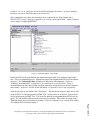
screen is divided into two columns. (Sources in project, and Processes for current source)
We need to select the proper device. Under the Sources in Project, double click on
ispLS15384VA-125LB388.
5. A window will pop open. Under family, scroll down until it says “Mach 4”. The device
number and part name are written on the PLD itself. You will see either M4-32/32 or
M4-64/32 which indicates the device. Under that is the part number which ends in JC or
JI. When selecting the part number choose the one ending in JC. Click OK and the
device is selected correctly. A window may pop open to suggest another device click
“OK” and then “YES” for continue with operation.
Starting Schematic Editor
Proceedings of the 2002 American Society for Engineering Education Annual Conference & Exposition
Copyright Ó 2002, American Society for Engineering Education
Page 7.1059.9
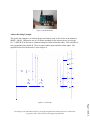
1. Go to the "Window" pop down menu and select Schematic Editor. You will see a
window pop open.
2. To add a logic gate, go to Add menu and select symbol.
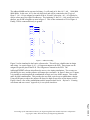
3. A window pops opens. You will see a list of libraries. Make sure \generic\gates.Lib is
highlighted.
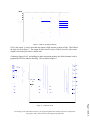
4. A list of symbols will be shown. The number in front of the logic names identifies how
many inputs. The number after the logic name shows how many of those inputs are
inverted. ex. (G_3AND1 means a 3 input AND gate with one inverted)