1
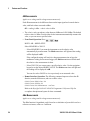
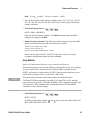
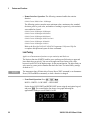
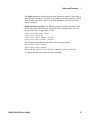
Keysight 34410A/11A
6 ½ Digit Multimeter
(includes the L4411A 1U DMM)
User’s Guide
Notices
© Keysight Technologies 2005-2014
Warranty
No part of this manual may be reproduced in
any form or by any means (including electronic
storage and retrieval or translation into a foreign language) without prior agreement and
written consent from Keysight Technologies
as governed by United States and
international copyright laws.
The material contained in this document is provided “as is,” and is
subject to being changed, without
notice, in future editions. Further,
to the maximum extent permitted
by applicable law, Keysight
disclaims all warranties, either
express or implied, with regard to
this manual and any information
contained herein, including but not
limited to the implied warranties of
mer-chantability and fitness for a
par-ticular purpose. Keysight shall
not be liable for errors or for
incidental or consequential
damages in connec-tion with the
furnishing, use, or performance of
this document or of any information
contained herein. Should Keysight
and the user have a separate
written agreement with warranty
terms covering the mate-rial in this
document that conflict with these
terms, the warranty terms in the
separate agreement shall control.
Manual Part Number
34410-90001
Edition
Edition 6, August 2014
Printed in Malaysia
Keysight Technologies
1400 Fountaingrove Parkway
Santa Rosa, CA 95403
Microsoft® and Windows® are U.S. registered
trademarks of Microsoft Corporation.
Software Revision
This guide is valid for the firmware that was
installed in the instrument at the time of manufacture. However, upgrading the firmware may
add or change product features. For the latest
firmware and documentation, go to the product
page at:
www.keysight.com/find/34410A
or
www.keysight.com/find/34411A
or
www.keysight.com/find/L4411A
2
Technology Licenses
The hardware and/or software described in this
document are furnished under a license and
may be used or copied only in accordance with
the terms of such license.
Safety Notices
CAUTION
A CAUTION notice denotes a hazard.
It calls attention to an operating procedure, practice, or the like that, if not
correctly performed or adhered to,
could result in damage to the product
or loss of important data. Do not proceed beyond a CAUTION notice until
the indicated conditions are fully
understood and met.
WA RNING
A WARNING notice denotes a hazard. It calls attention to an operating procedure, practice, or the like
that, if not correctly performed or
adhered to, could result in personal injury or death. Do not proceed beyond a WARNING notice
until the indicated conditions are
fully understood and met.
Restricted Rights Legend
U.S. Government Restricted Rights. Software
and technical data rights granted to the federal
government include only those rights customarily provided to end user customers. Keysight
provides this customary commercial license in
Software and technical data pursuant to FAR
12.211 (Technical Data) and 12.212 (Computer
Software) and, for the Department of Defense,
DFARS 252.227-7015 (Technical Data - Commercial Items) and DFARS 227.7202-3 (Rights
in Commercial Computer Software or Computer Software Documentation).
34410A/11A/L4411A User’s Guide
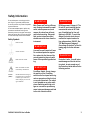
Safety Information
Do not defeat power cord safety ground feature. Plug in to a grounded (earthed) outlet.
Do not use product in any manner not specified
by the manufacturer.
Do not install substitute parts or perform any
unauthorized modification to the product.
Return the product to a Keysight Technologies
Sales and Service Office for service and repair
to ensure that safety features are maintained.
Safety Symbols
WA RNING
Main Power and Test Input Disconnect: Unplug instrument from wall
outlet, remove power cord, and
remove all probes from all terminals before servicing. Only qualified, service-trained personnel
should remove the cover from the
instrument.
Earth Ground
WA RNING
Chassis Ground
Risk of electric shock
Refer to manual for additional safety information
CAT II
(300V)
IEC Measurement Category
II. Inputs may be connected
to mains (up to 300 VAC)
under Category II overvoltage conditions.
34410A/11A/L4411A User’s Guide
Line and Current Protection Fuses:
For continued protection against
fire, replace the line fuse and the
current-protection fuse only with
fuses of the specified type and rating.
WA RNING
WA RNING
IEC Measurement Category II. The
HI and LO input terminals may be
connected to mains in IEC Category II installations for line voltages up to 300 VAC. To avoid the
danger of electric shock, do not
connect the inputs to mains for
line voltages above 300 VAC. See
"IEC Measurement Category II
Overvoltage Protection" on the following page for further information.
WA RNING
Protection Limits: To avoid instrument damage and the risk of electric shock, do not exceed any of
the Protection Limits defined in the
following section.
Front/Rear Switch: Do not change
the position of the Front/Rear
switch on the front panel while signals are present on either the front
or rear set of terminals. The switch
is not intended as an active multiplexer. Switching while high voltages or currents are present may
cause instrument damage and lead
to the risk of electric shock.
3
Protection Limits
Input Terminal Protection Limits
The Keysight 34410A/11A and L4411A Digital
Multimeters provide protection circuitry to prevent damage to the instrument and to protect
against the danger of electric shock, provided
the Protection Limits are not exceeded. To
ensure safe operation of the instrument, do not
exceed the Protection Limits shown on the
front and rear panel, and defined below:
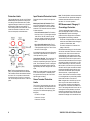
Protection Limits are defined for the input terminals:
Main Input (HI and LO) Terminals. The HI
and LO input terminals are used for voltage,
resistance, capacitance, and diode test measurements. Two Protection Limits are defined
for these terminals:
HI to LO Protection Limit. The Protection
Limit from HI to LO ("A" in the figure at left) is
1000 VDC or 750 VAC, which is also the
maximum voltage measurement. This limit
can also be expressed as 1000 Vpk maximum.
LO to Ground Protection Limit. The LO
input terminal can safely "float" a maximum
of 500 Vpk relative to ground. This is Protection Limit "B" in the figure.
As is implied by the above limits, the Protection
Limit for the HI input terminal is a maximum of
1500 Vpk relative to ground.
Note: The front-panel terminals are shown
above. The rear-panel terminals are identical.
The Front/Rear switch selects the terminal set
to be used. Do not operate this switch while
signals are present on the front or rear terminals. The current-protection fuse is on the rear
panel.
Current Input Terminal. The current input ("I")
terminal has a Protection Limit of 3A (rms)
maximum current flowing from the LO input terminal. This is Protection Limit "C" in the figure.
Note that the current input terminal will be at
approximately the same voltage as the LO terminal.
Note: The current-protection circuitry includes
a fuse on the rear panel. To maintain protection, replace this fuse only with a fuse of the
specified type and rating.
Sense Terminal Protection
Limits
The HI and LO sense terminals are used only
for four-wire resistance and temperature measurements ("Ω 4W"). The Protection Limit is
200 Vpk for all of the terminal pairings ("D" in
the figure):
LO sense to LO input.
Note: The 200 Vpk limit on the sense terminals
is the Protection Limit. Operational voltages in
resistance measurements are much lower —
less than 10 V in normal operation.
IEC Measurement Category II
Overvoltage Protection
To protect against the danger of electric
shock, the Keysight 34410A/11A and L4411A
Digital Multimeters provide overvoltage
protection for line-voltage mains connections
meeting both of the following conditions:
The HI and LO input terminals are connected
to the mains under Measurement Category II
conditions, defined below, and
The mains are limited to a maximum line
voltage of 300 VAC.
IEC Measurement Category II includes electrical devices connected to mains at an outlet on
a branch circuit. Such devices include most
small appliances, test equipment, and other
devices that plug into a branch outlet or socket.
The 34410A/11A and L4411A may be used to
make measurements with the HI and LO inputs
connected to mains in such devices, or to the
branch outlet itself (up to 300 VAC). However,
the 34410A/11A and L4411A may not be used
with its HI and LO inputs connected to mains in
permanently installed electrical devices such
as the main circuit-breaker panel, sub-panel
disconnect boxes, or permanently wired
motors. Such devices and circuits are subject
to overvoltages that may exceed the protection
limits of the 34410A/11A and L4411A.
Note: Voltages above 300 VAC may be measured only in circuits that are isolated from
mains. However, transient overvoltages are
also present on circuits that are isolated from
mains. The Keysight 34410A/11A and L4411A
are designed to safely withstand occasional
transient overvoltages up to 2500 Vpk. Do not
use this equipment to measure circuits where
transient overvoltages could exceed this level.
HI sense to LO input.
HI sense to LO sense.
4
34410A/11A/L4411A User’s Guide
Additional Notices
Waste Electrical and Electronic
Equipment (WEEE) Directive
2002/96/EC
This product complies with the WEEE Directive
(2002/96/EC) marking requirement. The affixed
product label (see below) indicates that you
must not discard this electrical/electronic product in domestic household waste.
Product Category: With reference to the
equipment types in the WEEE directive Annex
1, this product is classified as a "Monitoring
and Control instrumentation" product.
Do not dispose in domestic household waste.
To return unwanted products, contact your
local Keysight office, or see
www.keysight.com/environment/product
for more information.
Keysight 34138A Test Lead Set
The Keysight 34410A/11A is provided with
a Keysight 34138A Test Lead Set,
described below.
Test Lead Ratings
Test Leads - 1000V, 15A
Fine Tip Probe Attachments - 300V, 3A
Mini Grabber Attachment - 300V, 3A
SMT Grabber Attachments - 300V, 3A
Operation
The Fine Tip, Mini Grabber, and SMT Grabber
attachments plug onto the probe end of the
Test Leads.
Maintenance
If any portion of the Test Lead Set is worn or
damaged, do not use. Replace with a new
Keysight 34138A Test Lead Set.
WA RNING
If the Test Lead Set is used in a
manner not specified by Keysight
Technologies, the protection provided by the Test Lead Set may be
impaired. Also, do not use a damaged or worn Test Lead Set.
Instru-ment damage or personal
injury may result.
34410A/11A/L4411A User’s Guide
5
Declaration of Conformity
Declarations of Conformity for this product and for other Keysight products may be downloaded from
the Keysight Regulatory Web site:
http://regulations.products.keysight.com/DoC/search.htm
6
34410A/11A/L4411A User’s Guide
Keysight 34410A/11A/L4411A at a Glance
The Keysight 34410A, 34411A, and L4411A multimeters
provide 6½-digit, high-performance dc and ac measurements.
•
Voltage and Current Measurements. DC and AC(true-rms).
•
Resistance Measurements. 2-wire and 4-wire.
•
Continuity and Diode Testing.
•
Frequency and Period Measurements.
•
Capacitance Measurements.
•
Temperature Measurements. Thermistor and RTD.
•
Auto and Manual Ranging.
•
Math Features. Null, dB, dBm, limits, and statistics.
•
Data Logging. Into non-volatile instrument memory.
•
Instrument State Storage. User-defined named states.
•
GPIB (IEEE-488), USB, and LAN. Three standard remote
interfaces. LXI Class C Compliant.
•
Web Interface. Direct web browser access to instrument.
•
SCPI Compatibility. For easy instrument programming.
•
Voltmeter Complete and External Trigger Signals.
Synchronize with other instruments in your test system.
Note: This manual covers operation of the Keysight 34410A, 34411A,
and L4411A 6½ Digit Multimeters. The features described in this
manual, except where otherwise noted, apply to each of the
multimeters.
34410A/11A/L4411A User’s Guide
7
The Front Panel at a Glance (34410A/11A)
1
2
3
4
5
6
7
On/Off Switch
Measurement Function Keys
Configuration Key
Second Display Key (Reset)
Null Key (Math Functions)
Data Logger Key (Utility)
Trigger Key (Auto Trig)
8
9
10
11
12
13
14
Exit Key (Auto Range)
Shift Key (Local)
Menu Navigation Keypad (Range)
Front/Rear Switch
HI and LO Sense Terminals (4-wire measurements)
HI and LO Input Terminals (all functions except current)
Current Input Terminal (ac and dc current)
WA RNING
Front/Rear Switch: Do not change the position of the Front/Rear switch on the front panel while signals
are present on either the front or rear set of terminals. This switch is not intended as an active
multiplexer. Switching while high voltages or currents are present may cause instrument damage and
lead to the risk of electric shock.
8
34410A/11A/L4411A User’s Guide
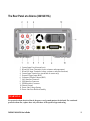
The Rear Panel at a Glance (34410A/11A)
1
2
3
4
5
6
7
8
9
10
11
12
Current Input Fuse (front and rear)
HI and LO Sense Terminals (4-wire resistance and temperature)
HI and LO Input Terminals (voltage, resistance, and other functions)
Current Input Terminal (ac current and dc current only)
External Trigger Input (BNC)
Voltmeter Complete Output (BNC)
LAN Interface Connector
USB Interface Connector
GPIB Interface Connector
Chassis Ground
Power-Line Voltage Setting
Power-Line Fuse-Holder Assembly
WA RNING
For protection from electrical shock, the power cord ground must not be defeated. For continued
protection from fire, replace fuses only with fuses of the specified type and rating.
34410A/11A/L4411A User’s Guide
9
The Display at a Glance (34410A/11A)
Alphanumeric Displays:
1 Primary display line
2 Secondary display line
Annunciators:
(measurement in progress)
3
4 Hi-Z (high input impedance, Vdc only)
5 OComp (offset compensation)
6 ManRng (manual ranging)
7 Trig (wait-for-trigger state)
8 Hold (reading hold)
9 Remote (remote interface operation)
10 Error (error in queue)
11 Null (null function enabled)
*
Annunciators:
12 Shift (shift key just pressed)
13 Math (dB or dBm function enabled)
14 Stats (statistics functions enabled)
15 Limits (limit-test function enabled)
16 Rear (rear-panel terminals active)
17 4W (four-wire ohms or temperature)
18
(continuity test function enabled)
19
(diode-check function enabled)
The following key refers to the primary front-panel display.
For further information, see Chapter 2, “Features and Functions”.
10
34410A/11A/L4411A User’s Guide
In This Guide…
1
Quick Start
In this chapter you prepare the multimeter for use and become familiar
with the most common front-panel operations.
2
Features and Functions
In this chapter you will find a detailed description of the multimeter’s
capabilities and operation. This chapter presents both front-panel and
remote interface operation of the instrument.
Note. Refer to the Keysight 34410A/11A/L4411A Programmer’s
Reference help system for a detailed description of the SCPI commands.
3
Remote Interface
This chapter describes how to connect the multimeter using a remote
interface.
4
Measurement Tutorial
This chapter discusses measurement techniques and considerations to
help you reduce sources of error and obtain the best accuracy from your
instrument.
5
Specifications
This chapter lists the 34410A/11A/L4411A multimeter specifications
and describes how to interpret these specifications.
34410A/11A/L4411A User’s Guide
11
12
34410A/11A/L4411A User’s Guide
Keysight 34410A/11A/L4411A 6½ Digit
Multimeter User’s Guide
1
Quick Start
This chapter gives you a quick overview of the 34410A/11A
multimeter’s front panel and basic features. The examples will help you
become familiar with your meter, its measuring functions, and basic
operation.
Basic Multimeter Operations 14
Preparing the Multimeter for Use 14
Using the Front Panel (34410A/11A) 15
Front-Panel Keys 15
Front-Panel Display Shortcuts 15
Making Basic Measurements (34410A/11A) 17
To Measure DC Voltage 17
To Measure AC Voltage 18
To Measure DC Current 18
To Measure AC Current 18
To Make a 2-Wire Resistance Measurement 19
To Make a 4-wire Resistance Measurement 19
To Measure Frequency 20
To Measure Period 20
To Measure Capacitance 21
To Make a 2-Wire Temperature Measurement 21
To Make a 4-Wire Temperature Measurement 22
To Test Continuity 22
To Check Diodes 23
Other Basics of Operation 23
If the Multimeter Does Not Turn On 24
To Replace the Power-Line Fuse (34410A/11A) 25
To Adjust the Carrying Handle 26
To Rack Mount the Multimeter (34410A/11A) 27
1
Quick Start
Basic Multimeter Operations
This section introduces the basics of the 34410A/11A multimeter, and how to use it.
NOT E
For basic information unique to the L4411A, refer to the L4411A Getting Started Guide
(p/n L4411-90001).
Preparing the Multimeter for Use
To verify that your 34410A or 34411A multimeter is ready for use:
1 Check the list of supplied items.
Verify that you have received the following items with your multimeter.
If anything is missing, contact your nearest Keysight Sales Office.
•
•
•
•
•
•
Test Lead Set.
Power Cord.
USB 2.0 Cable.
Keysight 34410A/11A/L4411A Product Reference CD–ROM.
Keysight Automation Ready (IO Libraries) CD–ROM.
Certificate of Calibration.
The product documentation, including the Keysight 34410A/11A/L4411A
Programmer’s Reference Help and the product manuals, are included on the Product
Reference CD–ROM. Printed (hardcopy) manuals are optional, and included only if
you ordered them.
2 Connect the power cord and turn on the multimeter.
The front–panel display will light up while the multimeter performs its power–on
self–test. The multimeter powers up in the dc voltage function with autoranging
enabled (unless a previous user has configured power–up using a non–default stored
state (see “Multimeter State Storage” on page 49).
14
34410A/11A/L4411A User’s Guide
Quick Start
1
Using the Front Panel (34410A/11A)
This section introduces the 34410A/11A multimeter front panel.
Front-Panel Keys
The front panel provides keys to select various functions and operations. Pressing a
measurement function key (e.g.
) selects that function. Press
to enter the
configuration menu for the selected measurement function.
Most keys have a shifted function printed in blue above the key. To perform a shifted
function, press
, and then press the key that has the desired label above it.
To view and select menu items, use the menu navigation keypad (for example the
or
keys). The current (or default) selection is displayed in FULL BRIGHTNESS. All
other choices are displayed in HALF BRIGHTNESS. The selections on each menu level
scroll, but do not wrap. Arrow annunciators on the second display line indicate
additional selections to the left or right. To accept a selection, press
.
To set numeric parameters, use
decrease that digit.
or
to select a digit, and
or
to increase or
Front-Panel Display Shortcuts
Direct front panel shortcuts are provided for three commonly used display functions:
ranging, digit masking, and integration time.
Ranging.
The multimeter’s manual range can be set directly from the navigation
keypad.
To manually change the current multimeter range, press
or
. The ManRng
annunciator will light, and the selected range (e.g. 100mV RANGE) will be briefly
displayed on the second line.
Digit Masking.
The navigation keypad provides a shortcut to mask (change the
number of digits displayed) the reading on the main display, easing readability.
To enable digit masking during any measurement function, press
or
. DIGIT MASK will be displayed, along with a list of choices (3.5, 4.5, 5.5,
6.5 and AUTO) on the second display line. Press
or
to scroll through and select one of these settings, and then press
.
34410A/11A/L4411A User’s Guide
15
1
Quick Start
Integration Time (Bandwidth, Gate Time). Four measurement functions allow
you to select the multimeter’s integration time: dc voltage, dc current, resistance, and
temperature. The ac voltage and current measurements allow you to select the ac signal
filter (bandwidth). The frequency/period function allows you to select gate time. The
navigation keypad provides a shortcut for quickly changing these settings.
• If the multimeter is configured to take the measurement using an integration time in
NPLCs, pressing
or
during front panel measurement operations will increase
or decrease the integration time setting.
• If either the ac voltage or ac current measurement function is selected, pressing
or
during front panel measurement operations will increase or decrease the
bandwidth setting.
• If the frequency/period measurement function is selected, pressing
or
during
front panel measurement operations will increase or decrease the gate time setting.
16
34410A/11A/L4411A User’s Guide
Quick Start
1
Making Basic Measurements (34410A/11A)
This section introduces the many types of measurements that you can make with your
34410A/11A multimeter, and how to make connections for each measurement. Most
basic measurements can be taken using the factory default settings. A more complete
description of all multimeter functions, measurement parameter configuration and
remote interface operation is provided in Chapter 2.
For each measurement, connect the test leads as shown. The test lead connections are the
same for the front or rear set of terminals.
Before making test lead connections, use the Front/Rear button on the front panel to
select either the front or rear set of terminals. The Rear annunciator lights if the rear
terminals are selected.
WA RNING
NOT E
Do not press the Front/Rear button while signals are present on either the front or
rear set of terminals. Switching while high voltages or currents are present can
cause instrument damage, and may increase the risk of electric shock.
For basic measurement connection information unique to the L4411A, refer to the
L4411A Getting Started Guide (p/n L4411-90001).
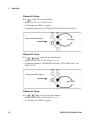
To Measure DC Voltage
Press
to select the dc voltage function.
• Ranges: 100 mV, 1 V, 10 V, 100 V, 1000 V
• Configurable parameters: INTEGRATION, RANGE, INPUT Z (input impedance),
AUTO ZERO, NULL, and NULL VALUE
Connect test leads as shown:
DC Voltage
34410A/11A/L4411A User’s Guide
17
1
Quick Start
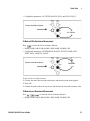
To Measure AC Voltage
Press
to select the ac voltage function.
• Ranges: 100 mV, 1 V, 10 V, 100 V, 750 V
• AC Technique: true–RMS, ac–coupled
• Configurable parameters: AC FILTER, RANGE, NULL and NULL VALUE
Connect test leads as shown:
AC Voltage
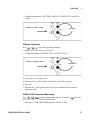
To Measure DC Current
Press
to select the dc current function.
• Ranges: 100 mA, 1 mA, 10 mA, 100 mA, 1 A, 3 A
• Configurable parameters: INTEGRATION, RANGE, AUTO ZERO, NULL, and
NULL VALUE
Connect test leads as shown:
DC Current
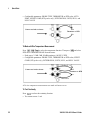
To Measure AC Current
Press
to select the ac current function.
• Ranges: 100 mA, 1 mA, 10 mA, 100 mA, 1 A, 3 A
• AC Technique: true–RMS, ac–coupled
18
34410A/11A/L4411A User’s Guide
Quick Start
1
• Configurable parameters: AC FILTER, RANGE, NULL and NULL VALUE
Connect test leads as shown:
AC Current
To Make a 2-Wire Resistance Measurement
Press
to select the 2-wire resistance function.
• Ranges: 100Ω, 1 kΩ, 10 kΩ, 100 kΩ, 1 MΩ, 10 MΩ, 100 MΩ, 1 GΩ
• Configurable parameters: INTEGRATION, RANGE, OFFSET COMP, AUTO
ZERO, NULL, and NULL VALUE
Connect test leads as shown:
Resistance
To null–out the test lead resistance:
1 Connect one end of the test leads at the meter, and short the probe ends together.
2 Press null.
3 Connect the probe ends to the test circuit, and measure the corrected resistance value.
To Make a 4-wire Resistance Measurement
Press
to select the 4-wire resistance function.
• Ranges: 100Ω, 1 kΩ, 10 kΩ, 100 kΩ, 1 MΩ, 10 MΩ, 100 MΩ, 1 GΩ
34410A/11A/L4411A User’s Guide
19
1
Quick Start
• Configurable parameters: INTEGRATION, RANGE, OFFSET COMP, NULL, and
NULL VALUE
Connect test leads as shown:
Resistance
All 4-wire resistance measurements are made with auto-zero on.
To Measure Frequency
Press
to select the frequency function.
• Measurement band: 3 Hz to 300 kHz
• Input signal range: 100 mVAC to 750 VAC
• Technique: reciprocal counting
• Configurable parameters: GATE TIME, RANGE, AC FILTER, NULL and NULL
VALUE
Connect test leads as shown:
AC Signal
To Measure Period
Press
to select the frequency function. Then press
from the menu.
and select PERIOD
• Measurement band: 0.33 s to 3.3 µs
• Input signal range: 100 mVAC to 750 VAC
• Technique: reciprocal counting
20
34410A/11A/L4411A User’s Guide
Quick Start
1
• Configurable parameters: GATE TIME, RANGE, AC FILTER, NULL and NULL
VALUE
Connect test leads as shown:
AC Signal
To Measure Capacitance
Press
to select the capacitance function.
• Ranges: 1 nF, 10 nF, 100 nF, 1 mF, 10 mF
• Configurable parameters: RANGE, NULL, and NULL VALUE
Connect test leads as shown:
Capacitance
To null–out the test lead capacitance:
1 Disconnect the + lead’s probe end from the test circuit, and leave open.
2 Press null.
3 Reconnect the + lead’s probe end to the test circuit, and measure the corrected
capacitance value.
To Make a 2-Wire Temperature Measurement
Press
to select the temperature function. Then press
RTD-2W or THERMISTOR-2W from the menu.
and select
• Probe types: 2.2 kΩ, 5 kΩ, 10 kΩ thermistors; 0.00385/°C RTD
34410A/11A/L4411A User’s Guide
21
1
Quick Start
• Configurable parameters: PROBE TYPE, THERMISTOR or RTD value, AUTO
ZERO, OFFSET COMP (RTD probes only), INTEGRATION, UNITS, NULL, and
NULL VALUE
Connect test leads as shown:
Thermistor or RTD
To Make a 4-Wire Temperature Measurement
Press
to select the temperature function. Then press
RTD-4W or THERMISTOR-4W from the menu.
and select
• Probe types: 2.2 kΩ, 5 kΩ, 10 kΩ thermistors; 0.00385/°C RTD
• Configurable parameters: PROBE TYPE, THERMISTOR or RTD value, OFFSET
COMP (RTD probes only), INTEGRATION, UNITS, NULL, and NULL VALUE
Connect test leads as shown:
Thermistor or RTD
All 4-wire temperature measurements are made with auto-zero on.
To Test Continuity
Press
to select the continuity function.
• Test current source: 1 mA
22
34410A/11A/L4411A User’s Guide
Quick Start
1
• Beeper Threshold: beeps below 10Ω
Connect test leads as shown:
Open or Closed Circuit
To Check Diodes
Press
to select the diode test function.
• Test current source: 1 mA
• Beeper Threshold: 0.3V ~ voltagemeasured ~ 0.8V (not adjustable)
Connect test leads as shown:
Forward Bias
The diode check function is used to indicate correct diode operation; closed–circuit on
forward bias and open–circuit on reverse–bias.
Other Basics of Operation
This section covers basic troubleshooting and general use.
34410A/11A/L4411A User’s Guide
23
1
Quick Start
If the Multimeter Does Not Turn On
Use the following steps to help solve problems you might encounter when turning on the
multimeter. If you need more help, see the Service Guide for instructions on returning
the multimeter to Keysight for service.
1 Verify that there is ac power to the multimeter.
First, verify that the multimeter’s Power switch is in the “On” position. Also, make sure
that the power cord is firmly plugged into the power module on the rear panel. You
should also make sure that the power source you plugged the multimeter into is
energized.
2 Verify the power–line voltage setting.
The line voltage is set to the proper value for your country when the multimeter is
shipped from the factory. Change the voltage setting if it is not correct. The settings are:
100, 120, 220, or 240 Vac (for 230 Vac operation, use the 220 Vac setting).
See “To Replace the Power-Line Fuse (34410A/11A)” on page 25 if you need to change
the line–voltage setting.
3 Verify that the power–line fuse is good.
The multimeter is shipped from the factory with a power–line fuse installed. The
supplied fuse is a 250 mA, 250V, slow–blow, 5x20mm fuse, Keysight part number
2110–0817. If you determine that the fuse is faulty, replace it with one of the same size
and rating.
See “To Replace the Power-Line Fuse (34410A/11A)” on page 25 if you need to replace
the power–line fuse.
The current input path is also fused. The supplied fuse is a 3 A, 250V, fast-acting,
5x20mm fuse, Keysight part number 2110–0780, and is housed
in a standard screw–in fuse holder on the left side of the rear panel. If you determine that
the fuse is faulty, replace it with one of the same size and rating.
24
34410A/11A/L4411A User’s Guide
Quick Start
1
To Replace the Power-Line Fuse (34410A/11A)
Remove power cord first. Then follow these steps:
Depress tab (1) and pull fuse holder (2) from
rear panel.
Remove line-voltage selector from fuse
holder assembly.
Keysight Part Number 2110-0817
(250 mA, 250V, slow-blow, 5x20mm)
Rotate line-voltage selector and reinstall so
correct voltage appears in fuse holder window.
Replace fuse holder assembly in rear panel.
Verify that the correct line voltage is selected and the power-line fuse is good.
NOT E
For multimeter operations with a 230 VAC supply, set the line–voltage selector to 220V.
34410A/11A/L4411A User’s Guide
25
1
Quick Start
To Adjust the Carrying Handle
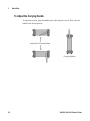
To adjust the position, grasp the handle by the sides and pull outward. Then, rotate the
handle to the desired position.
Bench-Top Viewing Positions
Carrying Position
26
34410A/11A/L4411A User’s Guide
Quick Start
1
To Rack Mount the Multimeter (34410A/11A)
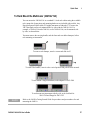
You can mount the 34410A/11A in a standard 19–inch rack cabinet using the available
rack–mount kits. Instructions and mounting hardware are included with each kit. Any
Keysight System II (half-width, 2U height) instrument of either the 272.3 mm or the
348.3 mm depth can be rack mounted side–by–side with the 34410A/11A. For
example, a 34410A/11A and a 34401A, or two 34410A/11As, can be mounted side–
by–side, as shown below.
You must remove the carrying handle, and the front and rear rubber bumpers, before
rack mounting an instrument.
To remove each bumper, stretch a corner and slide it off.
To remove the handle, rotate it to the vertical position and pull the ends outward.
To rack mount a single instrument, order adaptor kit 5063-9240
To rack mount two instruments side-by-side, order lock-link kit
5061-8769 and flange kit 5063-9212
NOT E
Refer to the L4411A Getting Started Guide for procedures and part numbers for rack
mounting the L4411A.
34410A/11A/L4411A User’s Guide
27
1
28
Quick Start
34410A/11A/L4411A User’s Guide
Contents
1
Quick Start
13
Basic Multimeter Operations
14
Preparing the Multimeter for Use
14
Using the Front Panel (34410A/11A)
15
Front-Panel Keys 15
Front-Panel Display Shortcuts 16
Making Basic Measurements (34410A/11A)
17
To Measure DC Voltage 18
To Measure AC Voltage 18
To Measure DC Current 19
To Measure AC Current 19
To Make a 2-Wire Resistance Measurement 20
To Make a 4-wire Resistance Measurement 20
To Measure Frequency 21
To Measure Period 21
To Measure Capacitance 22
To Make a 2-Wire Temperature Measurement 23
To Make a 4-Wire Temperature Measurement 23
To Test Continuity 24
To Check Diodes 24
Other Basics of Operation
25
If the Multimeter Does Not Turn On
25
To Replace the Power-Line Fuse (34410A/11A)
26
To Adjust the Carrying Handle
27
To Rack Mount the Multimeter (34410A/11A) 28
34410A/11A User’s Guide
29
Contents
2
Features and Functions
SCPI Commands
35
37
Front Panel Features (34410A/11A)
38
Front Panel Display
38
Displayed Messages 38
Self–Guiding Menus 38
Annunciators 40
Second Display Options 41
Turning the Display Off 41
Front–Panel Display Shortcuts 42
Front Panel Alphanumeric Character Entry 43
Front Panel Measurement Configuration Menus
44
Configuring DC Voltage and DC Current Measurements 44
Configuring AC Voltage and Current Measurements 45
Configuring Resistance Measurements 45
Configuring Frequency and Period Measurements 46
Configuring Temperature Measurements 46
Configuring Capacitance Measurements 47
Continuity and Diode Tests 47
Advanced Configuration Options
48
Multimeter State Storage 48
Accessing Reading Memory
49
Front/Rear Input Terminal Switching (34410A/11A)
Multimeter Reset
50
DC Measurements
51
Integration Time and Resolution 51
DC Input Impedance 53
AC Measurements
54
AC Filter 54
Gate Time 55
30
49
34410A/11A/L4411A User’s Guide
Contents
Auto Zero
56
Ranging
57
Null Measurements
59
Miscellaneous Configuration Settings 60
Radix Character (34410A/11A) 60
Thousands Separator (34410A/11A) 60
Beeper (34410A/11A) 61
Math Functions
62
dB Measurements 63
dBm Measurements 64
Using Statistics 65
Limit Testing 66
Triggering the Multimeter 67
Selecting a Trigger Source 67
Auto Triggering (34410A/11A) 68
Single Triggering (34410A/11A) 68
Reading Hold (34410A/11A) 69
Immediate Triggering 69
Software (Bus) Triggering 70
Internal (Level) Triggering (34411A/L4411A) 70
Number of Samples per Trigger 71
Number of Pre-Trigger Samples (34411A/L4411A)
Trigger Delay 72
Automatic Trigger Delay 73
External Triggering 75
Trigger Slope 77
Data Logging
78
System-Related Operations
82
Self–Test 82
Error Conditions 83
Reading the Error Queue 84
NISPOM Memory Sanitization
Calibration 84
Power-On and Reset State
34410A/11A/L4411A User’s Guide
71
84
85
31
Contents
3
Remote Interface Configuration
Configuring the GPIB Interface
Configuring the USB Interface
87
89
90
Configuring the LAN Interface 91
Configuring LAN Parameters 92
DHCP 92
Auto–IP 92
IP Address 93
Subnet Mask 93
Default Gateway 94
Host Name 94
DNS Server 95
Web Password 95
Instrument Unexpectedly Goes into Remote 95
Setting up a LAN connection from the Front Panel
96
Setting up a LAN connection from the Remote Interface
97
Keysight 34410A/11A Web Interface
98
4
Measurement Tutorial
99
DC Measurement Considerations
101
Thermal EMF Errors 101
Loading Errors (dc volts) 101
Noise Rejection
102
Rejecting Power–Line Noise Voltages 102
Common Mode Rejection (CMR) 102
Noise Caused by Magnetic Loops 103
Noise Caused by Ground Loops 103
Resistance Measurement Considerations
104
4–Wire Ohms Measurements 104
Removing Test Lead Resistance Errors 105
Minimizing Power Dissipation Effects 105
Errors in High Resistance Measurements 105
32
34410A/11A/L4411A User’s Guide
Contents
True RMS AC Measurements 106
True RMS Accuracy and High–Frequency Signal Content
Estimating High–Frequency (Out–of–Band) Error 110
Other Primary Measurement Functions
112
Frequency and Period Measurement Errors
DC Current Measurements 112
Capacitance Measurements
113
Temperature Measurements
115
Probe Type Choice 115
2–Wire vs. 4–Wire Measurements
Auto Zero On/Off 116
Integration 116
Offset Compensation 116
NULL Reading 116
112
115
High-Speed Measurements 117
Making High–Speed AC Measurements 117
Making High–Speed dc and Resistance Measurements
Other Sources of Measurement Error 119
Settling Time Effects 119
Loading Errors (ac volts) 119
Measurements Below Full Scale 120
High–Voltage Self–Heating Errors 120
AC Current Measurement Errors (Burden Voltage)
Low–Level Measurement Errors 120
Common Mode Errors 122
Leakage Current Errors 122
34410A/11A/L4411A User’s Guide
107
118
120
33
Contents
5
Specifications
123
DC Characteristics
125
AC Characteristics
128
Frequency and Period Characteristics 130
Capacitance Characteristics 132
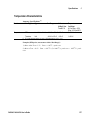
Temperature Characteristics
132
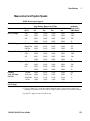
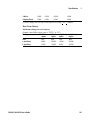
Additional 34411A/L4411A Specifications 133
Measurement and System Speeds
134
System Speeds 135
Data From Memory 136
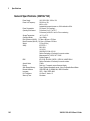
General Specifications (34410A/11A) 136
General Specifications (L4411A)
137
Triggering and Memory
137
Dimensions 138
To Calculate Total Measurement Error 139
Interpreting Accuracy Specifications 141
Transfer Accuracy 141
24–Hour Accuracy 141
90–Day and 1–Year Accuracy 141
Temperature Coefficients 141
Configuring for Highest Accuracy Measurements
142
DC Voltage, DC Current, and Resistance Measurements
AC Voltage and AC Current Measurements 142
Frequency and Period Measurements 142
A
Appendix: Firmware and Driver Updates
Downloading the Update Utility and Firmware
Downloading IVI-COM Driver Updates
34
142
143
144
147
34410A/11A/L4411A User’s Guide
Keysight 34410A/11A/L4411A 6½ Digit
Multimeter User’s Guide
2
Features and Functions
SCPI Commands 37
Front Panel Features (34410A/11A) 38
Front Panel Display 38
Displayed Messages 38
Self–Guiding Menus 38
Annunciators 39
Second Display Options 40
Turning the Display Off 41
Front–Panel Display Shortcuts 41
Front Panel Alphanumeric Character Entry 43
Front Panel Measurement Configuration Menus 44
Configuring DC Voltage and DC Current Measurements 44
Configuring AC Voltage and Current Measurements 44
Configuring Resistance Measurements 45
Configuring Frequency and Period Measurements 45
Configuring Temperature Measurements 46
Configuring Capacitance Measurements 46
Continuity and Diode Tests 47
Advanced Configuration Options 48
Multimeter State Storage 49
Accessing Reading Memory 50
Front/Rear Input Terminal Switching (34410A/11A) 50
Multimeter Reset 51
DC Measurements 52
Integration Time and Resolution 52
DC Input Impedance 54
2
Features and Functions
AC Measurements 55
AC Filter 55
Gate Time 55
Auto Zero 57
Ranging 58
Null Measurements 60
Miscellaneous Configuration Settings 61
Radix Character (34410A/11A) 61
Thousands Separator (34410A/11A) 61
Beeper (34410A/11A) 62
Math Functions 63
dB Measurements 64
dBm Measurements 64
Using Statistics 65
Limit Testing 66
Triggering the Multimeter 68
Selecting a Trigger Source 68
Auto Triggering (34410A/11A) 68
Single Triggering (34410A/11A) 69
Reading Hold (34410A/11A) 69
Immediate Triggering 70
Software (Bus) Triggering 70
Internal (Level) Triggering (34411A/L4411A) 70
Number of Samples per Trigger 71
Number of Pre-Trigger Samples (34411A/L4411A) 72
Trigger Delay 73
Automatic Trigger Delay 74
External Triggering 76
Trigger Slope 78
Data Logging 80
System-Related Operations 84
Self–Test 84
Error Conditions 85
Reading the Error Queue 85
NISPOM Memory Sanitization 86
Calibration 86
Power-On and Reset State 87
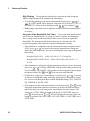
36
34410A/11A/L4411A User’s Guide
Features and Functions
2
SCPI Commands
The Keysight 34410A/11A/L4411A complies with the syntax rules and conventions
of SCPI (Standard Commands for Programmable Instruments).
NOT E
For complete SCPI command syntax information, refer to the Keysight
34410A/11A/L4411A Programmer’s Reference Help. This is a standard Windows help
system, provided on the Keysight 34410A/11A/L4411A Product Reference CD-ROM
that came with your instrument.
SCPI Language Conventions. Throughout this guide, the following conventions
are used for SCPI command syntax for remote interface programming:
• Braces ( { } ) enclose the parameter choices for a given command string. The braces
are not sent with the command string.
• A vertical bar ( | ) separates multiple parameter choices for a given command string.
• Triangle brackets ( < > ) indicate that you must specify a value for the enclosed
parameter. The brackets are not sent with the command string.
• Some parameters are enclosed in square brackets ( [ ] ). This indicates that the
parameter is optional and can be omitted. The brackets are not sent with the
command string. If you do not specify a value for an optional parameter, the
instrument chooses a default value.
SCPI Language Version. You can determine the SCPI version to which your
instrument adheres by sending a command from the remote interface.
• You can query the SCPI version from the remote interface only.
• Remote Interface Operation: The SYSTem:VERSion? query returns the SCPI
version in the form “YYYY.V”, where “YYYY” represents the year of the version, and
“V” represents a version number for that year (for example, 1994.0).
34410A/11A/L4411A User’s Guide
37
2
Features and Functions
Front Panel Features (34410A/11A)
Front Panel Display
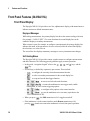
The Keysight 34410A/11A provides a two–line, alphanumeric display, with annunciators to
indicate certain non–default instrument states.
Displayed Messages
While taking measurements, the primary display line shows the current reading, with units
(for example: “-0.001,02 VDC”). For some functions the second display line can be
enabled to display a secondary measurement.
When a menu is open (for example, to configure a measurement), the primary display line
indicates the menu, or the parameter to be set or selected, while the second line displays
the selections, or a value to be set.
The second line also displays momentary messages to convey instrument state changes.
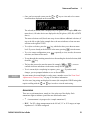
Self–Guiding Menus
The Keysight 34410A/11A provides context–sensitive menus to configure measurements
and other functions. The following general guidelines apply to menu operations.
• In this guide, “navigation keypad” refers to the
key.
,
,
, and
keys, and the
• Several keys (or shifted key sequences) open a menu. These include:
•
to configure the currently selected measurement function.
•
to select a secondary measurement for the second display line.
•
to set up and use the data logger function.
•
•
to turn on and select the math functions.
to return the multimeter to auto trigger mode, enable
reading hold, or select various triggering options.
•
•
to configure utility options or the remote interface.
to reset the multimeter to its reset state (equivalent to the
*RST command in SCPI).
• When you press
, the Shift annunciator is lit. It toggles on and off.
• If the multimeter is in the remote interface mode (Remote annunciator is lit),
pressing
(Local) once returns the multimeter to local (front panel) operation.
38
34410A/11A/L4411A User’s Guide
Features and Functions
• Once you have entered a menu, use the
or
item from those displayed on the second line.
2
keys to view and select a menu
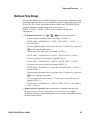
The selected (or default) item is displayed in full brightness (for example, dBM in the
menu above). All other choices are displayed in half brightness (OFF, dB, or STATS
above).
The menu selections scroll, but do not wrap. Arrows indicate additional selections, if
any, to the left or right. In the example above, the arrow indicates at least one more
selection to the right of STATS.
key, which also takes you to the next menu
• To confirm a selection, press the
level. If you are already at the last level in the menu, pressing
exits the menu.
• To review a menu configuration, press
selections, and then exit the menu.
repeatedly to view, in order, the current
• To step through the remaining menu choices after making the desired selections, hold
down the
key.
or
• The key that you used to enter the menu (for example,
confirm selections and advance in the menu exactly like the
), serves to
key.
. If you have made
• To exit a menu before completing its sequence, press
changes, you are prompted whether to save or discard them.
NOT E
In some menus, the second display is used to enter a number or text. See“Front Panel
Alphanumeric Character Entry” on page 43 for further information.
In a few cases, long strings are displayed in a menu (for example the USB ID string) that
require scrolling with the
and
keys in order to view the entire string.
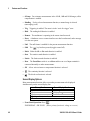
Annunciators
There are several annunciators, mostly in a line at the top of the display. Each
annunciator lights to indicate a particular non–default meter state:
•
*
A measurement is in progress (the “sample annunciator”).
• Hi–Z For DC voltage measurements in the 100 mV, 1 V or 10 V ranges, an input
impedance of >10 GΩ is configured.
34410A/11A/L4411A User’s Guide
39
2
Features and Functions
• OComp For resistance measurements in the 100 Ω, 1 kΩ and 10 kΩ ranges, offset
compensation is enabled.
• ManRng For the selected measurement function, a manual range is selected
(autoranging is off).
• Trig
Triggering is enabled. The meter is in the “wait–for–trigger” state.
• Hold
The reading hold function is enabled.
• Remote The multimeter is operating in the remote interface mode.
• Error A hardware error or remote interface error has been detected, and a message
is in the error queue.
• Null
The null feature is enabled for the present measurement function.
• Shift
The
• Math
Either the dB or dBm math function is enabled.
• Stats
The statistics math function is enabled.
• Limits
key has been pressed (toggles on and off).
The limit test math function is enabled.
• Rear The Front/Rear switch is set to Rear and the rear set of input terminals is
connected internally to make measurements.
• 4W A four–wire resistance or temperature function is selected.
•
The continuity function is selected.
•
The diode test function is selected.
Second Display Options
Many measurement functions allow a secondary measurement to be displayed
simultaneously on the second display line:
Primary Function
Second Display Function
DC V, DC I, AC V, AC I
Peak–to–Peak value
Freq
AC Voltage*
Temp
Raw Resistance**
*ac voltage of the input waveform
**actual raw resistance measured across temperature probe and leads
• Front Panel Operation: Press
2ND DISPLAY > PK-TO-PK (Where primary function is voltage or current.)
40
34410A/11A/L4411A User’s Guide
Features and Functions
2
Once the second display is enabled, you can scroll through all second display items,
including STATS or LIMITS if these functions are enabled.
• Remote Interface Operation: The following command selects the measurement or
math function to be displayed on the second display line. The <feed> parameter is a
quoted ASCII string designating the function to be displayed, such as
VOLTage:PTPeak.
DISPlay:WINDow2:TEXT:FEED <feed>
The following query returns the currently selected <feed> parameter, as a quoted
ASCII string:
DISPlay:WINDow2:TEXT:FEED?
Refer to the Keysight 34410A/11A/L4411A Programmer’s Reference Help for
a complete description and syntax for these commands.
Turning the Display Off
This feature is available from the remote interface only.
For security reasons, you may want to disable the front panel display. When disabled,
the entire front panel display (except for the Error and Remote annunciators) goes dark.
• Remote Interface Operation: The following command turns off the display:
DISPlay OFF
The following command queries the display setting:
DISPlay?
The query returns a “0” (OFF) or “1” (ON).
Refer to the Keysight 34410A/11A/L4411A Programmer’s Reference Help for
a complete description and syntax for these commands.
Front–Panel Display Shortcuts
Direct front–panel shortcuts are provided for three commonly used display functions:
ranging, digit masking, and integration time. These shortcuts are available only when
you are not in a menu.
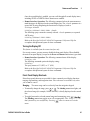
Ranging.
The meter range can be set directly from the navigation keypad.
• To manually change the range, press
or
. The ManRng annunciator lights, and
the selected range (for example, 100mV RANGE) is briefly displayed on the second
line.
• To toggle between the selected manual range and autoranging, press
The ManRng annunciator toggles on or off, as appropriate. Note: This is a
dual–function key, not a shifted key. Pressing
when in a menu will exit the
menu.
34410A/11A/L4411A User’s Guide
.
41
2
Features and Functions
Digit Masking.
The navigation keypad provides a shortcut to mask (change the
number of digits displayed) the reading on the main display.
• To enable digit masking for the selected measurement function, press
or
. DIGIT MASK will be displayed, along with a list of choices (3.5, 4.5, 5.5,
6.5 and AUTO). Select the desired setting (use the
keys) and press .
• Masking digits only affects what is displayed. It does not affect measurement speed
or accuracy.
Integration Time (Bandwidth, Gate Time). Four measurement functions allow
you to select the integration time: dc voltage, dc current, resistance, and temperature.
The ac voltage and ac current measurements allow you to select the ac signal filter
(bandwidth). The frequency/period function allows you to select gate time. The
navigation keypad provides a shortcut for quickly changing these settings.
• If the multimeter is configured to take the measurement using an integration time in
NPLCs, press
or
to increase or decrease the integration time setting and
display the new setting briefly. You can scroll through the entire range of integration
time settings:
Keysight 34410A, PLCs:
0.006, 0.02, 0.06, 0.2, 1, 2, 10 and 100
Keysight 34411A/L4411A, PLCs:
10, 100
0.001, 0.002, 0.006, 0.02, 0.06, 0.2, 1, 2,
• If the multimeter is configured to take the measurement using an aperture integration
time, press
or
to display APERTURE, with the current setting on the second
line (for example, 101.005mSEC). You can then use the navigation keypad to change
the aperture setting. The
and
keys have their usual functions.
• If either the ac voltage or ac current function is selected, press
or
to increase
or decrease the bandwidth setting, and briefly display the new setting on the second
line. You can scroll through the three available bandwidth settings: 3 HZ : SLOW, 20
HZ : MEDIUM, or 200 HZ : FAST.
• If the frequency/period measurement function is selected, pressing
or
during
front panel measurement operations will increase or decrease the gate time setting,
and briefly display the new setting on the second display line (for example, if the
setting was 0.1 GATE TIME, the display will show 0.01 GATE TIME when you
or
will scroll through the selection of gate time
press
). Repeated use of
settings in seconds (0.001 GATE TIME, 0.01 GATE TIME, 0.1 GATE TIME, and 1
GATE TIME).
42
34410A/11A/L4411A User’s Guide
Features and Functions
2
Front Panel Alphanumeric Character Entry
When you are in certain menus, particularly the utility menus, you may need to
manually enter a number or alphanumeric string on the second display line.
• To enter a number or character, press
or
to select the displayed character
(digit or letter) you wish to edit. The selected character will flash to indicate it can be
edited. Use the
and
keys to modify a digit (from 0 to 9) or a letter (from A to
Z).
• To quickly enter large numbers, you may press
to scroll over to the most
significant digit allowed and/or add leading zeros. For non–zero floating–point
entries, you may also press
to scroll to the magnitude prefix (for example, u, m,
k, M), then use the
and
keys to change the numerical entry.
Arrow annunciators on the second display line will indicate if there are editable
characters left or right of the one selected.
34410A/11A/L4411A User’s Guide
43
2
Features and Functions
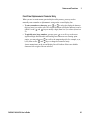
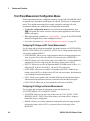
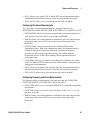
Front Panel Measurement Configuration Menus
Each measurement function is configured separately, except for Ω 2W and Ω 4W (which
are partially inter–dependent), and frequency and period, (which share a configuration
menu). The configuration settings (for example, integration, and range) for each
measurement function are retained when switching between functions.
• To enter the configuration menu for any selected measurement function, press
. The menus are context–sensitive; only the options applicable to the selected
function will appear.
• When digit masking is enabled (see “Digit Masking.” on page 42) the DIGIT MASK
submenu will appear before other configuration choices.
• For further information, see “Advanced Configuration Options” on page 48.
Configuring DC Voltage and DC Current Measurements
For dc voltage and dc current measurements, the menu selections are: INTEGRATION,
RANGE, AUTO ZERO, NULL and NULL VALUE. For dc voltage measurements only,
you can also configure INPUT Z.
• INTEGRATION: Allows you to set the integration time for the measurement in two
ways; in power–line cycles (select NPLC) or in seconds (select APERTURE).
• RANGE: Allows you to select a fixed range (select MANUAL), or let the multimeter
automatically select the range using the autoranging feature (select AUTO).
• INPUT Z: Allows you to select an input impedance of 10 MΩ (select 10 M) or >10
GΩ (select HI–Z) for the 100 mVdc, 1 Vdc and 10 Vdc ranges only.
• AUTO ZERO: Allows you to enable for all readings (select ON), enable for one
reading (select ONCE), or disable (select OFF) the auto zero feature, which subtracts
a zero reading from each measurement.
• NULL: Allows you to enable (ON) or disable (OFF) the null measurement feature,
which measures the difference between a stored null value and the input signal.
• NULL VALUE: Allows you to view and edit the null value (if enabled).
Configuring AC Voltage and Current Measurements
For ac voltage and ac current measurements, your menu selections are:
AC FILTER, RANGE, NULL and NULL VALUE.
• AC FILTER: Allows you to select one of three choices (3 HZ : SLOW, 20 HZ :
MEDIUM, 200 HZ : FAST). The ac filter allows you to trade off low–frequency
bandwidth versus ac settling time.
• RANGE: Allows you to let the multimeter automatically select the range using the
autoranging feature (select AUTO), or you may select a fixed range (select
MANUAL).
44
34410A/11A/L4411A User’s Guide
Features and Functions
2
• NULL: Allows you to enable (ON) or disable (OFF) the null measurement feature,
which measures the difference between a stored null value and the input signal.
• NULL VALUE: Allows you to view and edit the null value (if enabled).
Configuring Resistance Measurements
For 2–wire and 4–wire resistance measurements, your menu selections are:
INTEGRATION, RANGE, OFFSET COMP, AUTO ZERO, NULL and NULL VALUE.
• INTEGRATION: Allows you to set the integration time for the measurement in two
ways; in power–line cycles (NPLC) or in seconds (APERTURE).
• RANGE: Allows you to let the multimeter automatically select the range using the
autoranging feature (select AUTO), or you may select a fixed range (select
MANUAL).
• OFFSET COMP: Allows you to enable (ON) or disable (OFF) the offset
compensation feature. With offset compensation enabled, the multimeter makes a
normal resistance measurement first, followed by a second measurement to
determine any offset voltage in the input circuitry. The resultant displayed
measurement corrects for this offset. Enabling offset compensation increases
measurement time.
• AUTO ZERO: Allows you to enable for all readings (ON), enable for one reading
(ONCE), or disable (OFF) the auto zero feature, which subtracts a subsequent zero
reading from each measurement.
• NULL: Allows you to enable (ON) or disable (OFF) the null measurement feature,
which measures the difference between a stored null value and the input signal.
• NULL VALUE: Allows you to view and edit the null value (if enabled).
Configuring Frequency and Period Measurements
For frequency and period measurements, your menu selections are: CONFIGURE,
GATE TIME, RANGE, AC FILTER, NULL and NULL VALUE.
• CONFIGURE: Allows you to select either FREQUENCY or PERIOD as the primary
measurement.
• GATE TIME: Allows you to select one of four choices (0.001, 0.01, 0.1, or 1) for
gate time, in seconds.
• RANGE: Allows you to let the multimeter automatically select the range using the
autoranging feature (select AUTO), or you may select a fixed range (select
MANUAL).
34410A/11A/L4411A User’s Guide
45
2
Features and Functions
• AC FILTER: Allows you to select from three choices (3 HZ : SLOW,
20 HZ : MEDIUM, or 200 HZ : FAST). The ac filter allows you to trade off
low–frequency bandwidth versus ac settling time.
• NULL: Allows you to enable (ON) or disable (OFF) the null measurement feature,
which measures the difference between a stored null value and the input signal.
• NULL VALUE: Allows you to view and edit the null value (if enabled).
Configuring Temperature Measurements
For temperature measurements, your menu selections are: PROBE TYPE, OFFSET
COMP, AUTO ZERO, INTEGRATION, NULL, NULL VALUE, and UNITS.
• PROBE TYPE: Allows you to select from four choices (RTD–4W, RTD–2W,
THERMISTOR–2W, or THERMISTOR–4W) of temperature probe type.
• OFFSET COMP (for RTD probes only): Allows you to enable (ON) or disable (OFF)
the offset compensation feature. With offset compensation enabled, the multimeter
makes a normal temperature measurement first, followed by a second measurement
to determine any offset voltage in the input circuitry. The resultant displayed
measurement corrects for this offset. Enabling offset compensation increases
measurement time.
• AUTO ZERO: Allows you to enable (ON) or disable (OFF) the auto zero feature for
2–wire temperature measurements. This feature subtracts a subsequent zero reading
from each measurement.
Note that 4–wire temperature measurements are automatically made with auto zero
always on.
• INTEGRATION: Allows you to set the integration time for the measurement in two
ways; in power–line cycles (NPLC) or in seconds (APERTURE).
• NULL: Allows you to enable (ON) or disable (OFF) the null measurement feature,
which measures the difference between a stored null value and the input signal.
• NULL VALUE: Allows you to view and edit the null value (if enabled).
• UNITS: Allows you to select the temperature scale: Celsius (select C), Fahrenheit
(select F), or Kelvin (select K).
Configuring Capacitance Measurements
For capacitance measurements, your configuration menu choices are: RANGE, NULL
and NULL VALUE.
46
34410A/11A/L4411A User’s Guide
Features and Functions
2
• RANGE: Allows you to let the multimeter automatically select the range using the
autoranging feature (select AUTO), or you may select a fixed range (select
MANUAL).
• NULL: Allows you to enable (ON) or disable (OFF) the null measurement feature,
which measures the difference between a stored null value and the input signal.
• NULL VALUE: Allows you to view and edit the null value (if enabled).
Continuity and Diode Tests
There are no parameters to configure, nor any menus for these functions.
• Continuity Test. The range and resolution are fixed for continuity tests.
• The range is 1 kΩ (a 2-wire resistance measurement).
• The meter beeps (even if beep is disabled) for each measurement that is less than
or equal to the continuity threshold (which is 10 Ω), and the actual resistance
reading is displayed on the front panel.
• From 10 Ω to 1.2 kΩ the meter displays the actual resistance reading with no
beep. If the reading exceeds 1.2 kΩ, the meter displays "OPEN" on the front panel
(no beep).
• Diode Test. The range and resolution are fixed for diode tests.
• The range is 1 Vdc (with a 1 mA current source output).
• The voltage is displayed on the front panel if it is in the 0 to 1.2 volt range. The
meter beeps when the signal transitions to the 0.3 to 0.8 volt threshold (unless
beep is disabled). If the signal is greater than 1.2 volts, "OPEN" is displayed on
the front panel.
34410A/11A/L4411A User’s Guide
47
2
Features and Functions
Advanced Configuration Options
NOT E
48
The Remote Interface Operation segments within the following topics describes how
the instrument feature is used/accessed from a (remote) programming environment. For
the L4411A, this represents the only method of accessing the instrument. See the
L4411A Getting Started Guide for details.
34410A/11A/L4411A User’s Guide
Features and Functions
2
Multimeter State Storage
The present multimeter state, including all settings for measurement configuration, math
operations, triggering operations, system operations and I/O configuration, can be saved
in one of five non–volatile stored states and later recalled. State 0 (POWER_DOWN)
retains the multimeter configuration at power down. States 1 – 4
(STATE_1, STATE_2, STATE_3, STATE_4) are available for storing other
configurations.
• Front Panel Operation: Press
to open the utility menu.
• To store the present multimeter state (for example, to STATE_1):
UTILITY MENU > STORE/RECALL > STORE > STORE STATE > 1: STATE_1 >
CHANGE NAME
Use the navigation keypad to enter a new name (up to 12 characters), or just press
to store with the default name.
• To recall any of five stored states (for example: STATE_1):
UTILITY MENU > STORE/RECALL > RECALL > RECALL STATE > 1: STATE_1
• To delete a state you have stored (for example: STATE_1):
UTILITY MENU > STORE/RECALL > DELETE > DELETE STATE > 1: STATE_1
• To rename a state you have stored (for example: STATE_1):
UTILITY MENU > STORE/RECALL > RENAME > RENAME STATE > 1: STATE_1 >
CHANGE NAME
Use the navigation keypad to enter a new name (up to 12 characters), or just press
to store with the current name.
• To select any previously stored state (0 – 4) as the power–on default state (for
example: STATE_1):
UTILITY MENU > STORE/RECALL > PWR-ON > PWR-ON AUTO > ON > PWR-ON
STATE > 1: STATE_1
• Remote Interface Operation: Refer to the MEMory command subsystem in the
Keysight 34410A/11A/L4411A Programmer’s Reference Help for a complete
description and syntax of the commands that store, recall, and name multimeter states
from the remote interface.
34410A/11A/L4411A User’s Guide
49
Features and Functions
2
Accessing Reading Memory
Reading memory is accessed directly from the remote interface only.
The multimeter’s reading memory is a first–in–first–out (FIFO) buffer holding up to
50,000 readings (34410A) or 1 million readings (34411A/L4411A). The oldest readings
are preserved.
• Remote Interface Operation: The following command transfers readings stored in
non–volatile memory into the multimeter’s output buffer, from where you can read
them into your computer:
FETCh?
The following command will obtain whatever readings are present in NVMEM, and
erase them as they are read:
R?
Refer to the Keysight 34410A/11A/L4411A Programmer’s Reference Help for
a complete description and syntax for these commands.
Front/Rear Input Terminal Switching (34410A/11A)
• Front Panel Operation: The Front/Rear switch manually selects the set of input
terminals (front or rear) that is connected internally for measurements. Both sets are
equivalent and include Sense (LO and HI), Input (LO and HI), and Current (I)
terminals. The Rear annunciator is lit when the rear inputs are selected. See “The
Front Panel at a Glance (34410A/11A)” on page 8, for the location of the Front/Rear
switch. The Front/Rear switch has no effect on the Ext Trig or VM Comp
connectors.
WA RNING
Do not change the position of the Front/Rear switch while signals are present on
either the front or rear set of terminals. Switching while high voltages or currents
are present may cause instrument damage, and may increase the risk of electric
shock.
• Remote Interface Operation: The Front/Rear switch is manually switchable only,
and cannot be controlled from the remote interface. The following query returns the
current switch setting:
ROUTe:TERMinals?
The query returns either “FRON” or “REAR”
50
34410A/11A/L4411A User’s Guide
Features and Functions
2
Multimeter Reset
The reset function resets most multimeter settings to their factory settings, except if the
power–on state has been manually set to a stored state (see “Multimeter State
Storage” on page 49). The reset function is faster than cycling power because the
power–on self tests are omitted.
• Certain settings such as I/O addresses are stored in non–volatile memory, and are not
affected by a reset.
• Refer to “Power-On and Reset State” on page 87 for a complete listing of the
settings affected by a (front panel or remote interface) reset command.
• Front Panel Operation: To reset the multimeter, press
. RESET
DMM is displayed, along with the options NO (default) and YES. Select YES to reset
the multimeter.
• Remote Interface Operation: The following commands reset the multimeter to the
instrument reset state:
SYSTem:PRESet
*RST
Refer to the Keysight 34410A/11A/L4411A Programmer’s Reference Help for
a complete description and syntax for these commands.
34410A/11A/L4411A User’s Guide
51
2
Features and Functions
DC Measurements
Integration Time and Resolution
For dc voltage, dc current, resistance, and temperature measurements, the multimeter
provides two ways to set integration time, both of which affect the measurement
resolution. These are in the number of power–line cycles (NPLCs) and aperture (settable
in seconds).
NPLC mode.
Using NPLCs sets the number of power–line cycles during which the
multimeter’s analog–to–digital (A/D) converter samples the input signal for a
measurement. The multimeter automatically detects the AC line frequency, using it and
the NPLC selection to set integration time. Use a larger NPLC value for better
resolution. Use a smaller value for faster measurements.
To obtain normal mode (line–frequency noise) rejection, you must select NPLC mode,
with an integral number of power–line cycles (for example, 1, 10, or 100 NPLC). The
following table shows the resulting resolution for each integration time value (in
power–line cycles) selected.
Integration Time
0.001 PLC*
0.002 PLC*
0.006 PLC
0.02 PLC
0.06 PLC
0.2 PLC
1 PLC (default)
2 PLC
10 PLC
100 PLC
*Model 34411A/L4411A
Resolution
30 ppm x Range
15 ppm x Range
6.0 ppm x Range
3.0 ppm x Range
1.5 ppm x Range
0.7 ppm x Range
0.3 ppm x Range
0.2 ppm x Range
0.1 ppm x Range
0.03 ppm x Range
• Front Panel Operation: Select a dc measurement function (DC V, DC I, Ω 2W,
Ω 4W or Temp). Press
as required:
... > INTEGRATION > NPLC
Select the desired NPLC value: 0.006, 0.02, 0.06, 0.2, 1, 2, 10 or 100.
(The 34411A also allows you to select 0.001 or 0.002.) Then step through
or exit the configuration menu.
52
34410A/11A/L4411A User’s Guide
Features and Functions
2
• Remote Interface Operation: The following commands set the integration time in
NPLC:
[SENSe:]VOLTage[:DC]:NPLC {<PLCs>>MIN>MAX>DEF}
[SENSe:]CURRent[:DC]:NPLC {<PLCs>>MIN>MAX>DEF}
[SENSe:]RESistance:NPLC {<PLCs>>MIN>MAX>DEF}
[SENSe:]FRESistance:NPLC {<PLCs>>MIN>MAX>DEF}
[SENSe:]TEMPerature:NPLC {<PLCs>>MIN>MAX>DEF}
Each of these commands also has a query form.
Refer to the Keysight 34410A/11A/L4411A Programmer’s Reference Help for
a complete description and syntax for these commands.
Aperture mode.
Aperture is the period, measured in seconds, during which the
multimeter’s analog–to–digital (A/D) converter samples the input signal for a
measurement. A longer aperture yields better resolution; a shorter aperture provides for
faster measurements. This mode allows the user to set a specific integration time, not
based on power–line frequency. Values range from 100 μs to 1 second for the 34410A,
and from 20 μs to 1 second for the 34411A/L4411A.
• To allow for normal mode (line frequency noise) rejection, select the NPLC option
for INTEGRATION, with an integral number of NPLCs. Use the APERTURE
method only if you need precise control over the multimeter’s integration time, in
seconds.
• Front Panel Operation: Select a dc measurement function (DC V, DC I, Ω 2W,
Ω 4W or Temp). Press
as required:
... > INTEGRATION > APERTURE
Use the navigation keypad to set the desired aperture value, and press
step through or exit the configuration menu.
. Then
• Remote Interface Operation: The following commands set the aperture value, in
seconds:
[SENSe:]VOLTage[:DC]:APERture {<seconds>>MIN>MAX>DEF}
[SENSe:]CURRent[:DC]:APERture {<seconds>>MIN>MAX>DEF}
[SENSe:]RESistance:APERture {<seconds>>MIN>MAX>DEF}
[SENSe:]FRESistance:APERture {<seconds>>MIN>MAX>DEF}
[SENSe:]TEMPerature:APERture {<seconds>>MIN>MAX>DEF}
Each of these commands also has a query form.
34410A/11A/L4411A User’s Guide
53
2
Features and Functions
The following command (similar queries for current, resistance and temperature)
returns whether aperture mode is enabled:
[SENSe:]VOLTage[:DC]:APERture:ENABled?
This query returns a “0” (disabled) or “1” (enabled).
Refer to the Keysight 34410A/11A/L4411A Programmer’s Reference Help for
a complete description and syntax for these commands.
DC Input Impedance
Applies to dc voltage measurements only.
The default setting for the multimeter’s input impedance is fixed at 10 MΩ for all dc
voltage ranges, to minimize noise pickup. To reduce the effects of measurement loading
errors when making low–voltage measurements, this fixed resistance can be set to HI–Z
(>10 GΩ) for the 100 mVdc, 1 Vdc, and
10 Vdc ranges.
• Front Panel Operation: After the
function is selected, press
.
INTEGRATION > RANGE > INPUT Z
Select 10 M or HI–Z, and then step through or exit the menu.
Note that when HI–Z is selected, the multimeter will set an input impedance of >10
GΩ for the three lowest dc voltage ranges. The input impedance remains 10 MΩ for
all measurement ranges above 10 Vdc.
• Remote Interface Operation: The following command turns on the auto input
impedance function for dc voltage measurements. The AUTO function (equivalent of
setting HI–Z from the front panel) uses 10 MΩ for the 100V and 1000V ranges, and
>10 GΩ for the 100 mVdc, 1 Vdc and 10 Vdc ranges.
[SENSe:]VOLTage:DC:IMPedance:AUTO {OFF>0>ON>1}
The following command queries the auto impedance function setting:
[SENSe:]VOLTage:DC:IMPedance:AUTO?
This query returns a “0” (OFF) or “1” (ON).
Refer to the Keysight 34410A/11A/L4411A Programmer’s Reference Help for
a complete description and syntax for these commands.
54
34410A/11A/L4411A User’s Guide
Features and Functions
2
AC Measurements
AC Filter
Applies to ac voltage, ac current, frequency, and period measurements only.
The multimeter provides three bandwidth (ac signal filter) selections. Set the bandwidth
for the lowest frequency you expect to encounter. Note that a lower bandwidth setting
results in longer settling times, as shown in the table below.
AC Filter
Slow
Medium (default)
Fast
Input Frequency
3 Hz – 300 kHz
20 Hz – 300 kHz
200 Hz – 300 kHz
Settling Time ACV
Settling Time ACI
2.5 seconds/reading
0.625 seconds/reading
0.025 seconds/reading
1.66 seconds/reading
0.25 seconds/reading
0.025 seconds/reading
• Front Panel Operation: Select the ac voltage, ac current, frequency, or period
function. Press
as required.
... > AC FILTER
Select 3 HZ: SLOW, 20 HZ: MEDIUM, or 200 HZ: FAST, and then step
through or exit the menu.
• Remote Interface Operation: The following commands set the ac filter (3, 20 or
200 Hz) for ac measurements:
[SENSe:]VOLTage:AC:BANDwidth {<filter>>MIN>MAX>DEF}
[SENSe:]CURRent:AC:BANDwidth {<filter>>MIN>MAX>DEF}
The following commands query the filter setting:
[SENSe:]VOLTage:AC:BANDwidth? [{MIN>MAX}]
[SENSe:]CURRent:AC:BANDwidth? [{MIN>MAX}]
Refer to the Keysight 34410A/11A/L4411A Programmer’s Reference Help for
a complete description and syntax for these commands.
Gate Time
Applies to frequency and period measurements only.
34410A/11A/L4411A User’s Guide
55
2
Features and Functions
The multimeter provides four choices of gate time (also called aperture) for frequency or
period measurements. The gate time selection affects resolution as shown below.
Gate Time
Resolution
1 ms
10 ms
100 ms
1s
• Front Panel Operation: Press
100 ppm x Range
10 ppm x Range
1 ppm x Range
0.1 ppm x Range
and then press
.
CONFIGURE > FREQENCY > GATE TIME or
CONFIGURE > PERIOD > GATE TIME
Select a gate time in seconds (.001, .01, .1, or 1), and then step through or exit the
menu.
• Remote Interface Operation: The following commands set the gate time (aperture)
for frequency or period measurements:
[SENSe:]FREQuency:APERture {<seconds>>MIN>MAX>DEF}
[SENSe:]PERiod:APERture {<seconds>>MIN>MAX>DEF}
The following commands query the gate time setting:
[SENSe:]FREQuency:APERture? [{MIN>MAX}]
[SENSe:]PERiod:APERture? [{MIN>MAX}]
Refer to the Keysight 34410A/11A/L4411A Programmer’s Reference Help for
a complete description and syntax for these commands.
56
34410A/11A/L4411A User’s Guide
Features and Functions
2
Auto Zero
Auto zero is selectable for dc voltage, dc current, 2–wire resistance, and 2-wire
temperature measurements only. Auto zero is always enabled for 4–wire resistance or
4–wire temperature measurements.
When auto zero is ON (default) the multimeter internally disconnects the input signal
immediately following each measurement, and takes a zero reading. It then subtracts the
zero reading from the preceding measurement. This method prevents small offset
voltages present on the multimeter’s input circuitry from affecting measurement
accuracy.
When auto zero is OFF, the multimeter takes one zero reading and subtracts it from all
subsequent measurements. A new zero reading is taken each time you change the
function, range or resolution (integration time).
When auto zero is set to ONCE, the multimeter takes one zero reading, then sets auto
zero to OFF. The zero reading taken is used for all subsequent measurements until the
next change to the function, range or integration time. If the selected integration time is
less than 1 PLC, the zero reading is taken at 1 PLC to ensure normal mode noise
rejection in the zero reading; then subsequent readings are taken at the set integration
time.
• Front Panel Operation: Select a supported function. Press
as required.
... > AUTO ZERO
Select OFF, ONCE, or ON, and then step through or exit the menu.
• Remote Interface Operation: The following command enables or disables auto
zero:
SENSe:<function>:ZERO:AUTO {OFF>ONCE>0>ON>1}
where <function> = VOLTage:DC, CURRent:DC, RESistance, or
TEMPerature.
Auto zero may be also set indirectly using the CONFigure or MEASure commands.
The following command queries the auto zero feature status:
SENSe:<function>:ZERO:AUTO?
This query command returns “0” (OFF) or “1” (ON).
Refer to the Keysight 34410A/11A/L4411A Programmer’s Reference Help for
a complete description and syntax for these commands.
34410A/11A/L4411A User’s Guide
57
2
Features and Functions
Ranging
Applies to all measurements except continuity and diode test, which use a fixed range.
Temperature measurements always use autoranging.
You can let the multimeter automatically select the range using autoranging, or you can
select a fixed range using manual ranging. Autoranging is convenient because the
multimeter automatically selects the appropriate range for sensing and displaying each
measurement. However, manual ranging results in better performance, since the
multimeter does not have to determine which range to use for each measurement.
• Autorange thresholds – The multimeter will shift range as follows:
Down range at <10% of present range
Up range at >120% of present range
• Ranging is local to the selected function; the multimeter remembers the selected
ranging method (auto or manual) and selected manual range when you switch
between measurement functions.
• For frequency and period measurements, the selected range is for the ac voltage level
of the input signal.
• For temperature measurements, the multimeter uses autoranging, as appropriate for
the probe type.
• For continuity tests, the multimeter range is fixed at 1 kΩ. For diode tests the range is
fixed at 1 Vdc with a 1 mA current source output.
• Front Panel Operation: For applicable measurement functions, the ranging method
and manual range may be selected by front panel shortcuts
(see “Ranging.” on page 41).
Or, use the configuration menu for the selected function. For the latter method. Press
as required:
... > RANGE > AUTO or
... > RANGE > MANUAL (select the desired range.)
Then step through or exit the menu.
For manual ranging: If the input signal is greater than can be measured on the
selected range, the multimeter provides these overload indications:
± OVLD from the front panel or “±9.9E+37” from the remote interface.
(The sign is ± or +, whichever is appropriate.)
58
34410A/11A/L4411A User’s Guide
Features and Functions
2
• Remote Interface Operation: Autoranging may be enabled or disabled for the
specified function using the following command:
SENSe:<function>:RANGe:AUTO {OFF>ONCE>0>ON>1}
where <function> = VOLTage:DC, VOLTage:AC, CURRent:DC,
CURRent:AC, RESistance, FRESistance, or CAPacitance.
For <function> = FREQuency or PERiod, the range commands
affect the ac signal input voltage range.
The following command queries the autoranging feature status for the specified
<function>:
SENSe:<function>:RANGe:AUTO?
This query command returns “0” (OFF) or “1” (ON).
The following command manually sets the multimeter range for the specified
<function>:
SENSe:<function>:RANGe[:UPPER] {<range>>MIN>MAX>DEF}
A manual range may also be set using the CONFigure or MEASure commands.
The following command queries the multimeter range setting for the specified
<function>:
SENSe:<function>:RANGe[:UPPER]? [{MIN>MAX}]
Refer to the Keysight 34410A/11A/L4411A Programmer’s Reference Help for
a complete description and syntax for all commands on this page.
A Word About Ranging and Digits.
The 34410A/11A/L4411A is capable of
displaying “6½ digits” for most measurements. The crossover is at a 20 percent overload
for the currently selected range. Let’s look at an example for dc voltage with
autoranging enabled. As the input voltage increases from just below 1 volt to just above
1.2 volts, you might see the following progression of readings on the front-panel
display:
0.997,385 VDC
1.000,544 VDC
1.099,004 VDC
1.190,188 VDC
0.120,013 VDC
The first four readings are taken on the 1 Vdc range, but the autoranging feature
switches to the 10 Vdc range for the final reading, which is a 20 percent overload for the
1 Vdc range. This is a typical 6½ digit behavior.
34410A/11A/L4411A User’s Guide
59
2
Features and Functions
For frequency measurements only, the 34410A/11A/L4411A is capable of displaying a
full seven digits (for example, “999.980,3 HZ”).
Null Measurements
The 34410A/11A/L4411A allows separate null settings to be saved for each of the
following measurement functions: dc voltage, ac voltage, dc current, ac current,
resistance, frequency/period, capacitance, and temperature.
When making null (also called relative) measurements, each reading is the difference
between a stored (selected or measured) null value and the input signal. One possible
application is to increase accuracy of two–wire resistance measurements by nulling the
test lead resistance. Nulling the leads is particularly important prior to making
capacitance measurements. The formula used for calculating null measurements is:
Result = reading – null value
• The null value is adjustable, and you can set it to any value between
0 and ±120% of the highest range, for the present function. Note that the null value is
entered in fundamental units (for example, Vdc).
• Front Panel Operation: For any measurement function, you can directly measure
and store the null value by pressing
with the test leads open (nulls the test lead
capacitance), shorted (nulls the test lead resistance), or across a desired null value
circuit.
Alternately, you can enable null from the menu. Press
as required:
... > NULL > ON > NULL VALUE
Enter the desired null value with the navigation keypad, and then step through or exit
the menu. The Null annunciator is lit and the null function is enabled.
To turn the null function off: Press
again, or use the menu.
• Remote Interface Operation: The following command enables the null
measurement feature for the specified function:
SENSe:<function>:NULL[:STATe] {ON>OFF}
where <function> is any function except CONTinuity or DIODe.
60
34410A/11A/L4411A User’s Guide
Features and Functions
2
The following command queries the null measurement feature setting:
SENSe:<function>:NULL[:STATe]?
This query returns a “0” (OFF) or “1” (ON).
The following command stores a null value for the specified function:
SENSe:<function>:NULL[:VALue] {<value>>MIN>MAX}
The following command queries the null value:
SENSe:<function>:NULL[:VALue]?
Refer to the Keysight 34410A/11A/L4411A Programmer’s Reference Help for
a complete description and syntax for these commands.
Miscellaneous Configuration Settings
Radix Character (34410A/11A)
Available from the front panel only. The multimeter can display the radix character
(decimal point) as a period or a comma.
• The factory (default) setting is PERIOD.
• The radix character setting is stored in non–volatile memory.
• Front Panel Operation: Press
UTILITY MENU > MISC SETTINGS > BEEPER > RADIX CHAR
Select PERIOD or COMMA, and then step through or exit the menu.
Thousands Separator (34410A/11A)
Available from the front panel only. The multimeter can display front panel readings with
(ON) or without (OFF) a comma (thousands separator) delimiting the number into
3–digit sets.
• The factory (default) setting is ON.
• Front Panel Operation: Press
UTILITY MENU > MISC SETTINGS > BEEPER > RADIX CHAR > THOUSAND
SEP
Select OFF or ON, and then step through or exit the menu.
34410A/11A/L4411A User’s Guide
61
2
Features and Functions
Beeper (34410A/11A)
Normally, the multimeter emits a tone from the front panel whenever certain conditions
are met (for example, the multimeter beeps when a stable reading is captured in reading
hold mode). The beeper is factory set to ON, but may be disabled or enabled manually.
• Turning off the beeper does not disable the key click generated when you press a
front–panel key.
• A beep tone is always emitted (even with the beep state turned OFF) in the following
cases.
• A continuity measurement is less than or equal to the continuity threshold.
• A SYSTem:BEEPer command is sent.
• A beep tone is emitted only if the beep state is ON in the following cases.
• An error is generated.
• A set LO or HI limit is exceeded in a limit test.
• A stable reading is captured in the reading hold mode.
• A forward-biased diode is measured in the diode test function.
• Front Panel Operation: Press
UTILITY MENU > MISC SETTINGS > BEEPER
Select OFF or ON, and then step through or exit the menu.
• Remote Interface Operation: The following command disables or enables the front
panel beeper:
SYSTem:BEEPer:STATe {OFF>0>ON>1}
The following command queries the state of the beeper:
SYSTem:BEEPer:STATe?
This query returns a “0” (OFF) or “1” (ON).
Refer to the Keysight 34410A/11A/L4411A Programmer’s Reference Help for
a complete description and syntax for these commands.
62
34410A/11A/L4411A User’s Guide
Features and Functions
2
Math Functions
In addition to providing a separate null–per–function measurement capability, the
multimeter provides four math functions: dB measurements (dB), dBm measurements
(dBm), statistics for accumulated readings (STATS), and limit testing (LIMITS). Only
one of these math functions can be enabled at a time (in addition to the null
measurement), and remains in effect until you turn it off or change it.
• Front Panel Operation: Press
MATH
Select: OFF, dB, dBm, STATS or LIMITS.
See the dB, dBm, statistics, and limit testing sections that follow.
To turn any math function off: Press
MATH > OFF
• Remote Interface Operation: The following command selects the math function to
be used:
CALCulate:FUNCtion {NULL>DB>DBM>AVERage>LIMit}
The following command queries the currently selected math function:
CALCulate:FUNCtion?
This query returns the currently selected function
The following command turns the CALCulate subsystem, and thus all math
functions, on or off:
CALCulate[:STATe] {OFF>ON}
The following command queries the current calculation state:
CALCulate:STATe?
This query returns a “0” (OFF) or a “1” (ON).
Refer to the Keysight 34410A/11A/L4411A Programmer’s Reference Help for
a complete description and syntax for these commands.
NOT E
The null function in the CALCulate:FUNCtion command is provided only for SCPI
compatibility with the 34401A Multimeter. This null is not available from the front
panel. The use of this null is deprecated for the 34410A/11A/L4411A. Use the
null-per-function commands found in the [SENSe:] subsystem instead. See “Null
Measurements” on page 60 and the Keysight 34410A/11A/L4411A Programmer’s
Reference Help for details.
34410A/11A/L4411A User’s Guide
63
2
Features and Functions
dB Measurements
Applies to ac voltage and dc voltage measurements only.
Each dB measurement is the difference between the input signal and a stored relative
value, with both values converted to dBm.
dB = reading in dBm – relative value in dBm
• The relative value can take any value between 0 dBm and ± 200.0 dBm. The default
relative value is 0 dBm. You can either let the instrument automatically measure this
value, or you can enter a specified value.
• Front Panel Operation: Press
MATH > dB > dB RELATIVE
Select MEASURE or VALUE.
• Select MEASURE if you want the instrument to set the relative value
automatically by measurement. The Math annunciator will light and the reading
will be displayed in dB.
If the configured settings will result in a long measurement time or have the
multimeter waiting for an external trigger, the Math annunciator will flash until
the relative value measurement is taken.
• Select VALUE if you want to enter a specific relative value. Use the navigation
keypad to set the desired dB REL VALUE. The Math annunciator will light and
the reading will be displayed in dB.
You can also select VALUE to view a previously set or measured value.
• Remote Interface Operation: The following command sequence selects the dB
function, turns the function on, and sets a relative value.
CALCulate:FUNCtion DB
CALCulate:STATe ON
CALCulate:DB:REFerence <value>
Refer to the Keysight 34410A/11A/L4411A Programmer’s Reference Help for
a complete description and syntax for these commands.
dBm Measurements
Applies to ac voltage and dc voltage measurements only.
The dBm function is logarithmic, and is based on a calculation of power delivered to a
reference resistance, relative to 1 milliwatt.
64
34410A/11A/L4411A User’s Guide
Features and Functions
2
dBm = 10 x log 10 (reading 2 / reference resistance / 1 mW )
• You can choose from several reference resistance values: 50, 75, 93, 110, 124, 125,
135, 150, 250, 300, 500, 600, 800, 900, 1000, 1200, or 8000 (ohms). The default
setting is 600 ohms.
• Front Panel Operation: Press
MATH > dBM > dBm REF R
Select the desired reference resistance. The Math annunciator turns on and the
reading is now displayed in dBm.
• Remote Interface Operation: The following command sequence selects the dBm
function, turns the function on, and sets the reference resistance.
CALCulate:FUNCtion DBM
CALCulate:STATe ON
CALCulate:DBM:REFerence <value>
Refer to the Keysight 34410A/11A/L4411A Programmer’s Reference Help for
a complete description and syntax for these commands.
Using Statistics
Applies to all measurement functions except continuity and diode test.
From the front panel, you can view the following statistical data for any set of readings:
average or mean (AVG), maximum (MAX), minimum (MIN), standard deviation
(SDEV), and number of samples taken (COUNT). From the remote interface you can
read all of these, plus the peak–to–peak (MAX – MIN) value.
NOT E
The stored statistical data are cleared when statistics are enabled, when the
CALCulate:FUNCtion command is sent while CALCulate:STATe is ON, when the
power has been off, when the CALCulate:AVERage:CLEar command is executed, after
a Factory Reset (*RST command), after an Instrument Preset (SYSTem:PRESet
command), or after a function change.
• Front Panel Operation: Press
MATH > STATS
Scroll the second display with the
MAX, MIN, SDEV and COUNT.
34410A/11A/L4411A User’s Guide
and
keys to view the statistical data AVG,
65
2
Features and Functions
• Remote Interface Operation: The following command enables the statistics
function:
CALCulate:FUNCtion AVERage
The following queries return the mean, minimum value, maximum value, standard
deviation, peak–to–peak value, and number of readings, respectively, since statistics
were enabled or cleared.
CALCulate:AVERage:AVERage?
CALCulate:AVERage:MINimum?
CALCulate:AVERage:MAXimum?
CALCulate:AVERage:SDEViation?
CALCulate:AVERage:PTPeak?
CALCulate:AVERage:COUNt?
Refer to the Keysight 34410A/11A/L4411A Programmer’s Reference Help for
a complete description and syntax for these commands.
Limit Testing
Applies to all measurement functions except continuity and diode test.
The limit test function (LIMITS) enables you to perform pass/fail testing to upper and
lower limits that you specify. You can set the upper and lower limits to any value
between 0 and ±120% of the highest range, for the present function. The upper limit you
select must be a more positive number than the lower limit. The initial factory settings
for both are “0”.
NOT E
The instrument clears all limits after a Factory Reset (*RST command) or an Instrument
Preset (SYSTem:PRESet command), or when a function is changed.
• Front Panel Operation: Press
MATH > LIMITS > LOW LIMIT > HIGH LIMIT
Set the desired LOW LIMIT and HIGH LIMIT in turn using the navigation keypad,
and press
. The second display line shows a bar graph indicating the
approximate reading on a scale from LO to HI:
66
34410A/11A/L4411A User’s Guide
Features and Functions
2
The Limits annunciator indicates that the limits function is enabled. If the reading is
lower than the low limit, LO will flash. If the reading exceeds the high limit, HI will
flash. In either case, when a limit is crossed, the multimeter will also beep, if the
beeper is enabled.
• Remote Interface Operation: The following command sequence selects the limit
test function, turns that function on, and sets the lower and upper limits. You can
assign a lower limit, an upper limit, or both.
CALCulate:FUNCtion LIMit
CALCulate:STATe ON
CALCulate:LIMit:LOWer <value>
CALCulate:LIMit:UPPer <value>
The following commands query the selected lower and upper limits.
CALCulate:LIMit:LOWer?
CALCulate:LIMit:UPPer?
Refer to the Keysight 34410A/11A/L4411A Programmer’s Reference Help for
a complete description and syntax for these commands.
34410A/11A/L4411A User’s Guide
67
2
Features and Functions
Triggering the Multimeter
The 34410A/11A/L4411A triggering system allows you to generate triggers either
manually or automatically, take multiple readings per trigger, and insert a delay before
each reading. The 34411A/L4411A also allows you to set a level for internal triggering,
and to set up pre-triggering.
Selecting a Trigger Source
Specify the source from which the multimeter will accept a trigger. The power–on
default is auto triggering from the front panel. Several types of triggering are described
in the sections that follow.
• Front Panel Operation:
• Press
once to go to the single trigger mode. A single reading is taken, and
another reading is taken each time you press
, or when a hardware trigger is
received on the Ext Trig connector.
• Press
TRIGGER > AUTO
TRIGGER > LEVEL
and select:
To return to auto trigger mode.
To select internal (level) triggering (34411A only).
TRIGGER > HOLD
To select reading hold mode.
TRIGGER > SETUP
To enter the trigger setup menu.
• Remote Interface Operation: The following command selects the trigger source
from the remote interface:
TRIGger:SOURce {IMMediate>EXTernal|BUS>INTernal}
Where INTernal triggering applies only to the 34411A/L4411A.
Refer to the Keysight 34410A/11A/L4411A Programmer’s Reference Help for
a complete description and syntax for this command.
Auto Triggering (34410A/11A)
This mode is available from the front panel only.
The power–on trigger default mode for the multimeter is front panel operation, in auto
trigger mode.
• Auto triggering takes continuous readings at the fastest rate possible for the specified
measurement configuration (function, range, resolution, and so forth).
68
34410A/11A/L4411A User’s Guide
Features and Functions
2
• Auto triggering is a front panel mode similar to immediate triggering from the remote
interface, but also sets the sample count to infinite and automatically initiates
continuous measurements.
• To enable auto triggering, press
TRIGGER > AUTO
Single Triggering (34410A/11A)
This mode is available from the front panel only.
• The multimeter takes one reading, or a number of readings specified by a sample
count you enter, each time you press
, or upon receiving an external trigger
signal on the rear-panel Ext Trig connector (see “External Triggering” on page 76).
See also “Number of Samples per Trigger” on page 71.
• The Trig annunciator indicates that the multimeter is waiting for a trigger.
Reading Hold (34410A/11A)
This mode is available from the front panel only.
The reading hold mode allows you to capture and hold a stable reading on the front
panel display. This is useful in situations when you want to take a reading, remove the
test probes, and have the reading remain on the display. When a stable reading is
detected, the multimeter emits a beep (if the front–panel beeper is enabled) and holds the
reading on the display.
• The sensitivity band for reading hold depends on the measurement function that is
selected. The multimeter captures and displays a new value only when reading
stability is detected.
• Reading hold is disabled if you change measurement functions, or if you change to
remote mode.
• The currently configured range (auto or manual) is used for reading hold. If you
manually select a new range, reading hold is disabled.
• To enable reading hold, press
TRIGGER > HOLD
• The Hold annunciator is lit.
• Each time a stable reading is detected, the reading is displayed and the beeper
sounds (if enabled).
34410A/11A/L4411A User’s Guide
69
2
Features and Functions
Immediate Triggering
This mode is available from the remote interface only.
In the immediate trigger mode, the trigger signal is always present. When you place the
multimeter in the wait–for–trigger state, the trigger is issued immediately. This is the
default trigger source for remote interface operation.
• Remote Interface Operation: The following command selects the immediate trigger
source:
TRIGger:SOURce IMMediate
The CONFigure and MEASure? commands automatically set the trigger source to
IMMediate.
Refer to the Keysight 34410A/11A/L4411A Programmer’s Reference Help for
a complete description and syntax for these commands.
Software (Bus) Triggering
This mode is available from the remote interface only.
key from the front
The bus trigger mode corresponds in function to pressing the
panel, except that the trigger is initiated by sending a bus trigger command, after
selecting BUS as the trigger source.
• The following command selects the bus trigger source:
TRIGger:SOURce BUS
Then, any of the following commands will initiate readings:
MEASure?
READ?
INITiate
Refer to the Keysight 34410A/11A/L4411A Programmer’s Reference Help for
a complete description and syntax for these commands.
Internal (Level) Triggering (34411A/L4411A)
Applies only to ac and dc voltage, ac and dc current, and 2-wire and 4-wire resistance
measurements, and only for the 34411A/L4411A.
In the internal trigger mode, the 34411A/L4411A triggers on a positive or negative
crossing (as selected) of a specified input level. You can specify both the trigger level,
and the slope.
• Front Panel Operation: Press
70
34410A/11A/L4411A User’s Guide
Features and Functions
2
TRIGGER > LEVEL > TRIG LEVEL > TRIG SLOPE
Set TRIG LEVEL with the navigation keys, and then select NEG or POS for TRIG
SLOPE. The Trig annunciator indicates “waiting for trigger”.
• Remote Interface Operation: The following command selects the internal trigger
source:
TRIGger:SOURce INTernal
The following command sets the trigger level on which to trigger:
TRIGger:LEVel <level>
The following command sets the trigger slope (positive or negative):
TRIGger:SLOPe {POS|NEG}
Refer to the Keysight 34410A/11A/L4411A Programmer’s Reference Help for
a complete description and syntax for these commands.
Number of Samples per Trigger
By default, when the multimeter is in the wait–for–trigger state, it takes one reading (or
sample) each time you trigger the multimeter. You can, however, instruct the multimeter
to take up to 50,000 readings (up to 1 million for the 34411A/L4411A) each time a
trigger is initiated, whether from the front panel or remote interface.
• Front Panel Operation: Press
TRIGGER > SETUP > N SAMPLES
Enter the desired number of samples per trigger using the navigation keypad, and
then step through or exit the menu.
• Remote Interface Operation: The following command selects the number of
samples the multimeter will take per trigger:
SAMPle:COUNt {<count>>MIN>MAX}
After setting the sample count, you must place the meter in the wait–for–trigger state
before readings are triggered
(see “Software (Bus) Triggering” on page 70).
Refer to the Keysight 34410A/11A/L4411A Programmer’s Reference Help for
a complete description and syntax for this command.
34410A/11A/L4411A User’s Guide
71
2
Features and Functions
Number of Pre-Trigger Samples (34411A/L4411A)
The 34411A and L4411A provide pre-triggering. This feature allows you to specify a
pre-trigger sample count of readings to be retained before the trigger is received. The
pre–trigger sample count must be less than the sample count. Pre–triggering is primarily
a remote interface function, and is described more completely in the Keysight
34410A/11A/L4411A Programmer’s Reference Help. However, you can set the
pre–trigger count from the front panel, and you can use pre–triggering with the Data
Logger feature (see “Data Logging” on page 80). Pre-triggering is not supported for
continuity or diode test.
• Front Panel Operation: Press
TRIGGER > SETUP > N SAMPLES > PRE-TRIG CNT
Enter the desired number of pre–trigger samples per trigger using the navigation
keypad, and then step through or exit the menu. (The PRE-TRIG CNT selection
appears only if N SAMPLES is greater than one.)
72
34410A/11A/L4411A User’s Guide
Features and Functions
2
• Remote Interface Operation: The following commands set the sample count (must
be >1) and pre–trigger sample count:
SAMPle:COUNt {<count>|MIN|MAX|DEF}
SAMPle:COUNt:PRETrigger {<PTcount>>MIN>MAX|DEF}
Refer to the Keysight 34410A/11A/L4411A Programmer’s Reference Help for
a complete description and syntax for this command.
Trigger Delay
You can manually specify a delay between the trigger signal and the first sample that
follows. This may be useful in applications where you want to allow the input signal to
settle before taking a reading, or for pacing a burst of readings.
• The trigger delay may be set from 0 to 3600 seconds.
• The continuity and diode test functions ignore the trigger delay setting.
• If a trigger delay is not manually set, the default trigger delay is automatically set,
based on function, range, integration time and/or
ac filter setting (see also “Automatic Trigger Delay” on page 74).
• If you manually specify a trigger delay, that delay is used for all measurement
functions (except continuity and diode test).
• Front Panel Operation: Press
TRIGGER > SETUP > N SAMPLES > PRE-TRIG CNT > TRIG DELAY
Select AUTO, ZERO, or MANUAL:
• Select AUTO to use the automatic trigger delay.
• Select ZERO for a zero delay.
• Select MANUAL to enter the desired delay using the navigation keypad.
Then step through or exit the menu.
• Remote Interface Operation: The following command specifies the trigger delay, in
seconds:
TRIGger:DELay {<seconds>>MIN>MAX}
The following command specifies the automatic trigger delay:
TRIGger:DELay:AUTO
34410A/11A/L4411A User’s Guide
73
2
Features and Functions
If the multimeter is configured to take more than one sample per trigger, the effect of
the trigger delay on subsequent samples depends on the sample source setting. Refer
to the SAMPle:SOURce command description in the Keysight 34410A/11A/
L4411A Programmer’s Reference Help for a detailed description.
After setting the trigger delay, you must use the INITiate or READ command to
place the meter in the wait–for–trigger state before readings are triggered (see
“Software (Bus) Triggering” on page 70). The MEASure? command sets the trigger
delay to AUTO.
Refer to the Keysight 34410A/11A/L4411A Programmer’s Reference Help for
a complete description and syntax for these command.
Automatic Trigger Delay
If you do not specify a trigger delay, the multimeter selects the trigger delay time
automatically. Automatic trigger delays are set to ensure that completely settled and
accurate measurements are taken. The delay is determined by function, range,
integration time, and ac filter setting.
NOT E
For measurements from the remote interface, the automatic trigger delay values are as
shown in the tables that follow. These values are also used for single-trigger,
reading-hold, and level-trigger measurements from the front panel. However, for
auto-trigger measurements from the front panel only, the automatic trigger delay is 50
ms for all measurement functions.
DC Voltage Measurements (all ranges):
Integration Time
Trigger Delay
≥ 1 PLC
0.06 PLC or 0.2 PLC
≤ 0.02 PLC
160 μs
130 μs
100 μs
DC Current Measurements (all ranges):
Integration Time
Trigger Delay
≥ 1 PLC
0.06 PLC or 0.2 PLC
≤ 0.2 PLC
74
1.5 ms
1.0 ms
1.0 ms
34410A/11A/L4411A User’s Guide
Features and Functions
Range
2–wire Resistance Measurements:
Trigger Delay
Trigger Delay
Trigger Delay
(for ≤ 0.02
(for 0.06 or 0.2
(for ≥ 1 PLC)
PLC)
PLC)
100 Ω
80 μs
100 μs
130 μs
1 kΩ
110 μs
130 μs
160 μs
10 kΩ
130 μs
160 μs
190 μs
100 kΩ
540 μs
670 μs
800 μs
1 MΩ
5.0 ms
6.0 ms
7.5 ms
10 MΩ – 1GΩ
60 ms
70 ms
84 ms
Range
100Ω – 100 kΩ
1 MΩ
10 MΩ – 1GΩ
2
4–wire Resistance Measurements
Trigger Delay
Trigger Delay
Trigger Delay
(for ≤ 0.02
(for 0.06 or 0.2
(for ≥ 1 PLC)
PLC)
PLC)
1.0 ms
1.0 ms
1.5 ms
10 ms
10 ms
15 ms
100 ms
100 ms
100 ms
Capacitance
Trigger Delay
0s
AC Voltage Measurements (all ranges):
AC Filter
Trigger Delay
Slow (3 Hz)
2.5 s
Medium (20 Hz)
625 ms
Fast (200 Hz)
25 ms
AC Current Measurements (all ranges):
AC Filter
Trigger Delay
Slow (3 Hz)
34410A/11A/L4411A User’s Guide
1.66 s
Medium (20 Hz)
250 ms
Fast (200 Hz)
25 ms
75
2
Features and Functions
Frequency and Period
Trigger Delay
1s
NOT E
Temperature is measured using the 2–wire or 4–wire resistance function. The above
tables for resistance apply to temperature, but all temperature measurements use
autoranging. The range in use cannot be predicted; thus, nor can the delay. Use the
TRIGger:DELay? command to query the actual trigger delay for a temperature
measurement.
For capacitance measurements the automatic trigger delay is zero (capacitor discharge is
part of the measurement). The continuity and diode test functions ignore the trigger
delay.
External Triggering
External triggering takes one reading (or the specified number of readings) each time the
multimeter receives a pulse on the rear–panel Ext Trig connector. You may select
whether the multimeter uses the rising edge (POS) or falling edge (NEG) of the external
trigger signal to trigger a reading (see “Trigger Slope” on page 78). The diagram below
shows the Ext Trig connector timing (for a negative pulse).
• The multimeter buffers one external trigger. If the multimeter is currently taking a
reading while another trigger occurs, that second trigger is accepted. After the
reading in progress is completed, the stored trigger is issued.
• The Trig annunciator turns on when the multimeter is waiting for an external trigger.
76
34410A/11A/L4411A User’s Guide
Features and Functions
2
• The rear panel VM Comp (voltmeter complete) connector provides a pulse after
completion of each measurement. Voltmeter complete and external trigger
implement a standard hardware handshake sequence between measurement and
switching devices. The diagram below shows the VM Comp connector timing (for a
negative pulse).
• Front Panel Operation: The external trigger mode corresponds in function to
pressing the
key from the front panel, except that you apply the trigger signal to
the Ext Trig connector.
• Remote Interface Operation: The following command selects the trigger source
from the external connector:
TRIGger:SOURce EXTernal
Refer to the Keysight 34410A/11A/L4411A Programmer’s Reference Help for
a complete description and syntax for this command.
34410A/11A/L4411A User’s Guide
77
2
Features and Functions
Trigger Input/Output Circuitry. The following diagram is representative of the
34410A/11A/L4411A trigger input and output circuitry. In each circuit, a Schmitt
Trigger (74LVC14) is used to prevent multiple triggers.
Trigger Slope
You may select whether the multimeter uses the rising edge (POS) or falling edge
(NEG) of the external trigger signal to trigger a reading, or (independently) for the
voltmeter complete output signal. The default for both is NEG.
• Front Panel Operation: Press
TRIGGER > SETUP > N SAMPLES > TRIG DELAY > TRIG SLOPE > VMC
SLOPE
For each of TRIG SLOPE and VMC SLOPE, you can select either NEG or POS:
• TRIG SLOPE sets the slope of the Ext Trig input signal (NEG or POS).
• VMC SLOPE sets the slope of the VM Comp output signal (NEG or POS).
Then step through or exit the configuration menu.
78
34410A/11A/L4411A User’s Guide
Features and Functions
2
• Remote Interface Operation: The following command selects the trigger slope for
the external trigger (Ext Trig) connector:
TRIGger:SLOPe {POSitive>NEGative}
The following query returns the selected trigger slope for the Ext Trig connector:
TRIGger:SLOPe?
This query returns POS or NEG.
The following command selects the signal slope for the voltmeter complete (VM
Comp) signal:
OUTPut:TRIGger:SLOPe {POSitive>NEGative}
The following query returns the selected trigger slope for the VM Comp connector:
OUTPut:TRIGger:SLOPe?
This query returns POS or NEG.
Refer to the Keysight 34410A/11A/L4411A Programmer’s Reference Help for
a complete description and syntax for this command.
34410A/11A/L4411A User’s Guide
79
2
Features and Functions
Data Logging
The Data Logger feature (34410A/11A only) provides a front–panel user interface that
allows you to set up data logging into the instrument’s non–volatile memory without
programming, and without a connection to a computer. Once you have finished
collecting data, you can view it from the front panel, or you can then connect your
computer and import the data.
The 34410A/11A Web Interface provides a very convenient way of importing the data
into your spreadsheet or other application.
NOT E
The Data Logger logs data to non-volatile memory. Once the Data Logger has saved the
data, you can turn off the power, move the multimeter, and then view or retrieve the
logged data after turning the power back on. The 34410A and 34411A have non-volatile
memory for up to 50,000 readings, which is the limit for the Data Logger feature.
The 34410A/11A allows you to set the following data logging parameters:
START DELAY, INTERVAL, EVENTS/TIME (COUNT or DURATION).
• START DELAY is the delay time (0 to 3600 seconds) after initiating a trigger, before
the data logging function takes its first reading.
• INTERVAL is the time (20 μs to 3599.99999 s) between subsequent readings. The
minimum interval is configuration dependent and may be greater than 20 μs.
• EVENTS/TIME is the total duration of the data logging session. You can set a
COUNT of total readings, with N SAMPLES settable from 1 to 50,000 readings. Or,
you can set a DURATION in hours, minutes and seconds. The maximum duration
that you can set is limited to that which results in 50,000 readings, but in no event
more than HH:MM:SS = 99:59:59 (just under 100 hours).
• Front Panel Operation: To set up a data logging session, press
DATA LOGGER > SETUP > START DELAY > INTERVAL > EVENTS/TIME
• For START DELAY, enter the desired delay (use the navigation keypad).
• For INTERVAL, enter the desired interval.
• For EVENTS/TIME, select either COUNT or DURATION. Select COUNT if you
want to enter a total sample count. Select DURATION if you want to enter a time
duration.
• Upon pressing
, the message TO START - PRESS TRIGGER KEY appears.
The data logger is now ready to go. Just press
to begin logging. (A trigger
pulse on the Ext Trig connector will also initiate the session.)
• After the specified delay, the main display will show the data as it is collected,
while the second display line shows a progress bar and the current count (down).
80
34410A/11A/L4411A User’s Guide
Features and Functions
2
• The multimeter will continue taking readings until the specified count or duration
has been reached, unless the data logger is stopped manually. After the
programmed count or duration has been reached, the display will show SAVING
READINGS, then LOGGING COMPLETE. The readings are stored in
non–volatile memory.
To stop a data logging session in progress, press any key. The display will show
DATA LOGGER? and offer the selections CONTINUE or STOP. The data logger
continues to take readings while this is displayed.
• If you select STOP and press
, the display will read DATA TO NV?,
prompting you to SAVE or DISCARD the readings already logged. Select one of
these options and press
to terminate data logging.
• If you select CONTINUE and press
as set up, until complete.
, the data logging function will continue
To read the data logged from the front panel, press
DATA LOGGER > VIEW–RDGS
Use
NOT E
and
to scroll through the stored readings.
The 34411A provides pre-triggering. The data logger function can be used in
conjunction with pre-triggering to collect data both before and after the triggering event.
See “Number of Pre-Trigger Samples (34411A/L4411A)” on page 72 for information
about setting a pre-trigger sample count.
• Remote Interface Operation: The following command returns all readings stored in
non–volatile memory (NVMEM):
DATA:DATA? NVMEM
The following command deletes all readings stored in NVMEM.
DATA:DELete NVMEM
The following command returns the number of data points in NVMEM
DATA:POINts? NVMEM
Refer to the Keysight 34410A/11A/L4411A Programmer’s Reference Help for
a complete description and syntax for these commands.
34410A/11A/L4411A User’s Guide
81
2
Features and Functions
• Web Interface Operation: To access the data in the multimeter’s non–volatile
memory, launch the 34410A/11A Web Interface (see “Keysight 34410A/11A
Web Interface” on page 100):
Click on Browser Web Control to display the Control DMM dialog box:
82
34410A/11A/L4411A User’s Guide
Features and Functions
2
Now click on View Data. In the dialog, select Non–volatile Memory Readings and then
click on Get Data to view the logged data:
From this window, you can select and copy (see Web Interface Help) the data into
another application using the Microsoft® Windows® clipboard.
In the example below, the data has been pasted from the clipboard directly into a
Microsoft Excel spreadsheet.
34410A/11A/L4411A User’s Guide
83
2
Features and Functions
System-Related Operations
The utility menu accesses the following system–related operations: self–test, display of
error conditions, calibration, and instrument information. These features are described in
the subsections that follow.
The utility menu is also used to access the following three menus:
• REMOTE I/O menu (see Chapter 3, “Remote Interface Configuration” for a
complete description of the remote interface features).
• STORE/RECALL menu (see “Multimeter State Storage” on page 49 for a
complete description of the state storage feature).
• MISC SETTINGS menu (see “Miscellaneous Configuration Settings” on page 61
for a complete description of these features).
Self–Test
A power–on self–test occurs automatically when you turn on the instrument. This
limited test assures you that the multimeter is operational. This self–test does not
perform the extensive self test described below.
A complete self–test performs a series of internal tests, and takes about five seconds to
execute.
If the power–on or complete self–test fails, an error is stored in the error queue. See the
Keysight 34410A/11A/L4411A Service Guide for more information on obtaining
service.
• Following the complete self–test, the instrument issues a Factory Reset (*RST)
command.
• Front Panel Operation: Press
UTILITY MENU > SELF-TEST
If the test fails, the Error annunciator will light.
• Remote Interface Operation: The following command returns “+0“ if the self–test
is successful or “+1“ if it fails.
*TST?
Refer to the Keysight 34410A/11A/L4411A Programmer’s Reference Help for
a complete description and syntax for this command.
84
34410A/11A/L4411A User’s Guide
Features and Functions
2
Error Conditions
When the front panel ERROR annunciator turns on (34410A/11A), one or more
command syntax or hardware errors have been detected. A record of up to 20 errors can
be stored in the instrument’s error queue.
• The instrument (34410A/11A) beeps once each time a command syntax or hardware
error is generated.
• Each remote interface I/O session (for example, GPIB, USB, LAN) has its own
interface–specific error queue.
• A special global error queue holds all power–on and hardware– related errors (for
example, over–temperature).
• Errors are retrieved in first–in–first–out (FIFO) order. The first error returned is the
first error that was stored. Errors are cleared as you read them. Once you have read all
of the interface–specific errors, the errors in the global queue are retrieved.
• Errors are cleared as you read them. When you have read all errors from the
interface–specific and global error queues, the ERROR annunciator turns off and the
errors are cleared.
• If more than 20 errors have occurred, the last error stored in the queue (the most
recent error) is replaced with
–350,”Error queue overflow”.
No additional errors are stored until you remove errors from the queue. If no errors
have occurred when you read the error queue, the instrument responds with
+0,“No error”.
• The front panel reports errors from all I/O sessions as well as the global error queue.
• Both the interface–specific and global error queues are cleared by the *CLS (Clear
Status) command and when power is cycled. The errors are also cleared when you
read the error queue. The error queue is not cleared by a Factory Reset (*RST)
command or an Instrument Preset (SYSTem:PRESet) command.
Reading the Error Queue
You can read the error queue either from the front panel, or from the remote interface.
• Front Panel Operation: Press
UTILITY MENU > SCPI ERRORS
Scroll through the errors using the navigation keypad. Press
from the queue.
to clear all errors
• Remote Interface Operation: The following command reads and clears one error
from the error queue in first–in–first–out order.
SYSTem:ERRor[:NEXT]?
34410A/11A/L4411A User’s Guide
85
2
Features and Functions
Refer to the Keysight 34410A/11A/L4411A Programmer’s Reference Help for
a complete description and syntax for this command.
NISPOM Memory Sanitization
You can sanitize all user-accessible instrument memory either from the front panel, or
from the remote interface. This complies with the requirements in chapter 8 of the
National Instrument Security Program Operating Manual (NISPOM).
• Front Panel Operation: Press
UTILITY MENU > NISPOM
Select “YES” to sanitize all user-accessible memory.
• Remote Interface Operation: The following command sanitizes all user-accessible
instrument memory.
SYSTem:SECurity:IMMediate
Refer to the Keysight 34410A/11A/L4411A Programmer’s Reference Help for
a complete description and syntax for this command.
Calibration
Only service–qualified personnel should calibrate the multimeter. Improper use of the
front–panel CALIBRATION procedure in the UTILITY menu could result in damage to
the multimeter. The multimeter is secured with a calibration security code at the factory.
Refer to the Keysight 34410A/11A/L4411A Service Guide for calibration procedures.
86
34410A/11A/L4411A User’s Guide
Features and Functions
2
Power-On and Reset State
The tables that follow show the factory defaults for various instrument settings. The
parameters marked with a bullet (●) are stored in non–volatile memory, and are not
affected by power–on or a system reset. For those parameters, the initial factory settings
are shown. All other parameters are stored in volatile memory, and are reset to the
indicated values at power–on, after a front–panel Reset command, or after a *RST or
SYSTem:PRESet remote interface command.
Measurement Configuration
Function
Range
Resolution
Integration Time
Auto zero
Aperture
● Input Impedance
AC Input Filter (bandwidth)
Nulls (for individual measurement functions)
Second Display
*for all dc measurements
Factory Setting
DC Volts
Autorange (for all functions)
6.5 digits (0.3 ppm x Range) *
NPLC On, 1 PLC *
On *
Off, 1 second *
● 10 MΩ (fixed for all dc V ranges)
20 Hz (medium filter)
Off, 0 (for all functions)
Off
Math Operations
Math State
Math Registers
dB Relative Value
dBm Reference Resistance
Factory Setting
Off
Cleared (all registers)
0
600 Ω
Triggering Operations
Trigger Count
Trigger Source
Trigger Delay
Sample Count
Sample Source
Sample Timer
Factory Setting
1
Immediate
Auto Delay
1
Auto
1 second
System–Related Operations
Factory Setting
● Beeper Mode (34410A/11A)
● On
● Radix Character (34410A/11A)
● Period
● Thousands Separator (34410A/11A)
● On
34410A/11A/L4411A User’s Guide
87
2
Features and Functions
System–Related Operations
Display State (34410A/11A)
Reading Memory
Error Queue
● Stored States
● Calibration State
Factory Setting
On
Cleared
Cleared at Power–On.
Not cleared by a front panel or remote
interface Reset command
● No change
● Secured
Input/Output Configuration
Enable Interfaces: 1
● LAN
● GPIB
● USB
Lan Settings: 2
● DHCP
● Auto IP
● IP Address
● Subnet Mask
● Default Gateway
● DNS Server
● Host Name
● LAN Services1
Factory Setting
● Enabled
● Enabled
● Enabled
● On
● On
● 169.254.4.10
● 255.255.0.0
● 0.0.0.0
● 0.0.0.0
● A-34410A-nnnnn (for 34410A) 3
● A-34411A-nnnnn (for 34411A)
● A-L4411A-nnnnn (for L4411A)
● Enable All
GPIB Settings:
● GPIB Address
● 22
1 Interface enable or LAN service changes take effect only after you cycle power.
2 LAN setting changes require a LAN restart. From SCPI you must cycle power.
3 Where nnnnn represents the last 5 digits of the instrument serial number.
NOT E
88
The power-on/reset state may be different than that in the above tables if you have
enabled the power-on state recall mode (PWR-ON AUTO set to On from the Utility
menu). Also, you can recall one of four stored instrument states other than the power-on
state. See “Multimeter State Storage” on page 49 for further information.
34410A/11A/L4411A User’s Guide
Keysight 34410A/11A/L4411A 6½ Digit
Multimeter User’s Guide
3
Remote Interface Configuration
Configuring the GPIB Interface 91
Configuring the USB Interface 92
Configuring the LAN Interface 93
Configuring LAN Parameters 94
DHCP 94
Auto–IP 94
IP Address 94
Subnet Mask 95
Default Gateway 95
Host Name 96
DNS Server 96
Web Password 96
Instrument Unexpectedly Goes into Remote 97
Setting up a LAN connection from the Front Panel 98
Setting up a LAN connection from the Remote Interface 99
Keysight 34410A/11A Web Interface 100
NOT E
For remote interface configuration information specific to the L4411A, refer to the
L4411A Getting Started Guide (p/n L4411-90001).
3
Remote Interface Configuration
This chapter tells how to configure the Keysight 34410A/11A for remote
interface communication. For additional information, refer to the:
• Keysight USB/LAN/GPIB Connectivity Guide for interface configuration and
troubleshooting information. This manual is found on the Keysight Automation–
Ready CD–ROM or at www.keysight.com/find/connectivity.
• Keysight 34410A/11A/L4411A Programmer’s Reference Help for information on
programming the instrument using SCPI commands. This help file is found on the
Keysight 34410A/11A/L4411A Product Reference CD–ROM.
The Keysight 34410A/11A supports GPIB, USB, and LAN interfaces. All three interfaces
are enabled at power on. The front panel Remote annunciator turns on whenever there
is activity on the remote interface.
• GPIB Interface You need only set the GPIB address for the instrument (the factory
default is 22) and connect it to your PC using a GPIB cable (sold separately).
• USB Interface There is nothing to configure on your instrument for a USB
connection. Just connect the instrument to your PC using the USB 2.0 cable included
with the instrument.
• LAN Interface By default, DHCP is enabled on the instrument, which may enable
network communication over the LAN interface (10BaseT/100BaseTx). You may
need to set several configuration parameters as described in the LAN configuration
sections that follow.
NOT E
To configure and verify an interface connection between the 34410A/11A and your PC, use
the Keysight IO Libraries Suite (E2094M Keysight IO Libraries for Windows) or an
equivalent. For more information about Keysight's I/O connectivity software, go to
www.keysight.com/find/iolib.
• Keysight IO Libraries Suite for Windows® 98/2000/ME/XP. For more information
and to install this software see the Keysight Automation–Ready CD-ROM provided
with your 34410A/11A.
• To download the latest (or previous) version of this software for Windows® 98/
NT/2000/ME/XP from the Web, go to www.keysight.com/ find/iolib.
90
34410A/11A/L4411A User’s Guide
Remote Interface Configuration
3
Configuring the GPIB Interface
Each device on the GPIB (IEEE–488) interface must have a unique address. You can set
the multimeter’s address to any integral value between 0 and 30. The address is set to
“22” when the instrument is shipped from the factory.
• Your computer’s GPIB interface card has its own address. Be sure to avoid using that
address for any instrument on the interface bus.
• The GPIB address is stored in non–volatile memory, and does not change when
power has been off, after a Factory Reset (*RST) command, or after an Instrument
Preset (SYSTem:PRESet) command.
• Front Panel Operation: Press
UTILITY MENU > REMOTE I/O > GPIB > ENABLE GPIB? > GPIB
ADDRESS
After enabling or disabling GPIB, you must cycle the power for the change to take
effect.
• Remote Interface Operation: The following command enables the GPIB remote
interface:
SYSTem:COMMunicate:ENABle ON,GPIB
The following command queries the state of the GPIB interface:
SYSTem:COMMunicate:ENABle? GPIB
This query returns a “0” (OFF) or a “1” (ON).
The following command sets the multimeter’s GPIB (IEEE–488) address:
SYSTem:COMMunicate:GPIB:ADDRess {<address>}
The following query returns the IP address, (for example “+22”):
SYSTem:COMMunicate:GPIB:ADDRess?
Refer to the Keysight 34410A/11A/L4411A Programmer’s Reference Help for
complete description and syntax for these commands.
34410A/11A/L4411A User’s Guide
91
3
Remote Interface Configuration
Configuring the USB Interface
For the USB interface, no configuration parameters are required to set up the multimeter.
Connect your multimeter to a USB port on your computer. Note that it may take several
seconds for the computer to recognize and establish a connection to the multimeter.
• Front Panel Operation: Press
UTILITY MENU > REMOTE I/O > USB > ENABLE USB? > USB ID
After enabling or disabling USB, you must cycle the power for the change to take
effect.
Note that you generally do not need to know what the USB ID string is for your
instrument, as connections are automatic for most software. However, the string is
unique to your instrument and has the following format:
USB0::<mfgID>::<modID::<serial#>::INSTR
You will need to scroll the USB ID (
) to view the entire string.
• Remote Interface Operation: The following command enables the USB remote
interface:
SYSTem:COMMunicate:ENABle ON,USB
The following command queries the state of the USB interface:
SYSTem:COMMunicate:ENABle? USB
This query returns a “0” (OFF) or a “1” (ON).
Refer to the Keysight 34410A/11A/L4411A Programmer’s Reference Help for
complete description and syntax for these commands.
92
34410A/11A/L4411A User’s Guide
Remote Interface Configuration
3
Configuring the LAN Interface
By default, LAN connectivity with DHCP (Dynamic Host Configuration Protocol) is
enabled on the 34410A/11A. In many cases you can simply let DHCP assign the
necessary parameters for a LAN connection. However, you can also turn off DHCP and
set parameters manually.
LAN Parameters You may choose to manually set the following parameters, as
described in the subsections that follow. Following these descriptions are procedures for
setting up a LAN configuration from the front panel and the remote interface.
• IP Address
• Subnet Mask
• Default Gateway
• DNS Server
• Host Name
• LAN Services (Visa LAN, Sockets, Telnet, Keysight Web Server)
• Web Password
NOT E
The IP Address, Subnet Mask, Default Gateway, and DNS Server parameters use
“dot-notation” addresses. Dot–notation addresses (“nnn.nnn.nnn.nnn” where “nnn” is a
byte value) must be expressed with care:
Most computers will interpret byte values with leading zeros as octal numbers. For
example, “255.255.020.011” is actually equivalent to decimal “255.255.16.9” not
“255.255.20.11” because the computer will interpret “.020” as “16” expressed in octal,
and “.011” as “9”.
However, the multimeter assumes that all dot–notation addresses are expressed as
decimal byte values and strips all leading zeros from these byte values. Thus, attempting
to set an IP address of “255.255.020.011” will become “255.255.20.11” (a purely
decimal expression). Be sure to enter the exact expression, “255.255.20.11”, in your
computer web software to address the instrument. To avoid confusion, use only decimal
expressions of byte values (0 to 255), with no leading zeros.
34410A/11A/L4411A User’s Guide
93
3
Remote Interface Configuration
Configuring LAN Parameters
DHCP
DHCP is a protocol for automatically assigning a dynamic IP address, subnet mask and
default gateway to a device on a network, and is typically the easiest way to configure
your multimeter for remote communication using the LAN interface.
• Changing the DHCP setting will cause an automatic LAN restart.
• When DHCP is enabled (factory setting), the multmeter will try to obtain an IP
address from a DHCP server. If a DHCP server is found, it will assign a dynamic IP
address, Subnet Mask, and Default Gateway to the instrument. The DHCP server
may also assign the DNS address, and may change the specified Host Name if a
manually specified Host Name is already in use.
• When DHCP is disabled or unavailable, the multimeter will use the static IP address,
Subnet Mask, and Default Gateway during power–on.
• If a DHCP LAN address is not assigned by a DHCP server, then a static IP will be
assumed after approximately 1 minute.
• If Auto–IP is enabled, a dynamic (rather than static) IP address will be assigned by
the server at power–on.
Auto–IP
The Auto–IP standard automatically assigns an IP address to the multimeter when on a
network that does not have DHCP servers.
• Changing the Auto–IP setting will cause an automatic LAN reset.
• Auto–IP allocates IP addresses from the link– local address range (169.254.xxx.xxx).
• From the factory, the Auto–IP setting is enabled.
• The IP address is stored in non–volatile memory, and does not change when power
has been off, after a Factory Reset (*RST) command, or after an Instrument Preset
(SYSTem:PRESet) command.
IP Address
An Internet Protocol (IP) Address is required for all IP and TCP/IP communications
with the instrument. If DHCP is enabled (factory setting), the specified static IP address
is not used. However, if the DHCP server fails to assign a valid IP address, or if DHCP
and Auto–IP are both off, the currently configured static IP address will be used.
• Changing the IP address will cause an automatic LAN reset.
94
34410A/11A/L4411A User’s Guide
Remote Interface Configuration
3
• The factory–set default IP Address is “169.254.4.10”.
• If you are planning to use a static IP address on a corporate LAN, contact your
network administrator to obtain a fixed IP address to be used exclusively for your
instrument.
• The IP address is stored in non–volatile memory, and does not change when power
has been off, after a Factory Reset (*RST) command, or after an Instrument Preset
(SYSTem:PRESet) command.
Subnet Mask
The multimeter uses the Subnet Mask to determine if a client IP address is on the same
local subnet. When a client IP address is on a different subnet, all packets must be sent to
the Default Gateway. Contact your network administrator to determine if subnetting is
being used and for the correct Subnet Mask.
• Changing the Subnet Mask setting will cause an automatic LAN reset.
• The default Subnet Mask for the 34410A/11A multimeter is “255.255.0.0”.
• A value of “0.0.0.0” or “255.255.255.255” indicates that subnetting is not being used.
• The Subnet Mask is stored in non–volatile memory, and does not change when power
has been off, after a Factory Reset (*RST) command, or after an Instrument Preset
(SYSTem:PRESet) command.
Default Gateway
A Default Gateway address allows the multimeter to communicate with systems that are
not on the local subnet. Thus, this is the Default Gateway where packets are sent which
are destined for a device not on the local subnet, as determined by the Subnet Mask
setting. Contact your network administrator to determine if a gateway is being used and
for the correct address.
• Changing the Default Gateway setting will cause an automatic LAN reset.
• The default for the multimeter is “0.0.0.0” (no gateway, and subnetting is not being
used).
• The Default Gateway is stored in non–volatile memory, and does not change when
power has been off, after a Factory Reset (*RST) command, or after an Instrument
Preset (SYSTem:PRESet) command.
34410A/11A/L4411A User’s Guide
95
3
Remote Interface Configuration
Host Name
The Host Name is the host portion of the domain name, which is translated into an IP
address.
• Changing the Host Name will cause an automatic LAN reset.
• The default Host Name for the multimeter is “A–34410A–nnnnn” for the 34410A,
and “A–34411A–nnnnn” for the 34411A, where nnnnn is the last five digits of the
instrument’s serial number representation.
• If Dynamic Domain Name System (DNS) is available on your network and your
multimeter uses DHCP, the Host Name is registered with the Dynamic DNS service
at power–on.
• The Host Name is stored in non–volatile memory, and does not change when power
has been off, after a Factory Reset (*RST) command, or after an Instrument Preset
(SYSTem:PRESet) command.
DNS Server
The Domain Name Service (DNS) is an Internet service that translates Domain names
into IP addresses. Contact your network administrator to determine if DNS is being used
and for the correct address.
• If you change the DNS address, you must cycle power on the multimeter to activate
the new setting.
• The default DNS Address for the multimeter is “0.0.0.0”.
• The DNS Server address is stored in non–volatile memory, and does not change when
power has been off, after a Factory Reset (*RST) command, or after an Instrument
Preset (SYSTem:PRESet) command.
Web Password
You can control access to certain features of the 34410A/11A Web Interface (see
“Keysight 34410A/11A Web Interface” on page 100) using password protection. The
password is disabled by default. You can enable and set a web password from the front
panel. A web password consists of up to 12 alphanumeric characters.
96
34410A/11A/L4411A User’s Guide
Remote Interface Configuration
3
Instrument Unexpectedly Goes into Remote
If your 34410A/11A unexpectedly goes into remote mode, it is likely because you have
the instrument configured to the LAN on someone else’s host controller. Operations on
that host controller can query your instrument causing it to go into remote mode. To
prevent this, do any of the following:
• Disconnect the instrument from the LAN.
• Disable the LAN interface from the front panel (Utility menu).
• Use SYST:COMM:LAN:HISTory? to determine the IP address that is causing the
problem. Then delete your instrument’s LAN address from that host controller.
34410A/11A/L4411A User’s Guide
97
3
Remote Interface Configuration
Setting up a LAN connection from the Front Panel
Press
UTILITY MENU > REMOTE I/O > LAN > ENABLE LAN? > LAN SETTINGS >
VIEW | MODIFY
NOT E
If you disable or re–enable the LAN interface, or any of the LAN services, you must
cycle the power on the instrument to activate the new configuration. Other settings are
activated by a LAN restart when you exit the LAN menu.
• Select VIEW to view the current LAN settings.
• Select MODIFY to change the LAN settings. The following submenus are displayed:
1 RESET LAN? – NO or YES
2 DHCP – OFF or ON
3 AUTO IP – OFF or ON
4 IP ADDRESS. – Set IP address in dot notation using navigation keypad. This
parameter appears only if both DHCP and AUTO IP are OFF.
5 SUBNET MASK – Set subnet mask in dot notation using navigation keypad. This
parameter appears only if both DHCP and AUTO IP are OFF.
6 DEF GATEWAY – Set default gateway in dot notation using navigation keypad.
This parameter appears only if both DHCP and AUTO IP are OFF.
7 DNS SERVER – Set DNS address in dot notation using navigation keypad. This
parameter appears only if both DHCP and AUTO IP are OFF.
8 HOST NAME – Enter desired host name using navigation keypad. The Host
Name must be an string of alphanumeric characters plus dashes (“–”), up to 15
characters, with the first character a letter.
9 LAN SERVICES – ENABLE ALL or SELECT. SELECT allows you to enable or
disable the individual services (VISA LAN, SOCKETS, TELNET or WEB
SERVER).
If you disable or re–enable any of the LAN services, you must cycle the power on
the instrument for the change to take effect.
10 WEB PASSWORD – DISABLE or ENABLE. Select ENABLE and use the
navigation keypad to enter the desired password, up to 12 alphanumeric characters
in length.
98
34410A/11A/L4411A User’s Guide
Remote Interface Configuration
3
Setting up a LAN connection from the Remote Interface
Use the following SCPI commands to configure the LAN interface.
NOT E
If you disable or re–enable the LAN interface, you must cycle the power for the change
to take effect. You must also cylcle power when you disable or re–enable any of the
LAN services, or change any LAN settings from the remote interface using SCPI
commands.
• To enable or disable the LAN remote interface:
SYSTem:COMMunicate:ENABle {OFF>0>ON>1},LAN
• To enable or disable the use of DHCP for the LAN interface:
SYSTem:COMMunicate:LAN:DHCP {OFF>0>ON>1}
• To enable or disable the use of Auto–IP for the LAN interface:
SYSTem:COMMunicate:LAN:AUTOip[STATe] {OFF>0>ON>1}
• To assign the LAN a static IP address:
SYSTem:COMMunicate:LAN:IPADdress “<address>”
• To assign a LAN Subnet Mask:
SYSTem:COMMunicate:LAN:SMASk “<mask>”
• To assign a LAN Default Gateway:
SYSTem:COMMunicate:LAN:GATEway “<address>”
• To assign a LAN Host Name:
SYSTem:COMMunicate:LAN:HOSTname “<name>”
• To assign the LAN a static DNS address:
SYSTem:COMMunicate:LAN:DNS “<address>”
• To assign a LAN Domain Name:
SYSTem:COMMunicate:LAN:DOMain “<name>”
Query forms of these commands are also available. Refer to the Keysight
34410A/11A/L4411A Programmer’s Reference Help for complete command description
and syntax.
34410A/11A/L4411A User’s Guide
99
3
Remote Interface Configuration
Keysight 34410A/11A Web Interface
The 34410A/11A provides a built–in Web Interface. You can use this interface over
LAN for remote access and control of the multimeter using a Java–enabled Web
browser, such as Microsoft® Internet Explorer.
To access and use the 34410A/11A Web Interface:
1 Establish a LAN interface connection from your computer to the multimeter.
2 Open your computer’s Web browser.
3 Launch the 34410A/11A Web Interface by entering the IP address of your
multimeter, or its fully–qualified host name, in the browser address field. The
following welcome screen appears.
4 For further information, click Help with this Page and follow the instructions in
the Web Interface Help.
100
34410A/11A/L4411A User’s Guide
Keysight 34410A/11A/L4411A 6½ Digit
Multimeter User’s Guide
4
Measurement Tutorial
The Keysight 34410A/11A/L4411A multimeter is capable of making
highly accurate measurements. In order to achieve the greatest accuracy,
you must take the necessary steps to eliminate potential measurement
errors. This chapter describes common errors found in measurements
and gives suggestions to help you avoid these errors.
DC Measurement Considerations 103
Thermal EMF Errors 103
Loading Errors (dc volts) 103
Noise Rejection 104
Rejecting Power–Line Noise Voltages 104
Common Mode Rejection (CMR) 104
Noise Caused by Magnetic Loops 105
Noise Caused by Ground Loops 105
Resistance Measurement Considerations 106
4–Wire Ohms Measurements 106
Removing Test Lead Resistance Errors 107
Minimizing Power Dissipation Effects 107
Errors in High Resistance Measurements 107
True RMS AC Measurements 108
True RMS Accuracy and High–Frequency Signal Content 109
Estimating High–Frequency (Out–of–Band) Error 112
4
Measurement Tutorial
Other Primary Measurement Functions 114
Frequency and Period Measurement Errors 114
DC Current Measurements 115
Capacitance Measurements 115
Temperature Measurements 117
Probe Type Choice 118
2–Wire vs. 4–Wire Measurements 118
Auto Zero On/Off 118
Integration 118
Offset Compensation 119
NULL Reading: 119
High-Speed Measurements 120
Making High–Speed AC Measurements 120
Making High–Speed dc and Resistance Measurements
121
Other Sources of Measurement Error 122
Settling Time Effects 122
Loading Errors (ac volts) 122
Measurements Below Full Scale 123
High–Voltage Self–Heating Errors 123
AC Current Measurement Errors (Burden Voltage)
Low–Level Measurement Errors 123
Common Mode Errors 124
Leakage Current Errors 124
102
123
34410A/11A/L4411A User’s Guide
Measurement Tutorial
4
DC Measurement Considerations
Thermal EMF Errors
Thermoelectric voltages are the most common source of error in low–level dc voltage
measurements. Thermoelectric voltages are generated when you make circuit
connections using dissimilar metals at different temperatures. Each metal–to–metal
junction forms a thermocouple, which generates a voltage proportional to the junction
temperature. You should take the necessary precautions to minimize thermocouple
voltages and temperature variations in low–level voltage measurements. The best
connections are formed using copper–to–copper crimped connections, as the
multimeter’s input terminals are a copper alloy. The table below shows common
thermoelectric voltages for connections between dissimilar metals.
Copper to –
Cadmium-Tin Solder
Copper
Gold
Silver
Brass
Beryllium Copper
Approx. μV / °C
0.2
<0.3
0.5
0.5
3
5
Copper to –
Aluminum
Tin-Lead Solder
Kovar or Alloy 42
Silicon
Copper-Oxide
Approx. μV / °C
5
5
40
500
1000
Loading Errors (dc volts)
Measurement loading errors occur when the resistance of the device–under–test (DUT)
is an appreciable percentage of the multimeter's own input resistance. The diagram
below shows this error source.
To reduce the effects of loading errors, and to minimize noise pickup, you can set the
multimeter's input resistance to >10 GΩ (the HI–Z setting) for the 100 mVdc, 1 Vdc,
and 10 Vdc ranges. The input resistance is maintained at 10 MΩ for the 100 Vdc and
1000 Vdc ranges.
34410A/11A/L4411A User’s Guide
103
4
Measurement Tutorial
Noise Rejection
Rejecting Power–Line Noise Voltages
A desirable characteristic of integrating analog–to–digital (A/D) converters is their
ability to reject power–line related noise present with dc input signals. This is called
normal mode noise rejection, or NMR. The multimeter achieves NMR by measuring the
average dc input by "integrating" it over a fixed period. If you set the integration time to
a whole number of power line cycles (PLCs), these errors (and their harmonics) will
average out to approximately zero.
The multimeter provides four integration selections (1, 2, 10 and 100 PLCs) that achieve
NMR. The multimeter measures the power–line frequency (50 Hz or 60 Hz), and then
determines the corresponding integration time. For a complete listing of NMR,
approximate added rms noise, reading rate, and resolution for each integration setting,
see the Performance vs. Integration Time table on page 130.
You can also program specific apertures, using the INTEGRATION settings, to reject
undesired signal frequency components.
Common Mode Rejection (CMR)
Ideally, a multimeter is completely isolated from earth–referenced circuits. However,
there is finite resistance between the multimeter's input LO terminal and earth ground, as
shown below. This can cause errors when measuring low voltages which are floating
relative to earth ground.
104
34410A/11A/L4411A User’s Guide
Measurement Tutorial
4
Noise Caused by Magnetic Loops
If you are making measurements near magnetic fields, take caution to avoid inducing
voltages in the measurement connections. You should be especially careful when
working near conductors carrying large currents. Use twisted–pair connections to the
multimeter to reduce the noise pickup loop area, or dress the test leads as close together
as possible. Loose or vibrating test leads will also induce error voltages. Tie down test
leads securely when operating near magnetic fields. Whenever possible, use magnetic
shielding materials or increased distance from magnetic sources.
Noise Caused by Ground Loops
When measuring voltages in circuits where the multimeter and the device–under–test
are both referenced to a common earth ground, a "ground loop" is formed. As shown
below, any voltage difference between the two ground reference points (Vground) causes
a current to flow through the measurement leads. This causes noise and offset voltage
(usually power–line related), which are added to the measured voltage.
The best way to eliminate ground loops is to isolate the multimeter from earth by not
grounding the input terminals. If the multimeter must be earth–referenced, connect it
and the device–under–test to the same common ground point. Also connect the
multimeter and device–under–test to the same electrical outlet whenever possible.
34410A/11A/L4411A User’s Guide
105
4
Measurement Tutorial
Resistance Measurement Considerations
The multimeter offers two methods for measuring resistance: 2–wire and 4–wire ohms.
For both methods, the test current flows from the input HI terminal and then through the
resistor being measured. For 2–wire ohms, the voltage drop across the resistor being
measured is sensed internal to the multimeter. Therefore, test lead resistance is also
measured. For 4–wire ohms, separate "sense" connections are required. Since no current
flows in the sense leads, the resistance in these leads does not give a measurement error.
The errors mentioned earlier in this chapter for dc voltage measurements also apply to
resistance measurements. Additional error sources unique to resistance measurements
are discussed on the following pages.
4–Wire Ohms Measurements
The 4–wire ohms method provides the most accurate way to measure small resistances.
Test lead resistances and contact resistances are automatically reduced using this
method. Four–wire ohms is often used in automated test applications where resistive
and/or long cable lengths, numerous connections, or switches exist between the
multimeter and the device–under–test. The recommended connections for 4–wire ohms
measurements are shown below. See also “To Make a 4-wire Resistance
Measurement” on page 19.
106
34410A/11A/L4411A User’s Guide
Measurement Tutorial
4
Removing Test Lead Resistance Errors
To eliminate offset errors associated with the test lead resistance in 2–wire ohms
measurements, follow the steps below.
1 Short the ends of the test leads together. The multimeter displays the test lead
resistance.
2 Press
. The multimeter will store the test lead resistance as the 2–wire ohms null
value, and enable that value to be subtracted from subsequent measurements.
See also “Null Measurements” on page 60.
Minimizing Power Dissipation Effects
When measuring resistors designed for temperature measurements (or other resistive
devices with large temperature coefficients), be aware that the multimeter will dissipate
some power in the device–under–test.
If power dissipation is a problem, you should select the multimeter's next higher
measurement range to reduce the errors to acceptable levels. The following table shows
several examples.
Range
100 Ω
Test Current
DUT
Power at Full Scale
1 mA
100 μW
1 kΩ
1 mA
1 mW
10 kΩ
100 μA
100 μW
100 kΩ
10 μA
10 μW
1 MΩ
5 μA
25 μW
10 MΩ
500 nA
2.5 μW
Errors in High Resistance Measurements
When you are measuring large resistances, significant errors can occur due to insulation
resistance and surface cleanliness. You should take the necessary precautions to
maintain a "clean" high–resistance system. Test leads and fixtures are susceptible to
leakage due to moisture absorption in insulating materials and "dirty" surface films.
Nylon and PVC are relatively poor insulators (109 Ω) when compared to PTFE
insulators (1013 Ω). Leakage from nylon or PVC insulators can easily contribute a 0.1%
error when measuring a
1 MΩ resistance in humid conditions.
34410A/11A/L4411A User’s Guide
107
4
Measurement Tutorial
True RMS AC Measurements
True rms responding multimeters, like the Keysight 34410A/11A/L4411A, measure the
"heating" potential of an applied voltage. Power dissipated in a resistor is proportional to
the square of an applied voltage, independent of the waveshape of the signal. This
multimeter accurately measures true rms voltage or current, as long as the wave shape
contains negligible energy above the meter’s effective bandwidth.
Note that the 34410A/11A/L4411A uses the same techniques to measure true rms
voltage and true rms current. The effective ac voltage bandwidth is
300 kHz, while the effective ac current bandwidth is 10 kHz.
The multimeter's ac voltage and ac current functions measure the ac–coupled true rms
value. In this Keysight meter, the “heating value” of only the ac components of the input
waveform are measured (dc is rejected). As seen in the figure above; for sinewaves,
triangle waves, and square waves, the ac–coupled and ac+dc values are equal, since
these waveforms do not contain a dc offset. However, for non–symmetrical waveforms
(such as pulse trains) there is a dc voltage content, which is rejected by Keysight’s ac–
coupled true rms measurements. This can provide a significant benefit.
108
34410A/11A/L4411A User’s Guide
Measurement Tutorial
4
An ac–coupled true rms measurement is desirable when you are measuring small ac
signals in the presence of large dc offsets. For example, this situation is common when
measuring ac ripple present on dc power supplies. There are situations, however, where
you might want to know the ac+dc true rms value. You can determine this value by
combining results from dc and ac measurements, as shown below:
For the best ac noise rejection, you should perform the dc measurement using an
integration time of at least 10 power–line cycles (PLCs).
True RMS Accuracy and High–Frequency Signal Content
A common misconception is that "since an ac multimeter is true rms, its sine wave
accuracy specifications apply to all waveforms." Actually, the shape of the input signal
can dramatically affect measurement accuracy for any multimeter, especially when that
input signal contains high–frequency components which exceed the instrument’s
bandwidth.
As an example, consider a pulse train, one of the most challenging waveforms for a
multimeter. The pulse–width of that waveform largely determines its high–frequency
content. The frequency spectrum of an individual pulse is determined by its Fourier
Integral. The frequency spectrum of the pulse train is the Fourier Series that samples
along the Fourier Integral at multiples of the input pulse repetition frequency (prf).
34410A/11A/L4411A User’s Guide
109
4
Measurement Tutorial
On the following page, the first figure shows the Fourier Integral of two very different
pulses: one of broad width (200 μs); the other narrow (6.7 μs). The second figure is an
approximation of the shape of the input frequency response of the
34410A/11A/L4411A.
Comparing these two figures along the frequency axis, notice that
the
sin(πfT )
spectrum of the narrow pulse significantly exceeds the
πfT
effective bandwidth of the instrument. The net result is a less accurate measurement of the
narrow, high–frequency pulse.
In contrast, the frequency spectrum of the broad pulse has fallen off significantly below
the multimeter’s 300 kHz (approximately) band–width, so measurements of this pulse
are more accurate.
Reducing the prf increases the density of lines in the Fourier spectrum, and increases the
portion of the input signal’s spectral energy within the multimeter’s bandwidth, which
improves accuracy.
In summary, error in rms measurements arise when there is significant input signal
energy at frequencies above the multimeter’s bandwidth.
110
34410A/11A/L4411A User’s Guide
Measurement Tutorial
34410A/11A/L4411A User’s Guide
4
111
4
Measurement Tutorial
Estimating High–Frequency (Out–of–Band) Error
A common way to describe signal waveshapes is to refer to their “Crest Factor”. Crest
factor is the ratio of the peak value to rms value of a waveform. For a pulse train, for
example, the crest factor is approximately equal to the square root of the inverse of the
duty cycle.
Notice that crest factor is a composite parameter, dependent upon the pulse–width and
repetition frequency; crest factor alone is not enough to characterize the frequency
content of a signal.
Traditionally, DMMs include a crest factor derating table that applies at all frequencies.
The measurement algorithm used in the 34410A/11A/L4411A multimeters is not
inherently sensitive to crest factor, so no such derating is necessary. With this
multimeter, as discussed in the previous section, the focal issue is high–frequency signal
content which exceeds the multimeter’s bandwidth.
For periodic signals, the combination of crest factor and repetition rate can suggest the
amount of high–frequency content and associated measurement error. The first zero
crossing of a simple pulse occurs at:
f1 =
1
tp
This gives an immediate impression of the high-frequency,content by identifying where
this crossing occurs as a function of crest factor:
f1 = CF 2 ⋅ prf
112
34410A/11A/L4411A User’s Guide
Measurement Tutorial
4
The following table shows the typical error for various pulse waveforms as a function of
input pulse frequency:
prf
200
1000
2000
5000
10000
20000
50000
100000
Typical error for square wave, triangular wave, and pulse trains of CF=3, 5, or 10
square wave triangle wave
CF=3
CF=5
CF=10
–0.02%
0.00%
–0.04%
–0.09%
–0.34%
–0.07%
0.00%
–0.18%
–0.44%
–1.71%
–0.14%
0.00%
–0.34%
–0.88%
–3.52%
–0.34%
0.00%
–0.84%
–2.29%
–8.34%
–0.68%
0.00%
–1.75%
–4.94%
–26.00%
–1.28%
0.00%
–3.07%
–8.20%
–45.70%
–3.41%
–0.04%
–6.75%
–32.0%
–65.30%
–5.10%
–0.12%
–21.8%
–50.6%
–75.40%
This table gives an additional error for each waveform, to be added to the value from the
accuracy table provided in Chapter 5, “Specfications.”
The 34410A/11A/L4411A specifications are valid for CF ≤ 10, provided there is
insignificant signal energy above the 300 kHz bandwidth for voltage, or the 10 kHz
bandwidth for current. Multimeter performance is not specified for CF > 10, or when
significant out-of-band signal content is present.
Example:
A pulse train with level 1 Vrms, is measured on the 1 V range. It has pulse heights of 3 V
(that is, a Crest Factor of 3) and duration 111 μs. The prf can be calculated to be 1000
Hz, as follows:
Thus, from the table above, this ac waveform can be measured with 0.18 percent
additional error.
34410A/11A/L4411A User’s Guide
113
4
Measurement Tutorial
Other Primary Measurement Functions
Frequency and Period Measurement Errors
The multimeter uses a reciprocal counting technique to measure frequency and period.
This method generates constant measurement resolution for any input frequency. The
multimeter's ac voltage measurement section performs input signal conditioning. All
frequency counters are susceptible to errors when measuring low–voltage,
low–frequency signals. The effects of both internal noise and external noise pickup are
critical when measuring "slow" signals. The error is inversely proportional to frequency.
Measurement errors also occur if you attempt to measure the frequency (or period) of an
input following a dc offset voltage change. You must allow the multimeter's input dc
blocking capacitor to fully settle before making frequency measurements.
114
34410A/11A/L4411A User’s Guide
Measurement Tutorial
4
DC Current Measurements
When you connect the multimeter in series with a test circuit to measure current, a
measurement error is introduced. The error is caused by the multimeter's series burden
voltage. A voltage is developed across the wiring resistance and current shunt resistance
of the multimeter, as shown below.
Capacitance Measurements
The multimeter implements capacitance measurements by applying a known current to
the capacitor as shown below:
34410A/11A/L4411A User’s Guide
115
4
Measurement Tutorial
An Illustration of the response curve while charging is shown below:
Capacitance is calculated by measuring the change in voltage (DV) that occurs over a
“short aperture” time, (Dt). This measurement is repeated at two different times during
the exponential rise that occurs. An algorithm takes the data from these four points, and
by linearizing that exponential rise over these “short apertures”, accurately calculates the
capacitance value.
The measurement cycle consists of two parts: a charge phase (shown in the graph) and a
discharge phase. The time–constant during the discharge phase is longer, due to a 100
kΩ protective resistor in the measurement path. This time–constant plays an important
role in the resultant reading rate (measurement time).
116
34410A/11A/L4411A User’s Guide
Measurement Tutorial
4
The incremental times (or “sample times”) as well as the width of the “short apertures”,
vary by range, in order to minimize noise and increase reading accuracy. The following
table lists the current amplitude, peak voltage and average dc voltage developed across
the capacitor during the measurement.
Range
Current
Source
1 nF
500nA
10 nF
1μA
100 nF 10μA
1 μF 10μA
10 μF 100μA
Reading Rate
at full scale
5/second
5/second
5/second
2/second
0.3/second
Reading Rate @
10% of full scale
12/second
24/second
26/second
18/second
2.5/second
Applied
Voltage
5V
5V
4V
1.5V
1.5V
Approx. dc bias
@ full scale
2V
2V
2V
1V
1V
These values all vary by range. Control of the peak voltage across the capacitor is
important in some cases, such as when measuring larger electrolytic capacitors.
The values of capacitance and loss resistance measured with the multimeter may differ
from the values measured using an LCR meter. This is to be expected since this is
esentially a dc measurement method, while LCR measurement uses applied frequencies
anywhere from 100 Hz to 100 kHz. In most cases, neither method measures the
capacitor at its exact frequency of application.
The 34410A/11A/L4411A provides five capacitance ranges from 1 nF to 10 μF. The
voltage developed across the capacitor being measured is limited to less than 10 V. The
multimeter’s measurement accuracy is 0.4% of the reading, + 0.1% of the range in use
(except for the 1 nF range, for which the accuracy is 0.5% of the reading, + 0.5% of the
range).
Example: For a 5 nF capacitor, measured using the 10 nF range, the accuracy is (0.4%)(5
nF) + (0.1%)(10 nF) = 30 pF total error possible.
For the best accuracy, take a zero null measurement with open probes, to null out the test
lead capacitance, before connecting the probes across the capacitor to be measured.
Temperature Measurements
The multimeter allows the measurement of temperature by measurement of the
temperature sensitive resistance of two different "Probe" types: the resistance
temperature detector (RTD) of 0.00385/oC; and thermistors of
2.2 KΩ, 5 KΩ, or 10 KΩ). There are a number of measurement parameter and technique
choices available to you, and these affect various aspects of the measurement:
• Temperature range and resolution can direct the probe–type choice.
34410A/11A/L4411A User’s Guide
117
4
Measurement Tutorial
• Choice of four–wire or two–wire technique affects measurement accuracy.
• Use of the auto zero feature affects measurement speed and accuracy.
• Choice of integration (measurement time) setting affects measurement accuracy and
power–line noise rejection.
• Use of the offset compensation feature can eliminate residual voltages in the test
instrumentation or circuit.
Probe Type Choice
RTD's provide very accurate, highly linear relationships between resistance and
temperature, over a range of roughly –200 to 500 oC. There is very little conversion
complexity for an RTD since it is so intrinsically linear. The multimeter provides
measurement for the IEC751 standard RTD, which has a sensitivity of 0.00385/oC.
Thermistors consist of semiconductor materials, and provide roughly
10 times the sensitivity of the RTD. Because they are semiconductors, their temperature
range is more limited, commonly to –80 oC to 150 oC. Thermistors have highly
non–linear temperature–resistance relationships; therefore their conversion algorithms
are more complex. The Keysight multimeters use the standard Hart–Steinhart
Approximation to provide accurate conversions, with a typical resolution of 0.08 oC.
2–Wire vs. 4–Wire Measurements
As with resistance measurements, four–wire temperature measurements are more
accurate, since errors due to lead wire resistance are completely eliminated. Alternately,
you can use the multimeter’s Null function to remove the test lead resistance from the
measurement (see “NULL Reading:” on page 119).
Auto Zero On/Off
Enabling the auto zero feature (ON) provides greater accuracy; however, the additional
measurement (of zero) reduces the reading speed.
Integration
There are two methods of integrating the sampled data taken in the measurement,
NPLC's and Aperture.
NPLC's sets the number of power line cycles in the gating of the measurement. The
range of choices for NPLC includes 0.001 and 0.002 (for 34411A/L4411A), 0.006, 0.06,
0.02, 0.2, 1, 2, 10 and 100.
118
34410A/11A/L4411A User’s Guide
Measurement Tutorial
4
The fractional NPLC values offer faster measurements, at the expense of some accuracy.
When you set the NPLC to 1 or more, you not only achieve improved accuracy
associated with time averaging, but also achieve rejection of the power–line interference
(normal mode rejection, or NMR); the greater the integral NPLC value, the larger the
NMR.
Aperture is the period, measured in seconds, during which the multimeter's
analog–to–digital (A/D) converter samples the input signal for a measurement. A longer
aperture yields better resolution; a shorter aperture provides for faster measurements.
This feature allows the user to set a specific measurement period, not based on power
line frequency. Values range from 100 μs to 1 s for the 34410A, and from 20 μs to 1 s for
the 34411A/L4411A.
No normal mode rejection is provided in aperture mode.
Offset Compensation
With offset compensation enabled (ON), the multimeter makes a normal temperature
measurement first, followed by a second measurement to determine any offset voltage in
the input circuitry. The resultant displayed measurement corrects for this offset.
Enabling offset compensation increases measurement time.
NULL Reading:
The multimeter allows a separate null setting to be saved for the temperature function.
When making null measurements, each reading is the difference between a stored null
value and the input signal. One application of NULL is to increase accuracy of two–wire
resistance measurements by first nulling the closed–circuit test lead resistance.
34410A/11A/L4411A User’s Guide
119
4
Measurement Tutorial
High-Speed Measurements
Making High–Speed AC Measurements
The multimeter's ac voltage and ac current functions implement three low–frequency
filters. These filters allow you to trade–off minimum measured frequency for faster
reading speed. The FAST filter settles in 0.025 seconds, and is useful for frequencies
above 200 Hz. The MEDIUM filter settles in 0.625 seconds for voltage and 0.25 seconds
for current, and is useful for measurements above 20 Hz. The SLOW filter settles in 2.5
seconds for voltage and 1.66 seconds for current, and is useful for frequencies above 3
Hz.
With a few precautions, you can perform ac measurements at speeds up to 500 readings
per second. Use manual ranging to eliminate autoranging delays. By setting the trigger
delay to 0, the FAST, MEDIUM, and SLOW filters allow up to 500, 150, and 50
readings per second, albeit with reduced accuracy since the filter may not fully settle. If
the sample–to–sample levels are similar, little settling time is required for each new
reading. Under this specialized condition, the MEDIUM filter provides reduced
accuracy results at 20 readings per second, and the FAST filter provides reduced
accuracy results at 200 readings per second.
AC Filter
Filter
Settling Time
Bandwidth (Seconds)
Full Settling (rdgs/Sec)
Partial
Settling
Maximum
rdgs/Sec
ACV
ACI
ACV
ACI
ACV/ACI ACV/ACI
3 Hz
2.5
1.67
0.4
0.6
2
Medium
20 Hz
0.63
0.25
1.6
4
20
150
Fast
200 Hz
0.025
0.025
40
40
200
500
Slow
50
In applications where sample–to–sample levels vary widely, but the dc offset level does
not change, the MEDIUM filter settles at 2 to 4 readings per second (depending upon the
lowest frequency component in the waveform) as shown in the following table:
Medium Filter Performance
120
Full Accuracy Reading Rate
No DC Level Change
Lowest Frequency Component
20 Hz
50 Hz
100 Hz
200 Hz
AC Current (allowable rate rdgs/Sec)
4
4
4
4
AC Voltage (allowable rate rdgs/Sec)
2
3
4
4
34410A/11A/L4411A User’s Guide
Measurement Tutorial
4
For ac voltage, additional settling time may be required when the dc level varies from
sample to sample. The default sample delays allow for a dc level change of 3% of range
for all filters. If the dc level change exceeds these levels, additional settling time is
required. The multimeter's dc blocking circuitry has a settling time constant of 0.2
seconds. This settling time only affects measurement accuracy when dc offset levels
vary from sample to sample. If maximum measurement speed is desired in a scanning
system, you may want to add an external dc blocking circuit to those channels with
significant dc voltages present. This circuit can be as simple as a resistor and a capacitor.
For ac current, additional settling time is not required when the dc level varies sample to
sample.
Making High–Speed dc and Resistance Measurements
The multimeter incorporates an automatic zero measurement procedure (autozero) to
eliminate internal thermal EMF and bias current errors. Each measurement actually
consists of a measurement of the input terminals followed by a measurement of the
internal offset voltage. The internal offset voltage error is subtracted from the input for
improved accuracy. This compensates for offset voltage changes due to temperature. For
maximum reading speed, turn autozero off. This will more than double your reading
speeds for dc voltage, resistance, and dc current functions. Autozero does not apply to
other measurement functions.
34410A/11A/L4411A User’s Guide
121
4
Measurement Tutorial
Other Sources of Measurement Error
Settling Time Effects
The multimeter has the ability to insert automatic measurement settling delays. These
delays are adequate for resistance measurements with less than 200 pF of combined
cable and device capacitance. This is particularly important if you are measuring
resistances above 100 kΩ. Settling due to RC time constant effects can be quite long.
Some precision resistors and multi–function calibrators use large parallel capacitors
(1000 pF to 0.1 μF) with high resistor values to filter out noise currents injected by their
internal circuitry. Non–ideal capacitances in cables and other devices may have much
longer settling times than expected just by RC time constants due to dielectric
absorption (soak) effects. Errors are measured when settling after the initial connection
and after a range change.
Loading Errors (ac volts)
In the ac voltage function, the input of the multimeter appears as a 1 MΩ resistance in
parallel with 100 pF of capacitance. The cabling that you use to connect signals to the
multimeter also adds capacitance and loading. The table below shows the multimeter's
approximate input resistance at various frequencies.
Input Frequency Input Resistance
100 Hz
1 MΩ
1 kHz
850 kΩ
10 kHz
160 kΩ
100 kHz
16 kΩ
For low frequencies, the loading error is:
At high frequencies, the additional loading error is:
122
34410A/11A/L4411A User’s Guide
Measurement Tutorial
4
Measurements Below Full Scale
You can make the most accurate ac measurements when the multimeter is at or near the
full scale of the selected range. Autoranging occurs at 10% (down–range) and 120%
(up–range) of full scale. This enables you to measure some inputs at full scale on one
range and 10% of full scale on the next higher range. In general, the accuracy is better on
the lower range; for the highest accuracy, select the lowest manual range possible for the
measurement.
High–Voltage Self–Heating Errors
If you apply more than 300 Vrms, self–heating occurs in the multimeter's internal
signal–conditioning components. These errors are included in the multimeter's
specifications.
Temperature changes inside the multimeter due to self–heating may cause additional
error on other ac voltage ranges. The additional error is less than 0.02% and dissipates in
a few minutes.
AC Current Measurement Errors (Burden Voltage)
Burden voltage errors, which apply to dc current, also apply to ac current measurements.
However, the burden voltage for ac current is larger due to the multimeter's series
inductance and your measurement connections. The burden voltage increases as the
input frequency increases. Some circuits may oscillate when performing current
measurements due to the multimeter's series inductance and your measurement
connections.
Low–Level Measurement Errors
When measuring ac voltages less than 100 mV, be aware that these measurements are
especially susceptible to errors introduced by extraneous noise sources. An exposed test
lead acts as an antenna and a properly functioning multimeter will measure the signals
received. The entire measurement path, including the power line, act as a loop antenna.
Circulating currents in the loop create error voltages across any impedances in series
with the multimeter's input. For this reason, you should apply low–level ac voltages to
the multimeter through shielded cables. You should connect the shield to the input LO
terminal.
Make sure the multimeter and the ac source are connected to the same electrical outlet
whenever possible. You should also minimize the area of any ground loops that cannot
be avoided. A high–impedance source is more susceptible to noise pickup than a
34410A/11A/L4411A User’s Guide
123
4
Measurement Tutorial
low–impedance source. You can reduce the high–frequency impedance of a source by
placing a capacitor in parallel with the multimeter's input terminals. You may have to
experiment to determine the correct capacitor value for your application.
Most extraneous noise is not correlated with the input signal. You can determine the
error as shown below.
Correlated noise, while rare, is especially detrimental. Correlated noise always adds
directly to the input signal. Measuring a low–level signal with the same frequency as the
local power line is a common situation that is prone to this error.
Common Mode Errors
Errors are generated when the multimeter's input LO terminal is driven with an ac
voltage relative to earth. The most common situation where unnecessary common mode
voltages are created is when the output of an ac calibrator is connected to the multimeter
"backwards." Ideally, a multimeter reads the same regardless of how the source is
connected. Both source and multimeter effects can degrade this ideal situation. Because
of the capacitance between the input LO terminal and earth (approximately 200 pF), the
source will experience different loading depending on how the input is applied. The
magnitude of the error is dependent upon the source's response to this loading.
The multimeter's measurement circuitry, while extensively shielded, responds
differently in the backward input case due to slight differences in stray capacitance to
earth. The multimeter's errors are greatest for high–voltage, high–frequency inputs.
Typically, the multimeter exhibits about 0.06% additional error for a 100 V, 100 kHz
reverse input. You can use the grounding techniques described for dc common mode
problems to minimize ac common mode voltages.
Leakage Current Errors
The multimeter's input capacitance will "charge up" due to input bias currents when the
terminals are open–circuited (if the input resistance is >10 GΩ). The multimeter's
measuring circuitry exhibits approximately 30pA of input bias current for ambient
temperatures from 0 °C to 30 °C. Bias current doubles (x2) for every 8 °C change in
ambient temperature above 30 °C. This current generates small voltage offsets
124
34410A/11A/L4411A User’s Guide
Measurement Tutorial
4
dependent upon the source resistance of the device–under–test. This effect becomes
evident for a source resistance of greater than 100 kΩ, or when the multimeter's
operating temperature is significantly greater than 30 °C.
34410A/11A/L4411A User’s Guide
125
4
126
Measurement Tutorial
34410A/11A/L4411A User’s Guide
Keysight 34410A/11A/L4411A 6½ Digit
Multimeter User’s Guide
5
Specifications
DC Characteristics 129
AC Characteristics 132
Frequency and Period Characteristics 134
Capacitance Characteristics 136
Temperature Characteristics 137
Additional 34411A/L4411A Specifications 138
Measurement and System Speeds 139
General Specifications (34410A/11A) 142
General Specifications (L4411A) 143
Dimensions 145
To Calculate Total Measurement Error 146
Interpreting Accuracy Specifications 148
Configuring for Highest Accuracy Measurements 149
5
Specifications
These specifications apply when using the 34410A/11A/L4411A multimeter in an
environment that is free of electromagnetic interference and electrostatic charge.
When using the multimeter in an environment where electromagnetic interference or
significant electrostatic charge is present, measurement accuracy may be reduced.
Particularly note:
• The voltage measurement probes are not shielded and can act as antennas, causing
electromagnetic interference to be added to the signal being measured.
• Electrostatic discharges of 4000 V or greater may cause the multimeter to temporarily
stop responding, resulting in a lost or erroneous reading.
NOT E
The specifications on the following pages are valid for the Keysight 34410A,
34411A, and L4411A multimeters with firmware revision 2.05, or later.
Specifications are subject to change without notice. For the latest specifications, see
the product datasheet on the Web. Firmware updates may also be available on the Web.
Start at either product page:
www.keysight.com/find/34410A
www.keysight.com/find/34411A
www.keysight.com/find/L4411A
128
34410A/11A/L4411A User’s Guide
Specifications
5
DC Characteristics
Accuracy Specifications ±( % of reading + % of range ) [1]
Function
Range [3]
DC
100.0000 mV
1.000000 V
10.00000 V
100.0000 V
1000.000 V [5]
Resistance [4]
100.0000 Ω
1.000000 KΩ
10.00000 KΩ
100.0000 KΩ
1.000000 MΩ
10.00000 MΩ
100.0000 MΩ
1.000000 GΩ
DC Current
Continunity
Diode Test
24 Hour [2]
TCAL ± 1 °C
90 Day
TCAL ± 5 °C
1 Year
TCAL ± 5 °C
Temperature
Coefficient/°C
0 °C to (TCAL – 5 °C)
(TCAL + 5 °C) to 55 °C
0.0030+0.0030
0.0020+0.0006
0.0015+0.0004
0.0020+0.0006
0.0020+0.0006
0.0040+0.0035
0.0030+0.0007
0.0020+0.0005
0.0035+0.0006
0.0035+0.0006
0.0050+0.0035
0.0035+0.0007
0.0030+0.0005
0.0040+0.0006
0.0040+0.0006
0.0005+0.0005
0.0005+0.0001
0.0005+0.0001
0.0005+0.0001
0.0005+0.0001
1 mA Current Source
1 mA
100 µA
10 µA
5.0 µA
500 nA
500 nA | 10 MΩ
500 nA | 10 MΩ
0.0030+0.0030
0.0020+0.0005
0.0020+0.0005
0.0020+0.0005
0.0020+0.0010
0.0100+0.0010
0.200+0.001
2.000+0.001
0.008+0.004
0.007+0.001
0.007+0.001
0.007+0.001
0.010+0.001
0.030+0.001
0.600+0.001
6.000+0.001
0.010+0.004
0.010+0.001
0.010+0.001
0.010+0.001
0.012+0.001
0.040+0.001
0.800+0.001
8.000+0.001
0.0006+0.0005
0.0006+0.0001
0.0006+0.0001
0.0006+0.0001
0.0010+0.0002
0.0030+0.0004
0.1000+0.0001
1.0000+0.0001
100.0000 µA
1.000000 mA
10.00000 mA
100.0000 mA
1.000000 A
3.00000 A
<0.03 V Burden V
<0.3 V
<0.03 V
<0.3 V
<0.80 V
<2.0 V
0.010+0.020
0.007+0.006
0.007+0.020
0.010+0.004
0.050+0.006
0.100+0.020
0.040+0.025
0.030+0.006
0.030+0.020
0.030+0.005
0.080+0.010
0.120+0.020
0.050+0.025
0.050+0.006
0.050+0.020
0.050+0.005
0.100+0.010
0.150+0.020
0.0020+0.0030
0.0020+0.0005
0.0020+0.0020
0.0020+0.0005
0.0050+0.0010
0.0050+0.0020
1000 Ohms
1 mA Test Current
0.002+0.010
0.008+0.020
0.010+0.020
0.0010+0.0020
Test Current or
Burden Voltage
[6]
1 mA Test Current
0.002+0.010
0.008+0.020
0.010+0.020
0.0010+0.0020
1.0000 V
[ 1 ] Specifications are for 90 minute warm–up and integration setting of 100 NPLC.
For <100 NPLC, add the appropriate “RMS Noise Adder” from the table on the following page.
[ 2 ] Relative to calibration standards.
[ 3 ] 20% overrange on all ranges, except 1000 VDC, 3 A range.
[ 4 ] Specifications are for 4–wire ohms function, or 2–wire ohms using Math Null. Without Math
Null, add 0.2 Ω additional error in 2–wire ohms function.
[ 5 ] For each additional volt over ± 500 VDC add 0.02 mV of error.
[ 6 ] Accuracy specifications are for the voltage measured at the input terminals only. 1 mA test
current is typical. Variation in the current source will create some variation in the voltage drop
across a diode junction.
34410A/11A/L4411A User’s Guide
129
5
Specifications
Performance Versus Integration Time – 60Hz (50Hz) Power line frequency
RMS Noise Adder % range [4]
Integration Time
Resolution ppm NMR db
Number of Power Line Range [1]
Cycles (NPLC)
0.001 [6]
0.002 [6]
0.006
0.02
0.06
0.2
1
2
10
100
[2]
Readings /
Second [3]
DCV
10, 1000 V
DCV
1, 100 V
Resistance
1K, 10K ohm
DCV
0.1 V
Resistance
100 ohm
DCI
1 amp
50,000
30
0.0060
0
0.0100
0.1000
25,000
15
0.0030
0
0.0060
0.0600
10,000
6
0.0012
0
0.0040
0.0600
3000
3
0.0006
0
0.0030
0.0300
1000
1.5
0.0003
0
0.0020
0.0200
300
0.7
0.0002
0
0.0015
0.0150
60(50)
0.3
0.0
55
0.0001
0.0010
30(25)
0.2
0.0
110 [5]
0.0001
0.0010
110 [5]
6(5)
0.1
0.0
0.0
0.0005
110 [5]
0.6(0.5)
0.03
0.0
0.0
0.0
[ 1 ] Resolution is defined as the typical 10 VDC range RMS noise.
[ 2 ] Normal mode rejection for power–line frequency ± 0.1%.
[ 3 ] Maximum rate for DCV, DCI, and 2–Wire resistance functions
(using zero settling delay, autozero off, etc.).
[ 4 ] Autozero on for => 1 NPLC.
Basic dc accuracy specifications (previous page) include RMS noise at 100 NPLC.
For <100 NPLC, add appropriate “RMS Noise Adder” to basic accuracy specification.
[ 5 ] For power–line frequency ± 1% 75 dB and for ± 3% 55 dB.
[ 6 ] Only for 34411A/L4411A.
Transfer Accuracy (Typical)
All DC volts, <0.12 A DC Current, < 1.2 MΩ: (24 hour % of range error) / 2)
All other DC current and resistance: (24 hour % of range error + % of reading)/2
Conditions:
- Within 10 minutes and ±0.5 °C
- Within ±10% of initial value.
- Following a 2–hour warm–up.
- Fixed range.
- Using ≥10 NPLC.
- Measurements are made using accepted metrology practices.
130
34410A/11A/L4411A User’s Guide
Specifications
5
DC Voltage
Measurement Method:
10 VDC Linearity:
Input Resistance:
0.1 V, 1 V, 10 V Ranges
100 V, 1000 V Ranges
Input Bias Current:
Input Terminals:
Input Protection:
DC CMRR
Continuously integrating multi–slope IV A/D converter
0.0002% of reading + 0.0001% of range
Selectable 10 MΩ or >10 GΩ
(For these ranges, inputs beyond ±17 V are clamped
through 100 kΩ typical)
Fixed 10 MΩ ±1%
< 50 pA at 25 °C
Copper alloy
1000 V
140 dB for 1 kΩ unbalance in LO lead. ±500 VDC maximum
Resistance
Measurement Method:
Max. Lead Resistance
(4–wire ohms):
Input Protection:
Offset Compensation:
Selectable 4–wire or 2–wire ohms,
current source referenced to LO input.
10% of range per lead for 100 Ω, 1 kΩ ranges.
1 kΩ per lead on all other ranges
1000 V on all ranges
Selectable on the 100 Ω, 1 kΩ, and 10 kΩ ranges
DC Current
Shunt Resistor:
Input Protection:
0.1Ω for 1 A, 3 A
2 Ω for 10 mA, 100 mA
200 Ω for 100 µA, 1 mA
Externally accessible 3 A, 250 V fuse
Continuity / Diode Test
Response Time:
Continuity Threshold:
300 samples / sec with audible tone
Fixed at 10 Ω
Autozero OFF Operation (Typical)
Following instrument warm–up at a stable ambient temperature ±1 °C and <5 minutes.
Add 0.0002% of range + 2 µV for DCV or + 2 mΩ for resistance.
Settling Considerations
Reading settling times are affected by source impedance, cable dielectric characteristics, and input signal
changes. Default delays are selected to give first reading right for most measurements.
Measurement Considerations
Keysight recommends the use of high–impedance, low–dielectric absorption wire insulation
for these measurements.
34410A/11A/L4411A User’s Guide
131
5
Specifications
AC Characteristics
Accuracy Specifications ±( % of reading + % of range ) [1]
[3]
Function
Range
Frequency Range
24 Hour [2]
TCAL ± 1 °C
90 Day
TCAL ± 5 °C
1 Year
TCAL ± 5 °C
Temperature
Coefficient/°C
0 °C to (TCAL – 5 °C)
(TCAL + 5 °C) to 55 °C
True RMS AC
Voltage [4]
100.0000 mV
to
750.000 V
3 Hz – 5 Hz
5 Hz – 10 Hz
10 Hz – 20 kHz
20 kHz – 50 kHz
50 kHz – 100 kHz
100 kHz – 300 kHz
0.50 + 0.02
0.10 + 0.02
0.02 + 0.02
0.05 + 0.04
0.20 + 0.08
1.00 + 0.50
0.50 + 0.03
0.10 + 0.03
0.05 + 0.03
0.09 + 0.05
0.30 + 0.08
1.20 + 0.50
0.50 + 0.03
0.10 + 0.03
0.06 + 0.03
0.10 + 0.05
0.40 + 0.08
1.20 + 0.50
0.010 + 0.003
0.008 + 0.003
0.005 + 0.003
0.010 + 0.005
0.020 + 0.008
0.120 + 0.020
True RMS AC
Current [5]
100.0000µA
3 Hz – 5 kHz
0.10 + 0.04
0.10 + 0.04
0.10 + 0.04
0.015 + 0.006
to 3.00000A
5 kHz – 10 kHz
0.20 + 0.04
0.20 + 0.04
0.20 + 0.04
0.030 + 0.006
[ 1 ] Specifications are for 90 minute warm–up, slow ac filter, sinewave.
[ 2 ] Relative to calibration standards.
[ 3 ] 20% overrange on all ranges, except 750 Vac, 3 A range.
[ 4 ] Specifications are for sinewave input >0.3% of range and > 1mVrms.
Add 30 µV error to AC voltage specification for frequencies < 1kHz.
750 VAC range limited to 8 x 10⁷ Volt–Hz.
750 VAC range add 0.7 mV of error for each additional volt over 300 VAC.
[ 5 ] Specifications are for sinewave input >1% of range and > 10 µArms.
Frequencies > 5 kHz are typical for all ranges.
For the 3 A range (all frequencies), add 0.05% of reading + 0.02% of range to listed
specifications.
Low Frequency Performance
Three filter settings are available: 3 Hz, 20 Hz, 200Hz.
Frequencies greater than these filter settings are specified with no additional errors.
AC Current Burden Voltage
132
ACI Ranges
Voltage
100.0000 µA
1.000000 mA
10.00000 mA
100.0000 mA
1.000000 A
3.00000 A
<0.03 V
<0.3 V
<0.03 V
<0.3 V
<0.8 V
<2.0 V
34410A/11A/L4411A User’s Guide
Specifications
5
Voltage Transfer Accuracy ( typical )
Frequency
10 Hz to 300 kHz
Conditions:
Error
(24 hour % of range + % of reading)/5
- Sinewave input only using slow filter.
- Within 10 minutes and ±0.5 °C.
- Within ±10% of initial voltage and ±1% of initial frequency.
- Following a 2–hour warm–up.
- Fixed range between 10% and 100% of full scale (and <120 V).
- Measurements are made using accepted metrology practices
True RMS AC Voltage
Measurement Type
Measurement Method:
AC Common Mode Rejection
Maximum Input:
Input Impedance:
Input Protection:
AC–coupled True RMS. Measures the AC component of the input.
Digital sampling with anti–alias filter.
70 dB For 1 kΩ unbalanced in LO lead and <60 Hz, ±500 V peak maximum.
400 Vdc, 1100 Vpeak
1 MΩ ± 2%, in parallel with <150 pF
750 V rms all ranges
True RMS AC Current
Measurement Type:
Measurement Method:
Maximum Input:
Shunt Resistor:
Input Protection:
Directly coupled to the fuse and shunt.
AC–coupled True RMS measurement (measure the AC component only).
Digital sampling with anti–alias filter.
The peak value of the DC + AC current must be <300% of range.
The RMS current <3 A including the DC current content.
0.1 Ω for 1A, 3A
2 Ω for 10 mA 100 mA
200 Ω for 100 µA, 1 mA
Externally accessible 3A, 250 V fuse
Crest Factor and Peak Input
Crest Factor:
Peak Input:
Overload Ranging
For <10:1 errors included.
Limited by peak input and 300 kHz bandwidth.
300% of Range. Limited by maximum input
Will select higher range if peak input overload is detected during
auto range. Overload is reported in manual ranging.
Settling Considerations
Default delays are selected to give first reading right for most measurements. The input blocking RC time
constant must be allowed to fully settle before the most accurate measurements are possible.
34410A/11A/L4411A User’s Guide
133
5
Specifications
Frequency and Period Characteristics
Accuracy Specifications ±( % of reading ) [ 1, 3 ]
Function
Range
Frequency Range
24 Hour [2]
TCALC ± 1 °C
90 Day
TCAL ± 5 °C
1 Year
TCAL ± 5 °C
Temperature
Coefficient
0 °C to (TCAL – 5 °C)
(TCAL + 5 °C) to 55 °C
Frequency
Period
100 mV
to
750 V
3 Hz – 5 Hz
5 Hz – 10 Hz
10 Hz – 40 Hz
40 Hz – 300 kHz
0.07
0.04
0.02
0.005
0.07
0.04
0.02
0.006
0.07
0.04
0.02
0.007
0.005
0.005
0.001
0.001
Additional Errors ( % of reading ) [3]
Aperture (resolution / range)
Frequency
1 Second
(0.1 ppm)
0.1 Second
(1 ppm)
0.01 Second
(10 ppm)
0.001 Second
(100 ppm)
3 Hz – 5 Hz
0
0.11
0.11
0.11
5 Hz – 10 Hz
0
0.14
0.14
0.14
10 Hz – 40 Hz
0
0.16
0.16
0.16
40 Hz – 300 kHz 0
0.045
0.17
0.17
[ 1 ] Specifications are for 90 minute warm–up, using 1 second aperture.
[ 2 ] Relative to calibration standards.
[ 3 ] For AC input voltages 10% to 120% of range except where noted. 750 V range limited to 750
Vrms. 100 mV range specifications are for full scale or greater inputs. For inputs from 10 mV
to 100 mV, multiply total % of reading error by 10.
Transfer Accuracy ( typical ) 0.0003% of reading
Conditions:
134
- Within 10 minutes and ± 0.5 °C.
- Within ±10% of initial voltage and ± 1% of initial frequency.
- Following a 2–hour warm–up.
- For inputs > 1 kHz and > 100 mV
- Using 1 second gate time
- Measurements are made using accepted metrology practices.
34410A/11A/L4411A User’s Guide
Specifications
5
Frequency and Period
Measurement Type:
Input Impedance:
Input Protection:
Reciprocal–counting technique. AC–coupled input using the AC voltage
measurement function.
1 MΩ ±2%, in parallel with <150 pF
750 V rms all ranges
Measurement Considerations
All frequency counters are susceptible to error when measuring low–voltage, low–frequency signals.
Shielding inputs from external noise pickup is critical for minimizing measurement errors.
Settling Considerations
Errors will occur when attempting to measure the frequency or period of an input following a dc offset voltage
change. The input blocking RC time constant must be allowed to fully settle ( up to 1 sec. ). before the most
accurate measurements are possible.
34410A/11A/L4411A User’s Guide
135
5
Specifications
Capacitance Characteristics
Accuracy Specifications ±( % of reading + % of range ) [1]
Function
Range [2]
Test Current
24 Hour/90 Day/
1 Year
TCAL ± 5 °C
Temperature Coefficient
0 °C to (TCAL – 5 °C)
(TCAL + 5 °C) to 55 °C
Capacitance
1 nF
500 nA
0.50 + 0.50
0.05 + 0.05
10 nF
1 µA
0.40 + 0.10
0.05 + 0.01
100 nF
10 µA
0.40 + 0.10
0.01 + 0.01
1 µF
100 µA
0.40 + 0.10
0.01 + 0.01
10 µF
1 mA
0.40 + 0.10
0.01 + 0.01
[ 1 ] Specifications are for 90 minute warm–up using Math Null. Additional errors may occur for
non–film capacitors.
[ 2 ] Specifications are for 1% to 120% of range on the 1 nF range and 10% to 120% of range on
all other ranges.
Capacitance
Measurement Type:
Connection Type:
136
Current input with measurement of resulting ramp.
2 Wire
34410A/11A/L4411A User’s Guide
Specifications
5
Temperature Characteristics
Accuracy Specifications [1]
Function
Probe Type
Ro
Best Range
24 Hour/
90 Day/1 Year
TCAL ± 5 °C
Temperature
RTD
from 49 Ω to 2.1 kΩ
–200 oC to 600 oC 0.06 oC
Thermistor
N/A
–80 oC to 150 oC 0.08 oC
[ 1 ] For total measurement accuracy, add temperature probe error
Temperature
Coefficient
0 °C to (TCAL – 5 °C)
(TCAL + 5 °C) to 55 °C
0.003 oC
0.002 oC
Examples (RTD probe, measurement within “Best Range”):
1.) Meter within TCAL ± 5 °C:
Error = 0.06 oC + probe error
2.) Meter at TCAL + 10 °C: Error = 0.06 oC + (5 x 0.003 oC) + probe error = 0.075 oC + probe
error
34410A/11A/L4411A User’s Guide
137
5
Specifications
Additional 34411A/L4411A Specifications
Resolution
Overall Bandwidth, DCV and DCI
Triggering
Timebase Resolution
Trigger Jitter
External Trigger Latency
Internal Trigger Level Accuracy
See table on page 130
15 kHz typical @ 20 µs aperture (–3 dB)
Pre or Post, Internal or External, Positive or Negative
19.9524 µs, 0.01% accuracy
2 µs(p-p), 20 µs(p-p) when pre-triggered
< 3 µs
1% of range
Spurious-Free Dynamic Range and SNDR
Function
Range
Spurious-Free
Dynamic Range
Signal to Noise
Distortion Ratio (SNDR)
DCV
100.0000 mV
1.000000 V
10.00000 V [1]
100.0000 V
1000.000 V
–55 dB
–75 dB
–70 dB
–75 dB
–60 dB
40 dB
60 dB
65 dB
60 dB
55 dB
DCI
100.0000 µA [2]
1.000000 mA
10.00000 mA
100.0000 mA
1.000000 A
3.00000 A
–50 dB
–65 dB
–45 dB
–65 dB
–65 dB
–70 dB
38 dB
50 dB
38 dB
50 dB
55 dB
55 dB
[1] 10 V range specifications are valid for signals 2 V(p-p) < x(t) < 16 V(p-p)
[2] 100 µA range specifications are valid for signals 28.8 µA(p-p) < x(t) < 200 µA(p-p)
138
34410A/11A/L4411A User’s Guide
Specifications
5
Measurement and System Speeds
DMM Measurements Speeds
Direct I/O Measurements [1]
Single Reading – Measure and I/O Time
Function
Resolution
(NPLC)
DCV (10 V Range)
0.001 [2]
0.0026
0.0029
0.0046
0.0032
50000
0.006
0.0026
0.0029
0.0046
0.0032
10000
0.06
0.0031
0.0032
0.0047
0.0040
1000
1
0.0190
0.0190
0.0200
0.0190
60
Slow Filter
0.0100
0.0100
0.0100
0.0100
50
Medium Filter
0.0100
0.0100
0.0100
0.0100
150
ACV (10 V Range)
2–Wire Ω (10 kΩ Range)
4–wire Ω (10 kΩ Range)
Frequency
1 kHz, 10 V Range
Fast Filter
GPIB
Sec
USB 2.0
Sec
LAN (VXI-11)
Sec
Measurement
Into Memory
LAN (Sockets) (Readings/Sec)
(VM Complete)
Sec
Fast Filter
0.0100
0.0100
0.0100
0.0100
500
0.001 [2]
0.0026
0.0029
0.0046
0.0032
50000
0.006
0.0026
0.0029
0.0046
0.0032
10000
0.06
0.0031
0.0032
0.0047
0.0040
1000
1
0.0190
0.0190
0.0200
0.0190
60
0.001 [2]
0.0054
0.0040
0.0045
0.0056
1500
0.006
0.0054
0.0040
0.0045
0.0056
1200
0.06
0.0074
0.0078
0.0078
0.0074
380
1
0.0390
0.0390
0.0390
0.0390
30
1 ms Gate
0.0100
0.0100
0.0100
0.0100
500
10 mS Gate
0.0200
0.0200
0.0200
0.0200
80
100 mS Gate
0.1150
0.1150
0.1130
0.1130
10
1 S Gate
1.0200
1.0200
1.0200
1.0200
1
0.0820
0.0820
0.0820
0.0820
11
Capacitance
(100 nF Range)
[1] Typical. Display off, ½ scale input signal, immediate trigger, trigger delay 0, autozero off,
autorange off, no math, 60 Hz line, null off, sample count 1, trig count 1, one interface enabled.
[2] 0.001 PLC applies to 34411A/L4411A only.
34410A/11A/L4411A User’s Guide
139
5
Specifications
Direct I/O Measurements [1] (any remote interface)
Sustained maximum reading rate to I/O, 32–bit BINARY data ("SAMP:COUN
50000;:R?")
Function
Resolution (NPLC)
rdgs/Sec
DCV
0.001
0.006
50000 (34411A/L4411A)
10000
ACV
Fast Filter
500
2–Wire Ω
0.001
0.006
50000 (34411A/L4411A)
10000
4–Wire Ω
0.001
0.006
1500 (34411A/L4411A)
1200
Frequency/Period (1 k rdgs)
1 mS gate, fast filter
450
Capacitance (100 rdgs)
10
[1] ½ scale input signal, immediate trigger, trigger delay 0, autozero off, autorange off, no math,
60 Hz line, null off, sample count 50000, trigger count INF
System Speeds
General
Configuration [1]
(Sec)
Auto Range [2]
(Sec)
Maximum
External Trigger
Rate [3]
Maximum Internal
Trigger Rate [3]
0.022
0.0075
5000 /S
10000 / S
ACV
0.037
0.019
500 / S
500 / S
2–Wire Ω
0.022
0.0075
5000 / S
10000 / S
Frequency/Period
0.037
0.019
500 / S
500 / S
DCV
[1] Time for configuration change from 2-wire ohms to listed function (or from dc volts to 2-wire
ohms)
using appropriate FUNCtion command.
[2] Time to automatically change one range and be ready for new measurement, <10V, <10Mohm.
[3] Readings to memory.
Range Change
140
GPIB [1]
Sec
USB 2.0 [1]
Sec
LAN (VXI-11) [1]
Sec
LAN (Sockets) [1]
Sec
DCV
0.0026
0.0035
0.0039
0.0039
ACV
0.0064
0.0064
0.0096
0.0065
34410A/11A/L4411A User’s Guide
Specifications
2–Wire Ω
0.0026
0.0038
0.0039
0.0039
Frequency/Period
0.0064
0.0064
0.0093
0.0065
5
[1] Time to change from one range to next higher or lower range, <10V, <10Mohm.
Data From Memory
Maximum reading rate out of memory
(Sample count 50000, trigger count 1, "FETC?" or "R?")
Readings
GPIB
rdg/Sec
ASCII
4000
8500
7000
8500
4–byte Binary
89,000
265,000
110,000
270,000
8–byte Binary
47,000
154,000
60,000
160,000
34410A/11A/L4411A User’s Guide
USB 2.0
rdg/Sec
LAN (VXI-11)
rgs/Sec
LAN (Sockets)
rdg/Sec
141
5
Specifications
General Specifications (34410A/11A)
Power Supply:
Power Line Frequency:
100V/120V/ 220V / 240V ± 10%
50–60 Hz ± 10%,
400 Hz ± 10%.
Automatically sensed at power–on, 400 Hz defaults to 50Hz.
Power Consumption:
25 VA peak ( 16 W average )
Operating Environment:
Full accuracy for 0 °C to 55 °C
Full accuracy to 80% R.H. at 40 oC Non–condensing
Storage Temperature:
–40 °C to 70 °C
Operating Altitude:
Up to 3000m
Rack Dimensions (WxHxD): 212.8mm x 88.3mm x 272.3mm
Bench Dimensions (WxHxD): 261.2mm x 103.8mm x 303.2mm
Weight:
3.72 kg (8.2 lbs)
Safety:
IEC 61010-1
EN 61010-1
UL 61010-1
CAN/CSA-C22.2 No. 61010-1
Refer to Declaration of Conformity for current revisions.
Measurement CAT II 300V, CAT I 1000V
Pollution Degree 2
EMC:
IEC 61326, EN 61326, CISPR 11, ICES-001, AS/NZS 2064.1
Refer to Declaration of Conformity for current revisions.
Acoustic Noise:
37 dBa
Display:
Dual–line, 17–segment vacuum florescent display
State Storage Memory:
Power Off state automatically saved, 4 User Configurable Stored States
Remote Interfaces:
GPIB IEEE–488, 10/100Mbit LAN, USB 2.0 Standard
Language:
SCPI – 1994.0, IEEE–488.2
LXI Compliance:
LXI Class C, Version 1.0
Warm–up Time:
90 minutes
142
34410A/11A/L4411A User’s Guide
Specifications
5
General Specifications (L4411A)
Power supply:
Power line frequency:
Power consumption:
Operating Environment:
Storage environment:
Dimensions (H x W x L):
Weight:
Display:
Safety:
EMC:
Warranty:
34410A/11A/L4411A User’s Guide
Universal 100V to 240V ±10%
45 Hz to 440 Hz +/- 10% automatically sensed
50 VA peak (18W average)
Full accuracy for 0 °C to 55 °C
Full accuracy to 80% R.H. at 40 °C
-40 °C to 70 °C
40.9 x 212.3 x 363.2 mm
1.61 x 8.36 x 14.3 in
1.9 kg, 4.25 lbs
Dual–line, 5x7 Dot Matrix, 16-character LCD
conforms to CSA, UL/IEC/EN 61010-1
conforms to IEC/EN 613226-1, CISPR 11
1 year
143
5
Specifications
Triggering and Memory
Reading Hold Sensitivity:
Samples per Trigger:
Trigger Delay:
External Trigger
Delay:
Jitter:
Max rate
Min Pulsewidth
Voltmeter Complete
Polarity
Pulsewidth
Non–volatile Memory
Sample Timer
Range
Jitter
144
1% of reading
1 to 50,000 (34410A)
1 to 1,000,000 (34411A/L4411A)
0 to 3600 sec (20 μs step size)
Low–power TTL compatible input programmable edge triggered
< 1μs
< 1μs
up to 5 kHz
1 μs
3 V Logic output
Programmable edge pulse
Approximately 2 μs
50,000 readings
Up to 3600 sec in 20 μs steps
< 100 ns
34410A/11A/L4411A User’s Guide
Specifications
5
Dimensions
212.3
40.9
363.2
All dimensions are shown in millimeters
34410A/11A/L4411A User’s Guide
145
5
Specifications
To Calculate Total Measurement Error
The multimeter's accuracy specifications are expressed in the form:
( % of reading + % of range ). In addition to the reading error and range error, you may
need to add additional errors for certain operating conditions. Check the list below to
make sure you include all measurement errors for a given function. Also, make sure you
apply the conditions as described in the footnotes on the specification pages.
• If you are operating the multimeter outside the temperature range specified, apply an
additional temperature coefficient error.
• For dc voltage, dc current, and resistance measurements, you may need to apply an
additional reading speed error or autozero OFF error.
• For ac voltage and ac current measurements, you may need to apply an additional low
frequency error or crest factor error.
Understanding the " % of reading " Error The reading error compensates for
inaccuracies that result from the function and range you select, as well as the input signal
level. The reading error varies according to the input level on the selected range. This
error is expressed in percent of reading. The following table shows the reading error
applied to the multimeter's 24–hour dc voltage specification.
146
Range
Input Level
Reading Error
(% of reading)
Reading Error
(Voltage)
10 VDC
10 VDC
0.0015
±150 μV
10 VDC
1 VDC
0.0015
±15 μV
10 VDC
0.1 VDC
0.0015
±1.5 μV
34410A/11A/L4411A User’s Guide
Specifications
5
Understanding the " % of range " Error
The range error compensates for
inaccuracies that result from the function and range you select. The range error
contributes a constant error, expressed as a percent of range, independent of the input
signal level. The following table shows the range error applied to the multimeter's
24–hour dc voltage specification.
Range
Input Level
Range Error
(% of range)
Range Error
(Voltage)
10 VDC
10 VDC
0.0004
±40 μV
10 VDC
1 VDC
0.0004
±40 μV
10 VDC
0.1 VDC
0.0004
±40 μV
Total Measurement Error To compute the total measurement error, add the reading
error and range error. You can then convert the total measurement error to a "percent of
input" error or a "ppm (parts–per–million) of input" error as shown below.
Error Example Assume that a 5 VDC signal is input to the multimeter on the 10 V
range. Compute the total measurement error using the 90–day accuracy specifications: ±
(0.0020% of reading + 0.0005% of range).
Reading Error = 0.0020% x 5 VDC = 100 μV
Range Error = 0.0005% x 10 VDC = 50 μV
Total Error =
34410A/11A/L4411A User’s Guide
100 μV + 50 μV
= \150 μV
= \0.003% of 5 VDC
= \30 ppm of 5 VDC
147
5
Specifications
Interpreting Accuracy Specifications
Transfer Accuracy
Transfer accuracy refers to the error introduced by the multimeter due to noise and
short–term drift. This error becomes apparent when comparing two nearly–equal signals
for the purpose of "transferring" the known accuracy of one device to the other.
24–Hour Accuracy
The 24–hour accuracy specification indicates the multimeter's relative accuracy over its
full measurement range for short time intervals and within a stable environment.
Short–term accuracy is usually specified for a 24–hour period and for a ±1 °C
temperature range.
90–Day and 1–Year Accuracy
These long–term accuracy specifications are valid at the calibration temperature (Tcal) ±
5 °C temperature range. These specifications include the initial calibration errors plus
the multimeter's long–term drift errors.
Temperature Coefficients
Accuracy is usually specified at the calibration temperature (Tcal) ± 5 °C temperature
range. This is a common temperature range for many operating environments. You must
add additional temperature coefficient errors to the accuracy specification if you are
operating the multimeter outside the ± 5 °C temperature range (the specification is per
°C).
148
34410A/11A/L4411A User’s Guide
Specifications
5
Configuring for Highest Accuracy Measurements
The measurement configurations shown below assume that the multimeter is in its
power–on or reset state. It is also assumed that auto–ranging is enabled to ensure proper
full scale range selection.
DC Voltage, DC Current, and Resistance Measurements:
• Select NPLC and 100 (NPLCs) for INTEGRATION.
• Set INPUT Z to HI–Z (for the 100 mV, 1 V, and 10 V ranges) for the best dc voltage
accuracy.
• Use the 4–wire ohms function (Ω 4W) for the best resistance measurement accuracy.
• For 2–wire ohms, dc voltage and dc current measurements, set AUTOZERO to ON to
remove thermal EMF and offset errors.
• Null the test lead resistance for 2–wire ohms measurements, and to remove any
interconnection offset for dc voltage measurements.
AC Voltage and AC Current Measurements:
• Set the AC FILTER to 3 Hz: SLOW.
Frequency and Period Measurements:
• Set the GATE TIME to 1 sec.
34410A/11A/L4411A User’s Guide
149
5
150
Specifications
34410A/11A/L4411A User’s Guide
Keysight 34410A/11A/L4411A 6½ Digit
Multimeter User’s Guide
A
Appendix: Firmware and Driver Updates
Firmware and (IVI-COM) driver updates for the 34410A/11A
multimeters are available via the Web. This section contains
information for locating and downloading the updates to your computer.
Downloading the Update Utility and Firmware 152
Downloading IVI-COM Driver Updates 155
NOT E
For firmware and driver update information specific to the L4411A, refer to the L4411A
Getting Started Guide (p/n L4411-90001).
A
Appendix: Firmware and Driver Updates
Downloading the Update Utility and Firmware
Keysight 34410A/11A firmware updates are installed in the instrument using the Keysight
Firmware Update Utility. The utility and firmware file can be found on the Web at:
www.keysight.com/find/34410A
or
www.keysight.com/find/34411A
Once this page is displayed, click on ‘Technical Support’ under the heading “More
Details”. From the Technical Support window, scroll to ‘Drivers and Software’ and
select:
√ 3341xA Firmware Update Revision < x.xx >
√ Documents & Downloads
√ Keysight 34410A/11A Firmware Update Utility
If the firmware update utility is not currently installed on your PC, open and install the
utility from the Web site. The utility is saved in the default directory C:\Program Files\
Keysight\Firmware Update Utility.
Downloading and Installing the Firmware Update
Return to the Web page and under “Documents & Downloads and select:
3441xA Firmware Update Revision < x.xx >
‘Open’ or ‘Save’ the firmware file to download it to your PC. Note the directory location
as you will need to specify the path to the (firmware) file when you run the update
utility.
NOT E
152
Depending on the interface to the 34410A or 34411A, the firmware update
utility will require the instrument’s LAN address, GPIB address, or USB
address/alias. Note this address before starting the utility.
34410A/11A/L4411A User’s Guide
Appendix: Firmware and Driver Updates
A
1. From the directory where the update utility was installed, start the utility by selecting
FirmwareUpdateUtility.exe. Select ‘Next’ until the window shown in Figure A-1
appears.
Figure A-1. Firmware Update Utility File Selection Window.
2. Using the ‘Browse’ button, specify the path to the firmware file. Once specified, the
instrument model number will appear in the ‘Applicable Model’ window along with the
revision and instrument description. Select ‘Next’.
NOT E
The ‘Applicable Model’ window lists the instruments which may be updated by
the specified firmware (.xs) image. The window is not used to select the
instrument receiving the firmware update.
3. Select the I/O interface to the instrument and then select ‘Next’. Enter the machine
name, IP address, GPIB address, or Alias,... as prompted (Figure A-2). Select ‘Update’
to start the update process.
34410A/11A/L4411A User’s Guide
153
A
Appendix: Firmware and Driver Updates
Figure A-2. Specifying the Instrument Address.
The firmware update takes a few moments to complete. The 34410A/11A will reboot
once the update is complete.
154
34410A/11A/L4411A User’s Guide
Appendix: Firmware and Driver Updates
A
Downloading IVI-COM Driver Updates
An IVI-COM driver for the 34410A/11A is provided on the Product Reference
CD-ROM (p/n 34410-13601). Updates to the IVI-COM driver can be found on the Web
at:
www.keysight.com/find/34410A
or
www.keysight.com/find/34411A
Once this page is displayed, click on ‘Technical Support’ under the heading “More
Details”. From the Technical Support window, scroll to ‘Drivers and Software’ and
select:
√ Instrument Drivers
√ Starts with 3 Download Keysight drivers for instruments
that start with 3
√ Keysight 34410A Digital Multimeter, 6.5
Digit or
√ Keysight 34411A Digital Multimeter, 6.5 Digit
Select “Download” to install the driver. Additional information is provided by the ‘More
Information’ link next to the ‘Download’ link.
34410A/11A/L4411A User’s Guide
155
A
156
Appendix: Firmware and Driver Updates
34410A/11A/L4411A User’s Guide
Index
Numerics
B
1-Year Specifications, 148
24-hour accuracy, 148
34410A, 7
firmware updates, 152
34411A, 7
firmware updates, 152
90-Day Specifications, 148
Bandwidth, 16, 42, 55
Beeper, 62
Bumper Removal, 27
Burden Voltage, 123
Bus Triggering, 70
A
Cable Capacitance, 122
Calibration, 86
Calibration Errors, 124
Capacitance Measurements, 21
Configuring, 46
Errors In, 115
Specifications, 136
Carrry Handle, 26
Changing Digits Displayed, 15, 42
Character Entry, 43
Configuring
LAN, 93
USB, 92
Connectors on Rear Panel, 9
Continuity Tests, 47
AC Current Measurements, 18
Configuring, 44
Configuring for Accuracy, 149
Errors In, 123
AC Filter, 44, 46, 55
AC Voltage Measurements
Configuring, 44
Configuring for Accuracy, 149
Errors In, 108
High Speed, 120
Loading Errors, 122
Specifications, 132
AC Volts Measurements, 17
Accuracy, 149
Accuracy Specification
Explained, 146
Annunciators, 39
Aperture, 53
Auto Triggering, 68
Auto Zero, 44, 45, 46, 57
Auto-IP, 94
Automatic Trigger Delay, 74
Autoranging, 58
Average Value, 65
34410A/11A/L4411A User’s Guide
C
D
Data Logger, 80
dB Measurements, 64
dBm Measurements, 64
DC Current Measurements, 18
Configuring, 44
Configuring for Accuracy, 149
Errors In, 115
DC Voltage Measurements
Configuring, 44
Configuring for Accuracy, 149
Errors In, 103
Hih Speed, 121
Integration Integration Time, 52
Loading Error, 103
Specifications, 129
Thermal EMF Error, 103
DC Volts Measurement, 17
Declaration of Conformity, 6
Default Gateway, 95
Default Settings, 87
Delay (triggering), 73
Description, 7
DHCP, 93
Digit Masking, 15, 42
Diode Test, 23
Diode Tests, 47
Display, 38
Character Entry, 43
Shortcuts, 15, 41
Turn Off, 41
Display Annunciators, 39
Display Options, 40
DNS Server, 93, 96
downloading firmware updates, 152
downloading the IVI-COM
driver, 155
E
Error Conditions, 85
errors
reading, 85
EXT TRIG Terminal, 76
External Triggering, 76
157
Index
F
K
Factory Settings, 87
firmware updates
downloads, 152
installation, 152
update utility, 152
Frequency Measurements, 20
Configuring, 45
Configuring for Accuracy, 149
Errors In, 114
Specifications, 134
Front Panel Description, 8, 10
Front Panel Display, 38
Front Panel Keys, 15
Front/Rear Terminal Switch, 50
Fuse, 24
Power Line, 25
Keys, 8, 10, 15
G
Gate Time, 16, 42, 45, 55
GPIB Interface, 91
Ground Loops, 105
H
High Speed Measurements, 120
High Voltage Self-Heating Error, 123
Host Name, 96
I
IEEE-488, 91
IMMediate Triggering, 70
Input Impedance, 44, 54
Integration, 44, 45, 46
INtegration Time, 16, 42
Integration TIme, 104
Integration Time, 52
INTernal Triggering, 70
IP Address, 94
IVI-COM
driver updates, 155
158
L
LAN Interface, 90, 93
Leakage Current, 124
Limit TEsting, 63
Limit Testing, 66
Loading Errors, 103, 122
M
Magnetic Loop Noise, 105
Manual Ranging, 58
Math Functions, 63
dB Measurements, 64
dBm, 64
Limit Testing, 66
Statistics, 65
Maximum Value, 65
Measure
2-Wire Ohms, 19
4-wire Ohms, 19
AC Current, 18
AC Volts, 17
Capacitance, 21
DC Current, 18
DC Volts, 17
Diode Test, 23
Frequency, 20
Period, 20
Resistance, 19
Temperature, 21, 22
Measurement Error, 146
Below Full Scale, 123
Burden Voltage, 123
Common Mode, 124
Ground Loops, 105
High Resistance
Measurements, 107
Leakage Current, 124
Loading, 122
Loadiong Errors, 103
Low Level Measurments, 123
Magnetic Loops, 105
Noise, 104
Power Dissipation, 107
Self-Heating, 123
Test Lead Resistance, 107
Thermal EMF, 103
Memory sanitization, 86
Menus, 38
Messages Displayed, 38
Minimum Value, 65
Multimeter
Failure to Turn On, 24
Front Panel Keys, 15
Fuse, 24
Preparing for Use, 14
Rack Mounting, 27
Reset, 51
Supplied Items, 14
Triggering, 68
N
NISPOM, 86
NMR, 104
Noise, 104, 105, 123
Non-volatile Memory, 87
NPLC, 52
Null, 44, 45, 46, 47, 60
Null Measurements, 60
O
Offset Compensation, 45, 46
34410A/11A/L4411A User’s Guide
Index
P
Period Measurements, 20
Configuring, 45
Configuring for Accuracy, 149
Errors In, 114
Specifications, 134
Power Dissipation, 107
Power LIne Noise, Rejecting, 104
Power On State, 87
Prepare for Use, 14
Pre-Trigger Samples, 72
Probe Type, 46
R
Rack Mounting, 27
Radix Character, 61
Range, 44, 45, 47, 58
Reading Hold, 69
Rear Panel Description, 9
Relative Measurements, 60
remote
unexpected, 97
Remote Annunciator, 90
remote I/O
introduction, 90
Remote Interface Configuration, 90
Replacing the Power Line Fuse, 25
Reset, 51
Resistance Measurements, 19
Configuring, 45
Configuring for Accuracy, 149
Errors In, 106
High Resistance Errors, 107
High Speed, 121
Integration Time, 52
NPLC, 52
Settling Time Errors, 122
Rubber Bumper Removal, 27
S
Safety Information, 3
Safety Notices, 2
Safety Symbols, 3
34410A/11A/L4411A User’s Guide
Sample Count, 65
Samples per Trigger, 71
SCPI
Commands, 37
Language Conventions, 37
Language Version, 37
Second Display, 40
Selecting Front or Rear
Terminals, 50
Self-Test, 84
Setting
AC Filter, 44, 46
Auto Zero, 44, 45, 46
Beeper, 62
Centigrade, 46
Fahrenheit, 46
Gate Time, 45
Input IMpedance, 44
Integration Time, 44, 45, 46
Kelvin, 46
NPLC, 44, 45, 46
Null, 44, 45, 46, 47
Offset Comp, 45, 46
Probe Type, 46
Radix Character, 61
Range, 44, 45, 47, 58
Temperature Units, 46
Settling Time, 55, 122
Single Triggering, 69
Software Triggering, 70
Specifications, 128, 148
1-year, 148
24-hour accuracy, 148
90-day, 148
Transfer Accuracy, 148
Specifications Explained, 146
Standard Deviation, 65
State Storage, 49
Statistics, 63, 65
Store State, 49
Subnet Mask, 93
System II Rack Mounts, 27
System Memory, 49
System Operations, 84
System Specifications, 142
T
TCP/IP, 94
Temperature Coefficients (and
Accuiracy), 148
Temperature Measurements, 21, 22
Configuring, 46
Errors In, 117
NPLC, 52
Units, 46
Test Lead Resistance, 107
Test Limits, 66
Thermal EMF Errors, 103
Thousands Seperator, 61
Transfer Accuracy, 148
Triggering, 68
Auto Triggering, 68
Automatic Delay, 74
Bus, 70
Delay, 73
External, 76, 78
Falling Edge, 78
Immediate, 70
Internal, 70
Pre-Trigger Samples, 72
Reading Hold, 69
Rising Edge, 78
Samples Per Trigger, 71
Single, 69
Slope, 78
Software, 70
Source, 68
Troubleshooting, 24
True RMS, 108
Turn Off Display, 41
U
USB Interface, 90, 92
V
VM Complete, 77
159
Index
W
Waste Electrical and Electronic
Equipment Directive, 5
Web Browser, 100
Web Password, 93, 96
160
34410A/11A/L4411A User’s Guide
This information is subject to change without notice.
© Keysight Technologies 2005 - 2012, 2014
Edition 6, August 2014
*34410-90001*
34410-90001
www.keysight.com