1
RollCall-Pro Basic
Operator's Manual
Published by: Current Works, Inc.
April 2015
RollCall-Pro Basic Version 3.2
Contents
3
Table of Contents
Part I Purpose of this Manual
4
Part II Site Setup
4
Part III Starting the RollCall-Pro System
5
Part IV Using the RollCall-Pro System
8
1 Keypad
...................................................................................................................................
and Screen Controls
8
Voter Keypads.......................................................................................................................................................... 9
Leader’s Keypad
.......................................................................................................................................................... 9
Leader Program
..........................................................................................................................................................
Options
11
2 Roll Call
................................................................................................................................... 11
3 Discussion
................................................................................................................................... 14
4.4.2 Vote Passing
..........................................................................................................................................................
Criteria
15
4.4.4 Present and
..........................................................................................................................................................
Absent
15
4 Roll Call
...................................................................................................................................
Voting
16
5 Results
...................................................................................................................................
of Vote
18
6 Reveal
...................................................................................................................................
and Record the Vote
19
7 Continue
...................................................................................................................................
or Exit
21
8 Results
...................................................................................................................................
Saved from a Meeting
22
Part V Trouble Shooting and Customer Service
Index
23
25
© 2015 Current Works, Inc.
3
4
1
Purpose of this Manual
This Operator’s Manual describes how to use the RollCall-Pro System, both the
software and the wireless SideKeys keypads, in a meeting.
It presumes that you have already used the Installation and Setup Manual to install the
RollCall-Pro software program and to create the Configuration Files you will use in a
meeting.
You should also become familiar with the SideKeys User Manual that came with this
System. This manual provides valuable information regarding the setup, maintenance and
trouble shooting of the wireless keypad system.
2
Site Setup
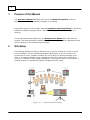
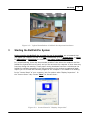
The following diagram and picture illustrate how to set the system up to work in a City
Council Chamber, County Commissioners Room, Board Room, or any room where the
system may be used. Possible scenarios are LCD or large TV monitors hanging in the
room, or a projected display of the computer screen onto a white wall or drop-down
screen, or a number of other display possibilities. The projection device can either be a
portable system or a permanent projector hanging from the ceiling.
Figure 2-1. Typical Hardware Setup
© 2015 Current Works, Inc.
Site Setup
5
Figure 2-2. Typical Installation of RollCall-Pro System Hardware
3
Starting the RollCall-Pro System
Before starting the RollCall-Pro program for use in a meeting, we recommend that
you adjust the computer so that it will not automatically go to a screen saver, to sleep,
to hibernation or shut down the screen or any other power saving options.
In a normal meeting, there may be extended periods of time when the computer and the
RollCall-Pro System will not be used, and you do not want the computer to shut down any
functions during the meeting. These power-saving shutdown functions could disrupt the
RollCall-Pro software program or the USB connection to the wireless keypads and might
require you to re-start the software program or the computer in the middle of a meeting.
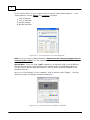
In the “Control Panel” of your computer, look for options under “Display Properties”. In
the “Screen Saver” tab, choose “None” for Screen Saver:
Figure 3-1. Control Panel’s “Display Properties”
© 2015 Current Works, Inc.
6
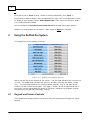
In the “Control Panel” of your computer look for options under “Power Options”. In the
“Power Options” choose “Never” for all options, including:
Turn off monitor
Turn off hard disk
System standby
System hibernate
Figure 3-2. Control Panel’s “Power Options”
Note: If you are using a Laptop Computer, always have the computer plugged into an
external power source; it is not recommended to run this program off of batteries.
Special Note: If you are using a Dell™ computer you may also need to use a USB Hub
with an external power supply between the computer and the USB SideKeys Receiver.
This will ensure that the required standard 5 volts of power is always available to the
SideKeys Receiver.
Also in the “Control Panel” of your computer, look for options under “Display”. Click the
"Advanced" tab in the Display Properties dialog box:
Figure 3-3. Control Panel’s “Display” Options
© 2015 Current Works, Inc.
Starting the RollCall-Pro System
7
The "Screen Resolution" option should be set to 1024 by 768 pixels, and the "Color
Quality" option should be set to 32 or 16 bit, not 8 bit.
Also on the Display Properties dialog box, click on the "Advanced" button. There, the DPI
Setting should be 96 DPI, not 120 DPI:
Figure 3-4. Display Properties DPI Setting
Click "OK" to close the Display Properties dialog box.
To start RollCall-Pro program, double-click on the icon on your desktop:
The shortcut will open the RollCall-Pro System, and display its Welcome Screen:
Figure 3-5. RollCall-Pro System Start Screen
© 2015 Current Works, Inc.
8
Click this Screen’s “ Sta rt” button, choose a saved configuration, and “ O pe n” it.
If you need to make changes in the Configuration File, right-click in the application screen
to display a list of options; select ‘Hide/Unhide Tabs’, then select the Setup to modify
your configuration as needed.
See the RollCall-Pro Ins ta lla tio n a nd Se tup M a nua l for details about these options.
Update your Configuration as necessary. Don’t forget to Save your changes.
4
Using the RollCall-Pro System
The RollCall-Pro screen displays as below:
Figure 4-1. RollCall-Pro Display Screen
Notice the last row at the bottom of the screen. The first field indicates the current item
or issue. The middle field indicates the action to be taken (roll call, discussion, voting,
etc.). The third field indicates the criteria required (Majority, 2/3, ¾, No Vote Req’rd,
Custom) for the current item to pass. The small ">" button at the far right-hand side of
the screen can be clicked with the mouse to "Proceed" (advance the program) through
the Meeting Cycle (Roll Call, Discussion, Voting).
4.1
Keypad and Screen Controls
The keypads and program options are used to move the participants through the voting
session.
© 2015 Current Works, Inc.
Using the RollCall-Pro System
4.1.1
Voter Keypads
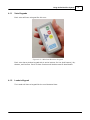
Each voter will have a keypad like this one:
Figure 4-2. Wireless Member Keypad
Each voter has a wireless keypad with 4 active buttons for Yes (and Present), No,
Abstain, and Confirm. Each of these functions will be discussed in detail below.
4.1.2
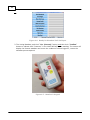
Leader’s Keypad
The Leader will have a keypad like the one illustrated here:
© 2015 Current Works, Inc.
9
10
Figure 4-3. Wireless Leader’s Keypad
The Leader’s keypad has six buttons for controlling the functions of RollCall-Pro:
1. The Pro ce e d button (top left, green button on the keypad) advances the RollCall-Pro
software through the meeting. This will be explained in detail below. This “Proceed”
function can also be accessed from the computer running the software program: either
with the “z” key on the keyboard or by “ Le ft -Clic king” the mouse cursor on the small “
> “ icon in the bottom right corner of the Display screen:
2. The % to Pa s s button adjusts the criteria to pass the Item being voted on. This
function can also be accessed from the computer – either by using the “Period” (“ . “)
key on the keyboard or by “ Le ft -Double -Clic king” the cursor on the Criteria field in the
lower right corner of the display screen during the Discussion mode of the meeting:
3. The Swa p button allows the Leader to switch between the RollCall-Pro software
program and any other software application, like PowerPoint, an Excel Spreadsheet, or a
Word Document.
4. & 5.The Ne xt and B a ck buttons allow the Leader, when in PowerPoint Slideshow
presentation, to remotely advance the presentation, forward and back, respectively.
6. The Lo ck O ut button locks out all other wireless keypads, except the Leader’s keypad.
© 2015 Current Works, Inc.
Using the RollCall-Pro System
11
This is useful when the Leader needs to stop the use of keypads for any reason. (e.g.,
when the Clerk needs to type in revisions to the Agenda during a meeting, or when a
vote must be Cancelled, or when a Word doc is projected and you don’t want text from
the keypads inserted, or when a PowerPoint presentation is being given and some text
input might interrupt the presentation).
Use of these functions will be discussed in further detail below.
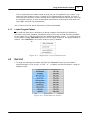
4.1.3
Leader Program Options
The Leader will also have a desktop or a laptop computer from which the RollCall-Pro
software is executed, updated, and Results saved. There are several functions available
to the Leader by c lic king the mouse on the RollCall-Pro display screen. To initially access
these options, simply right click anywhere on the display screen for the popup window of
options. Then le ft click on the choice inside the pop-up window:
Figure 4-4. “Right Click” Pop-up Menu Screen
4.2
Roll Call
1. To begin the meeting the Leader will push the “ Pro ce e d” button on the Leader’s
wireless keypad, or the “z’ key, or click “ > “ to display the Roll Call Screen, ready for
Members’ input:
Figure 4-5. Initial Start up Screen
© 2015 Current Works, Inc.
12
Figure 4-6. Ready for Members’ Roll Call input
2. The Voting Members push their “ Y e s (Pre s e nt)” button and then their “ C o nfirm ”
button to indicate their “Presence” in the initial Roll Call for the meeting. The screen will
display the Present members and count the numbers of Voters logged in, versus the
minimum quorum required.
Figure 4-7. Member's Keypad
© 2015 Current Works, Inc.
Using the RollCall-Pro System
13
Figure 4-8. Roll Call in process
3. After all the Members who are actually Present have Confirmed their Presence, the
Leader presses the Pro ce e d button again on the Leader’s keypad ( o r hits the “ z ” ke y
o r clicks on the “ > “ icon). The Voting Screen will display those who are “Present” and
those who are “Absent”.
No te : The Keypads of those “Absent” members can not be used to mark them Absent.
They automatically become Absent when the program is advanced with the Pro ce e d
function:
Figure 4-9. Roll Call completed at beginning of meeting
© 2015 Current Works, Inc.
14
Note: The meeting can continue only if the number of voters present equals or exceeds
the Quorum number set in the configuration file as the minimum number of members
required for the meeting to proceed.
4. If there are not enough members for the meeting to continue, the bottom center field
will indicate that there are insufficient members for the meeting to proceed:
Figure 4-10. Message indicating a Quorum is not yet present
5. If there are at least the Minimum Number of Voting Members to conduct business, the
screen will display the Members “Present” and those “Absent”. A record of the Members
who are “Present” and “Absent” during this Roll Call is also documented in the Results
file for this meeting.
6. If a Member arrives late to the meeting after the Roll Call is completed, they can be
marked Present by the Clerk. The actual time they are marked Present is Time Stamped
in the Results File.
4.3
Discussion
After the Startup Roll Call is completed, the Leader pushes the “ Pro ce e d” button (or the
“z” key or clicks the “>” button) again to display the Discussion Screen for the first
agenda Item:
Figure 4-11. Discussion Screen
© 2015 Current Works, Inc.
Using the RollCall-Pro System
4.3.1
15
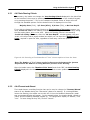
4.4.2 Vote Passing Criteria
If necessary, the leader can change the Vote Passing Criteria displayed in the third field
at the bottom of the screen by pushing the “ % to Pa s s ” button on the Leader’s keypad,
or by pressing the period “.” key on the computer keyboard. Either of these will scroll
through the standard options until the desired choice is displayed in the field:
Majority Vote (51%), 2/3 Vote (67%), 3/4 Vote (75%), or No Vote Req’rd.
If you wish to change this Voting Criteria to a fixed number of Yes votes to pass, you
must do uble le ft- click on the Passing Criteria field (bottom right corner of screen) during
the Discussion phase, prior to the Vote. When this Passing Criteria is accessed by
do uble le ft clicking the mouse, after the “No Vote Req’rd” criteria appears, the next
double c lic k will provide a popup window into which you can input the “Number of Yes
Votes” required to pass the Item, regardless of how many voters are present:
Figure 4-24. Entering a Fixed Number of “Yes” Votes require to Pass the Item
No te : The Num be r o f " Y e s " Vo te s ne e de d to Pa s s m us t be be twe e n the Q uo rum
R e quire d a nd the Num be r o f Vo ting M e m be rs pre s e nt a t the m e e ting.
Once the leader enters the "Number of Yes Votes" and clicks "OK", the Vote Passing
Criteria displayed in the third field at the bottom of the screen updates:
4.3.2
4.4.4 Present and Absent
The Leader has an overriding function that can be used to change the “Present/Absent”
status of any Member during the “Discussion” phase of a meeting. If a Voting Member
leaves the meeting, the Leader can double -le ft c lic k on the Member’s Name and a small
pop-up message window will appear. In the example below, the Leader double-clicked on
“Doris” and the following message popped up. To change Doris’ display to “Absent”, click
“Yes”. To leave things as they are, click on “Cancel”.
© 2015 Current Works, Inc.
16
Figure 4-12. Clerk changing Present to Absent
Once the Leader chooses “Yes”, the display will look like the following:
Figure 4-13. Member status after being marked Absent
Note: This same sequence can be used to change the “Absent” status back to a
“Present” status.
This “status change” function can only be done by the Leader during the “Discussion”
phase of the meeting.
4.4
Roll Call Voting
The members vote on the Item by first pushing their Voting buttons: Yes, No or Abstain.
Then the Members lock-in their vote by pushing the C o nfirm button.
Note: Members can change their mind on how they wish to vote until they push their
C o nfirm button. At that point, the last choice they made, just before C o nfirm , is locked
in.
The Voting screen will first display “Confirming” on a yellow background when each
member pushes their Vote button:
When they lock-in their vote with the C o nfirm button, the Voting screen displays “Vote
Locked”:
© 2015 Current Works, Inc.
Using the RollCall-Pro System
17
Not e t ha t t he v ot e s a re ide nt ifie d by t he ‘Confirm ing’ a nd ‘V ot e Loc ke d’ st a t us, not by a
‘Y e s’ or ‘No’ or a ny ot he r indic a t ion of how e a c h m e m be r v ot e d. T his a llow s e v e ry one t o
v ot e w it hout be ing unduly influe nc e d by how ot he rs ha v e v ot e d:
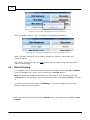
Figure 4-14. Voting in Process
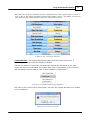
Cancel the Vote: This system also has an option is to Cancel the entire Vote, if
necessary, before the votes are officially revealed.
If there is a reason to cancel the vote and start back at the Discussion of the Item,
before the final vote is revealed, the Leader must right c lic k anywhere on the screen to
get the popup screen of options. One of these Options is “Cancel Vote”:
Figure 4-15. Right-Click Popup Options
Left Click on the “Cancel Vote” menu option, and then the system will ask you to confirm
your cancellation:
Figure 4-16. Are you sure?
© 2015 Current Works, Inc.
18
Select “Yes”, and the program will then return you to the Discussion phase of the Current
Item.
4.5
Results of Vote
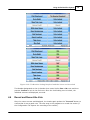
Once all votes are in and confirmed, the individual votes are displayed next to each
voter’s name:
Figure 4-17. Vote Tally
When the Votes are revealed, the field at the bottom of the screen displays the status of
the vote, whether it “Passed” or “Failed”. The number of ‘Yes’ votes required to pass an
item or resolution depends on the “Criteria to Pass” selected and displayed at the bottom
right corner of the screen, before the vote was started.
If the First Position Voter is designated in the Business Rules to only vote in case of a tie,
she/he does not vote unless a tie is indicated. In case of a tie, the Voting Screen will
indicate the need for the Tie Breaker to vote. The specific votes of other Voting Members
are not displayed until after the Tie Breaking vote is cast:
© 2015 Current Works, Inc.
Using the RollCall-Pro System
19
Figure 4-18. Tie Breaker Voting Required and the Votes are Revealed
The Member designated as the tie breaker then casts his/her Yes or No vote and then
presses C o nfirm to lock in the final vote. Once the tie breaking vote is locked, the
individual votes are all displayed, as usual.
4.6
Reveal and Record the Vote
Once the votes are cast and displayed, the Leader again pushes the “ Pro ce e d” button to
confirm that it was a good vote. The next step in the program is to record the results (if
the Configuration File requires the recording of the results).
© 2015 Current Works, Inc.
20
T he sc re e n be low indic a t e s t ha t RollCa ll-Pro is in t he proc e ss of re c ording re sult s:
Figure 4-19. Recording Results in the record
The results will be saved as a text file:
Figure 4-20. Results Document in Text Format
© 2015 Current Works, Inc.
Using the RollCall-Pro System
21
This Results file indicates that for Item 1 a total of 8 votes were cast; that Members 2 &
4 were Absent for the Discussion and the vote; that 5 voted in favor, 2 were opposed,
and 1 abstained.
The RollCall-Pro System results file is created and the name of the file is embedded with
the current date (Example: “2009_2_15_1925.txt” means that the meeting started at
7:25 pm on February 15, 2009.) If an additional meeting is held on the same date, the
software first checks to see if a results file exists for the current date and if so, prompts
the user to either append the results to the current results file or to add another new
results file in the Results Folder:
Figure 4-21. Select Yes = Same meeting, or No = New meeting
For example, if the user chooses to create a new results file by choosing “No”, then a
new results file is created, with the time added to the date in the new document's name.
For example, if the date was February 15th, 2009, and the time was 8:15pm, then a new
results file would be created with the name of “2009_2_15_2015.txt”. Note the time is in
military format, or 24 hour notation.
4.7
Continue or Exit
Continue with a discussion and a vote on another item by clicking on the Leader’s “
Pro ce e d” button; or, if the meeting is finished, exit RollCall-Pro by right-clicking on the
screen to display the list of options, then selecting the ‘Exit Voting Pro’ option:
The “Are you sure?” window pops up to confirm that you wish to Exit before proceeding:
Figure 4-22. Exit RollCall-Pro Process
© 2015 Current Works, Inc.
22
If there are unsaved Voting Results that did not yet get recorded, the following window
will also popup to request that you proceed to save the Results before Exiting the
program:
Figure 4-23. Exit, After Saving Results
When the RollCall-Pro software is closed through this “Exit” function, the End of the
Meeting is also Time Stamped in the Results document.
4.8
Results Saved from a Meeting
If, in the Setup Configuration Files, the “Record Results” has been selected, they will be
saved at the location specified. The Default location is in (C:\RollCall-Pro\Results).
The RollCall-Pro software program will automatically install a shortcut on your desktop to
the “RollCall-Pro Folders”, where the Results Folder is located:
The saved file will be labeled according to the date of the meeting (e.g. 2008_10_05.txt).
This report, which is a “text file” (.txt), can be copied and pasted into any other Word
Processing program, like MS Word, to become a part of the recorded Minutes of the
meeting.
Note: You may go view the saved Results document before the meeting is finished, but
you must close the Results document down before returning to the meeting, where
additional Voting Results will be saved. The Voting Results cannot be saved to an
“Opened” document and in some cases, an “Error Message” may occur when the program
tries to save additional Voting Results to a document that is opened.
© 2015 Current Works, Inc.
Trouble Shooting and Customer Service
5
23
Trouble Shooting and Customer Service
If the RollCall-Pro software program does not seem to be responding to signals
from any of the wireless keypads, the following trouble shooting steps should be
tried, in the order given:
1. Be sure that the RollCall-Pro screen is active and available to accept input from the
keypads.
Le ft- C lick the mouse on theRollCall-Pro screen to assure it is active; try the
keypads again.
2. Be sure the keypads are not “Locked Out” by the Leader’s keypad.
a)The red LED on the Receiver blinks on and off when the Lock-Out function is on.
b)Turn off the “Lock-Out” by pushing the “Lock-Out” button on the Leader’s
keypad.
3. Be sure that the USB Receiver is properly connected to the computer.
a)The red LED should be glowing next to the RollCall-Pro label on the Receiver.
b)If the red LED is not on, unplug and re-plug the USB cable at both ends, just to
be sure that full and proper connections are being made.
c)If the red LED is glowing, but is not next to the Voting-Pro label, push the small
red button on the side of the Receiver (if there is one) to scroll the LED to the
RollCall-Pro or the Voting-Pro template.
d)The USB cable connecting the computer and Receiver should be uncoiled, free to
dangle.
e)This Radio Frequency Receiver cannot be resting on a metal surface; try
moving it to different locations.
If some of the keypads do not seem to work, try the following trouble shooting
steps:
1. Try installing new “alkaline 9-volt batteries” in the defective keypad(s).
2. Be sure that all the Voting Members have the correct keypad. If Voters have the wrong
keypad, they may think their keypad is not working properly.
3. The Radio Frequency keypads cannot be resting on a metal surface; this will
seriously limit the range of the radio frequency signal. Try moving it to another surface.
© 2015 Current Works, Inc.
24
If none of the keypads or the mouse or the keyboard works on the software, be
certain that all sleep, hibernation and power saving settings are turned off on the
computer.
If the RollCall-Pro software will not advance when the “Proceed” button on the
Leader’s Keypad or the “z” button on the computer keyboard is hit – be sure that
the Caps-Lock key has not been depressed.
You must turn off the Caps Lock key, before the software will respond to keystroke
inputs.
If the problem cannot be fixed with these steps, please contact Customer Service:
Current Works, Inc.
1395 Horizon Drive
Johnsburg, IL 60051
1 (888) 526-1200
Email: [email protected]
www.rollcallpro.com
© 2015 Current Works, Inc.
Index
Index
-RRecord the Vote
19
Results of Vote
18
Results Saved from a Meeting
Reveal the Vote
19
Roll Call Phase
11
Roll Call Voting
16
-AAbsence and Presence
15
-C-
-S-
Continue or Exit dialog
21
Criteria for Passing
15
Customer Service
23
Saved Results
22
Site Setup
4
Starting the RollCall-Pro System
-DDiscussion Phase
Trouble Shooting
Using the RollCall-Pro System
-KKeypad and Screen Controls
Keypad, Leader
9
Keypad, Voter
9
8
-L11
-MMeeting Cycle, Discussion
14
Meeting Cycle, Roll Call
11
Meeting Cycle, Voting
16
-PPresent and Absent
15
Purpose of this Manual
4
© 2015 Current Works, Inc.
23
-U-
14
Leader Program Options
Leader's Keypad
9
5
-T-
14
-IItem Discussion
22
-VVote Passing Criteria
Vote Results
18
Voter Keypads
9
Voting Phase
16
15
8
25