1
17
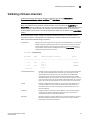
Administrative Domains overview
NOTE
Do not confuse an Admin Domain number with the domain ID of a switch. They are two different
identifiers. The Admin Domain number identifies the Admin Domain and has a range from 0 through
255. The domain ID identifies a switch in the fabric and has a range from 1 through 239.
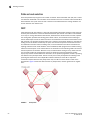
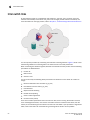
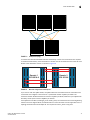
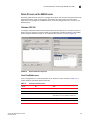
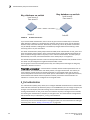
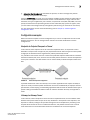
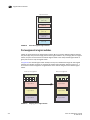
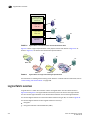
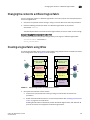
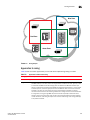
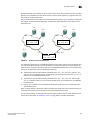
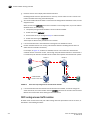
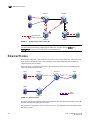
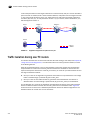
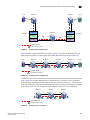
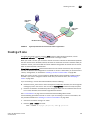
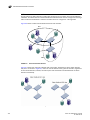
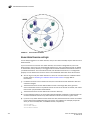
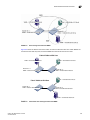
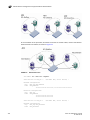
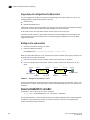
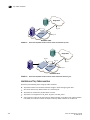
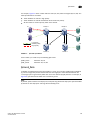
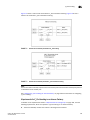
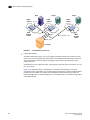
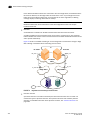
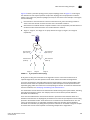
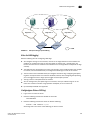
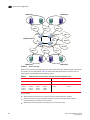
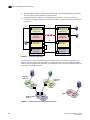
Figure 56 shows a fabric with two Admin Domains: AD1 and AD2.
AD1
AD2
FIGURE 56
Fabric with two Admin Domains
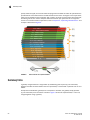
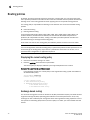
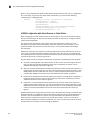
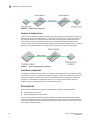
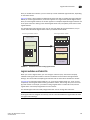
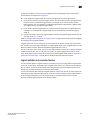
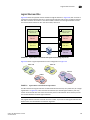
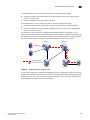
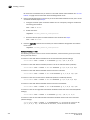
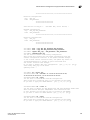
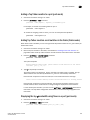
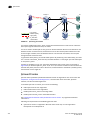
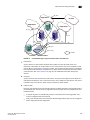
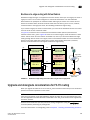
Figure 57 shows how users get a filtered view of this fabric, depending on which Admin Domain
they are in. As shown in Figure 57, users can see all switches and E_Ports in the fabric, regardless
of their Admin Domain; however, the switch ports and end devices are filtered based on Admin
Domain membership.
FIGURE 57
340
Filtered fabric views when using Admin Domains
Fabric OS Administrator’s Guide
53-1002148-02