1
Upgrade and downgrade considerations for FC-FC routing
23
Backbone-to-edge routing with Virtual Fabrics
Backbone-to-edge routing is not supported in the base switch, unless you use a legacy FC router. A
legacy FC router is an FC router configured on a Brocade 7500 switch or an FR4-18i blade.
Base switches can participate in a backbone fabric with legacy FC routers. You cannot connect
devices to the base switch, because the base switch does not allow F_Ports. You can, however,
connect devices to the legacy FC router, thus enabling backbone-to-edge routing.
If you connect a legacy FC router to a base switch, you must set the backbone FID of the FC router
to be the same as that of the base switch.
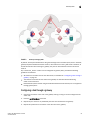
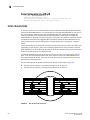
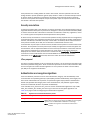
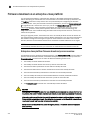
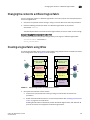
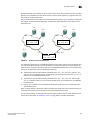
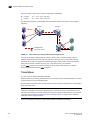
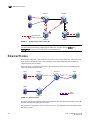
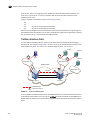
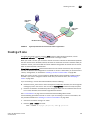
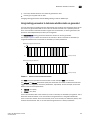
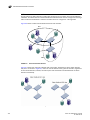
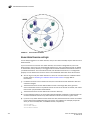
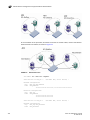
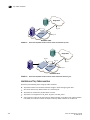
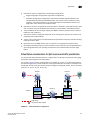
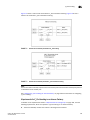
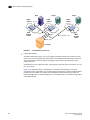
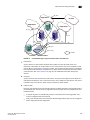
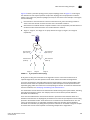
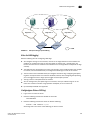
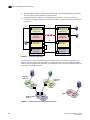
In Figure 82, no devices can be connected to the backbone fabric (Fabric 8) because base
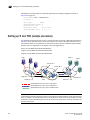
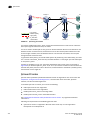
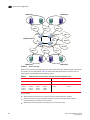
switches cannot have F_Ports. Figure 84 shows an FC router in legacy mode connected to a base
switch. This FC router can have devices connected to it, and so you can have backbone-to-edge
routing through this FC router. In this figure, Host A in the backbone fabric can communicate with
device B in the edge fabric with FID 20; Host A cannot communicate with device C, however,
because the base switches do not support backbone-to-edge routing.
Physical chassis 2
Physical chassis 1
IFL
E Logical switch 1 E
(Default logical switch)
Fabric ID 128
ISL
B
E Logical switch 5 F
(Default logical switch)
Fabric ID 128
Logical switch 2
Fabric ID 1
Allows XISL use
Edge fabric
FID 20
Logical switch 6
Fabric ID 1
Allows XISL use
C
F
Logical switch 3
Fabric ID 15
E
ISL
E
E
E
Logical switch 7
Fabric ID 15
IFL
IFL
EX Logical switch 4 EX
(Base switch)
E
Fabric ID 8
XISL
E
Logical switch 8
(Base switch)
Fabric ID 8
EX
E
A
E
ISL
Legacy FC router
Fabric ID 8
FIGURE 84
Backbone-to-edge routing across base switch using FC router in legacy mode
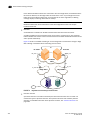
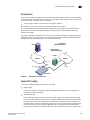
Upgrade and downgrade considerations for FC-FC routing
When you upgrade to Fabric OS v7.0.0 or later, EX_Ports remain functional and you can continue to
perform all FC router operations on the switch.
NOTE
If EX_Ports are present on the FR4-18i blade, upgrade to Fabric OS v7.0.0 is prevented. EX_Ports
are not supported on the FR4-18i blade in Fabric OS v7.0.0. VEX_Ports continue to be supported on
this blade, however.
Brocade recommends that you save your FC-FC routing configuration (using the configUpload
command) before performing any downgrades.
For further instructions on downgrading, refer to Chapter 9, “Installing and Maintaining Firmware”.
Fabric OS Administrator’s Guide
53-1002148-02
499