1
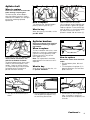
Agitator belt
3-3
A
3-4
B
When to replace
Disconnect cleaner from electrical outlet
before checking or replacing belt.
To check the belt, remove bottom
plate (see following section). If belt is
stretched, cut or broken, or if the agitator brushes are being replaced,
replace belt.
C
When purchasing a new belt, ask for
part No. 44783.
Release worn belt from pulley.
Lift out agitator, remove old belt and
place new belt in groove of agitator.
Replace agitator. On one end of agitator roll there is a raised metal plate
(B). Make sure that this end is
placed in slotted side of cleaner (C).
Agitator brushes
3-6
How to replace
Turn cleaner over. Remove bottom
plate by releasing latches (A).
What to buy
3-5
D
Disconnect cleaner from electrical
outlet before checking or replacing brushes.
When to replace
A
Place belt on pulley (D). Side of belt
nearer cleaner should be in line
with ribs on bottom of cleaner.
To replace bottom plate, place metal
knobs on front end of plate in wire
holders. Check to see that latches
(A) are pushed back and will not be
covered by plate. Place plate in
position and latch securely.
3-7
To check condition of brushes, move
edge of a card across agitator opening while turning agitator by hand.
Replace brushes if they do not
touch edge of card.
Note: The agitator belt should be
replaced each time the brush roll is
replaced.
What to buy
When purchasing new brushes, ask
for part No. 48445001.
3-8
How to replace
Disconnect cleaner from electrical
outlet.
1. Remove bottom plate, belt and
agitator.
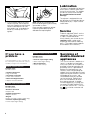
2. Turn end plates of agitator (A) in
opposite directions until one end
plate comes off.
3-9
C
B
3. Then pry out end section (B) as
shown.
A
4. Remove opposite end plate and
shaft by pulling straight out. Pry
out remaining end section.
5. Pull brushes (C) out of agitator
slots, using pliers if necessary.
Slide new brushes completely into
channels.
Continued ➜
5