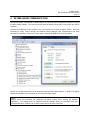
1
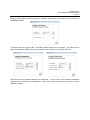
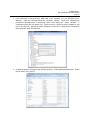
Mono-Utility v5.0 ® Oriel Utility Software For Monochromators and Spectrographs Quick Start Guide Family of Brands – ILX Lightwave® • New Focus™ • Ophir® • Corion • Richardson Gratings™ • Spectra-Physics® MONOUTILITY-QSG, Rev A MONO-UTILITY SOFTWARE QUICK START GUIDE Page 2 TABLE OF CONTENTS 1 2 3 4 5 6 7 INTRODUCTION .................................................................................................................................. 3 REQUIREMENTS................................................................................................................................. 4 2.1 SOFTWARE INSTALLATION ................................................................................................ 4 2.2 SOURCE CODE ..................................................................................................................... 4 2.3 IEEE-488 (GPIB) COMMUNICATION.................................................................................... 4 2.4 RS232 COMMUNICATION .................................................................................................... 4 2.5 USB COMMUNICATION ........................................................................................................ 4 SOFTWARE INSTALLATION .............................................................................................................. 5 ESTABLISHING COMMUNICATION ................................................................................................. 10 USING THE UTILITY SOFTWARE .................................................................................................... 12 5.1 FRONT PANEL PARAMETER SETTINGS.......................................................................... 12 5.2 GRATING, FILTER, OUTPUT PORT SETTINGS ............................................................... 13 5.3 MOTORIZED SLIT SETTINGS ............................................................................................ 14 5.4 CALIBRATION PARAMETERS SETTINGS ........................................................................ 14 APPENDIX: UNINSTALLING PREVIOUS SOFTWARE VERSIONS ............................................... 15 WARRANTY AND SERVICE ............................................................................................................. 18 7.1 CONTACTING ORIEL INSTRUMENTS............................................................................... 18 7.2 REQUEST FOR ASSISTANCE / SERVICE......................................................................... 19 7.3 LOANER / DEMO MATERIAL .............................................................................................. 19 MONO-UTILITY SOFTWARE QUICK START GUIDE Page 3 1 INTRODUCTION Thank you for your purchase of this spectroscopy instrument from Oriel Instruments. Please read this Quick Start Guide prior to installing the utility software and operating the monochromator or spectrograph. For additional important information regarding this instrument, refer to the complete User’s Manual. Do not attempt to operate the system without reading all the information provided with each of the components. This utility software allows users to control the following: • Cornerstone 130 Monochromators • Cornerstone 260 Monochromators • MS260i Spectrographs Instruments are available with either USB or RS232/GPIB connections. The following communication methods are compatible with the utility software: • USB • RS232 • IEEE-488 (GPIB) Utility software instrument control features: • Set wavelength • Set wavelength units • Open/close shutter • Select grating • Select Filter • Select output port [dual output port instruments only] • Automatic grating, filter and port changeover setup • Set slit widths [motorized slits only] • Automatic bandpass adjustment [motorized slits only] • Set up scan parameters • Run/abort scan • Adjust calibration factors during field recalibration Utility software instrument monitoring features: • Present wavelength • Wavelength units • Output port selected • Shutter position • Grating in use, blaze wavelength and line density • Filter in use, filter label • Calibration parameters MONO-UTILITY SOFTWARE QUICK START GUIDE Page 4 2 REQUIREMENTS 2.1 SOFTWARE INSTALLATION The computer user performing the software installation must be logged on with Administrator privileges. Computer requirements: Operating System Memory Free Hard Disk Space Windows 7, 32-bit and 64-bit 2 GB minimum 800 MB The computer on which the utility software is to be installed on must have a USB port in order to access the software contained on the USB drive provided with the instrument. NOTE: A legacy version of the utility software is available for Windows XP users. The following procedure does not apply for monochromators or spectrographs that are to be used with the optional Oriel TracQ™ Basic software. If a prior version of the utility software has been installed onto the computer, it must be uninstalled prior to installation of the newest version of software. The uninstallation procedure is covered in the Appendix at the back of this Quick Start Guide. 2.2 SOURCE CODE This program is a closed executable file written in National Instrument’s LabVIEW™. LabVIEW developers may access example VIs through the MonoTERM program. Refer to the API document for more information. 2.3 IEEE-488 (GPIB) COMMUNICATION Before installing the utility software, it is required to have a National Instrument’s IEEE-488 controller card or a GPIB/USB converter cable. In either case, its associated drivers must be installed on the computer. It is important to configure the computer and establish communications before proceeding with any application software. The GPIB board index and instrument address assigned should be noted for establishing communication when running the utility software. 2.4 RS232 COMMUNICATION It is important to configure the computer and establish communications before proceeding with the installation and use of the utility software. The COM PORT should be noted for establishing communication when running the utility software. 2.5 USB COMMUNICATION A USB2 port must be available on the PC. The ORIEL_USB.SYS driver must be installed before the instrument can be controlled via a computer. MONO-UTILITY SOFTWARE QUICK START GUIDE Page 5 3 SOFTWARE INSTALLATION The software installation screens shows are applicable to a Windows 7, 32-bit operating system. The screens shown may differ slightly, depending on the operating system type and whether any versions of the National Instruments LabVIEW Runtime Engine had been installed previously. Do not connect the instrument to the computer until the software installation is complete and the computer has been restarted. Insert the USB drive that came with the instrument and open it to view the contents. Right click on the setup.exe application and select Properties. MONO-UTILITY SOFTWARE QUICK START GUIDE Page 6 Click on the Compatibility tab. Check “Run this program as an administrator.” Click “Apply” and “OK”. Double click the setup.exe application to begin the utility software installation. MONO-UTILITY SOFTWARE QUICK START GUIDE Page 7 Select the destination directories and click “Next”. Accept the Newport License Agreement and click “Next.” MONO-UTILITY SOFTWARE QUICK START GUIDE Page 8 Accept the National Instruments License Agreement and click “Next.” The following screen indicates which software is to be installed. This screen’s appearance may vary if other National Instruments software is already installed on the computer. MONO-UTILITY SOFTWARE QUICK START GUIDE Page 9 When the software installation is complete, click “Next”. When prompted, select “Restart” to finish the software installation. The installation software will have placed a shortcut onto the desktop, as shown below. The program may also be accessed through Start Newport Mono Utility 5.0.x. MONO-UTILITY SOFTWARE QUICK START GUIDE Page 10 4 ESTABLISHING COMMUNICATION All instruments that communicate via USB interface must have the driver installation verified prior to using the Mono Utility software. The instrument must finish the startup routine prior to connecting the USB to computer. Connect the instrument to the computer, turn it on and allow it to finish its startup routine. Once the instrument is ready, ensure through the Windows Device Manager that communication has been successfully established. Below is a screen capture showing the USB driver correctly installed. Double click on the shortcut icon on the desktop to start the Mono Utility software. A window will appear allowing the software to be configured for the instrument being utilized. NOTE: Always ensure the instrument has completed its startup routine before opening the software application. The startup routine is complete when the gratings, filters, port selection mirror and motorized slits are in position and no further noises are made by the instrument. MONO-UTILITY SOFTWARE QUICK START GUIDE Page 11 Being by selecting the instrument model first. Available choices are the Cornerstone 130 or Cornerstone 260/MS260i models. The default connection type is USB. The GPIB or RS232 options may be selected. The VISA resource Name field allows the GPIB board index and address to be selected, or the RS232 COM Port. Select the number of gratings installed in the instrument. If unsure, refer to the calibration parameters supplied with the instrument on the USB drive. Then click the green check mark to proceed to the main application window. MONO-UTILITY SOFTWARE QUICK START GUIDE Page 12 5 USING THE UTILITY SOFTWARE 5.1 FRONT PANEL PARAMETER SETTINGS The main application window, shown below, provides easy access to most of the Cornerstone functions. Present Wavelength/Set Wavelength: “Present Wavelength” indicates the wavelength position of the monochromator. “Set Wavelength” allows the user to change “Present Wavelength” to different wavelength value. The wavelength units indicators on the right allows user to set different wavelength -1 units. Choices for units are nanometers (nm), micrometers (μm) or wavenumber (cm ). Step Wavelength/Stop: The icons under the “Set Wavelength” field may be used to step the monochromator wavelength forwards or backwards. Choices are single step or continuous steps. Continuous steps continue to change the wavelength until the Stop icon is clicked. Output Port: For instruments with dual output ports, this selection allows users to choose either the “Axial” [C] or “Lateral” [B] port. The “Current Output” field displays the selected port. Shutter: Indicates and allows changing the shutter status. Choices are open or closed. Go/Abort Scan: Once the Start Wavelength, End Wavelength, Interval Wavelength (step size) and Delay field are filled in with the desired scan parameters, the Go Scan icon allows the scan to begin. Click the Abort Scan icon to stop the scan at any time. Grating Number: shows the currently selected grating position, in addition to its blaze wavelength and groove density in lines per millimeter. Using the pull-down menu, the active grating may be changed or the auto grating selection feature may be enabled. Filter #: shows the currently selected filter, and the filter wheel number. Note that the Cornerstone and the MS260i models only support a single filter wheel. Using the pull-down menu, the active filter may be changed or the auto filter selection feature may be enabled. MONO-UTILITY SOFTWARE QUICK START GUIDE Page 13 Filter Label: Allows up to eight characters to be entered for labeling the active filter. If the automatic filter selection is enabled, this feature is not enabled. All characters (upper case, lowercase, letters, numbers and symbols) may be entered. Labels greater than eight characters are truncated. 5.2 GRATING, FILTER, OUTPUT PORT SETTINGS The following control menus allow users to set up tables that determine the filter, grating and output port in use over specific wavelength ranges. The uppermost wavelength is entered as “Inf”, which is an abbreviation for Infinity. To activate these settings, the selected grating, filter and/or port need to be set to “Auto” in the main application window. The settings may be saved and re-loaded as needed. Type the desired file name and file extension as appropriate for the parameter table. Use file extension .grt (gratings), .flt (filters) or .prt (port). MONO-UTILITY SOFTWARE QUICK START GUIDE Page 14 5.3 MOTORIZED SLIT SETTINGS The Utility Menu also allow users to control or change motorized slits width in “Manual” mode by setting the width (in micrometers) for each slit at the input and output ports. In “Automatic Bandpass” mode, the user may allow the software to set all input and output port slit widths. The user enters the desired bandpass, and the software adjusts the slit widths to maintain that bandpass at all wavelengths. The desired bandpass is entered in the same units as was selected in the main application window. 5.4 CALIBRATION PARAMETERS SETTINGS The Parameters icon in the main application window allows the calibration parameters to be displayed and changed, if desired, for the active grating. Additionally, the grating line density and blaze wavelength may also be viewed or updated. Use caution when changing grating factors or offsets. Refer to the instrument’s user manual for more information. MONO-UTILITY SOFTWARE QUICK START GUIDE Page 15 6 APPENDIX: UNINSTALLING PREVIOUS SOFTWARE VERSIONS 1. Connect the monochromator or spectrograph to the computer and power it up. 2. In the Windows Start menu, click on Control Panel, and then select Program and Features. This shows a list of all software currently installed on the system, including the version numbers. Select and uninstall Mono Utility version x.x.x and National Instrument Software. Uninstallation will take approximately 10 minutes total. NOTE: Removing National Instruments software requires user interaction to select all NI programs as displayed under the “Products” tab. After selecting all products, click “Remove”. MONO-UTILITY SOFTWARE QUICK START GUIDE Page 16 3. If the instrument is connected by a USB cable to the computer, go to the Windows Device Manager. Open the Universal Serial Bus controllers category. Right click “Newport/Oriel Cornerstone Monochromator” to display the option menu dialog box. Select “Uninstall”. A confirmation dialog box will appear next. Check the box to “Delete the driver software for this device” and click OK. Refresh the Device Manager to ensure the e “Newport/Oriel Cornerstone Monochromator” driver was removed. 4. In Windows Explorer, navigate to the following directory: C:\Windows\System32\drivers. Delete the file named “oriel_usb.sys”. MONO-UTILITY SOFTWARE QUICK START GUIDE Page 17 5. Navigate to C:\Windows\inf directory and perform the following steps: • Locate and delete the “Cornerstone drivers” directory (if this directory cannot be found, it was removed automatically by Windows in step 2). • Search for and delete both “x64” and “x86” directories (if these directories cannot be found, it was removed automatically by Windows). 6. If Mono Utility 4.7 was installed, delete files “oriel_cs.cat” and “oriel_usb.inf”. If these files cannot be found, they were removed automatically by Windows 7. Disconnect the monochromator or spectrograph from the computer and proceed with installation of the latest utility software as noted in this Guide. MONO-UTILITY SOFTWARE QUICK START GUIDE Page 18 7 WARRANTY AND SERVICE 7.1 CONTACTING ORIEL INSTRUMENTS Oriel Instruments belongs to Newport Corporation's family of brands. Thanks to a steadfast commitment to quality, innovation, hard work and customer care, Newport is trusted the world over as the complete source for all photonics and laser technology and equipment. Founded in 1969, Newport is a pioneering single-source solutions provider of laser and photonics components to the leaders in scientific research, life and health sciences, photovoltaics, microelectronics, industrial manufacturing and homeland security markets. Newport Corporation proudly serves customers across Canada, Europe, Asia and the United States through numerous international subsidiaries and sales offices worldwide. Every year, the Newport Resource catalog is hailed as the premier sourcebook for those in need of advanced technology products and services. It is available by mail request or through Newport's website. The website is where one will find product updates, interactive demonstrations, specification charts and more. To obtain information regarding sales, technical support or factory service, United States and Canadian customers should contact Oriel Instruments directly. Newport - Oriel Instruments 1791 Deere Avenue Irvine, CA 92606 USA Telephone: 800-222-6440 (toll-free in United States) 949-863-3144 Fax: 949-253-1680 Sales: [email protected] Technical assistance: [email protected] Repair Service: [email protected] Customers outside of the United States must contact their regional representative for all sales, technical support and service inquiries. A list of worldwide representatives can be found on Oriel's website: http://www.newport.com/oriel. MONO-UTILITY SOFTWARE QUICK START GUIDE Page 19 7.2 REQUEST FOR ASSISTANCE / SERVICE Please have the following information available when requesting assistance or service: Contact information for the owner of the product. Instrument model number (located on the product label). Product serial number and date of manufacture (located on the product label). Description of the problem. To help Oriel's Technical Support Representatives diagnose the problem, please note the following: Is the system used for manufacturing or research and development? What was the state of the system right before the problem? Had this problem occurred before? If so, when and how frequently? Can the system continue to operate with this problem, or is it non-operational? Were there any differences in the application or environment before the problem occurred? 7.3 LOANER / DEMO MATERIAL Persons receiving goods for demonstrations or temporary use or in any manner in which title is not transferred from Newport shall assume full responsibility for any and all damage while in their care, custody and control. If damage occurs, unrelated to the proper and warranted use and performance of the goods, recipient of the goods accepts full responsibility for restoring the goods to their original condition upon delivery, and for assuming all costs and charges. Confidentiality & Proprietary Rights Reservation of Title: The Newport programs and all materials furnished or produced in connection with them ("Related Materials") contain trade secrets of Newport and are for use only in the manner expressly permitted. Newport claims and reserves all rights and benefits afforded under law in the Programs provided by Newport Corporation. Newport shall retain full ownership of Intellectual Property Rights in and to all development, process, align or assembly technologies developed and other derivative work that may be developed by Newport. Customer shall not challenge, or cause any third party to challenge the rights of Newport. Preservation of Secrecy and Confidentiality and Restrictions to Access: Customer shall protect the Newport Programs and Related Materials as trade secrets of Newport, and shall devote its best efforts to ensure that all its personnel protect the Newport Programs as trade secrets of Newport Corporation. Customer shall not at any time disclose Newport's trade secrets to any other person, firm, organization, or employee that does not need (consistent with Customer's right of use hereunder) to obtain access to the Newport Programs and Related Materials. These restrictions shall not apply to information (1) generally known to the public or obtainable from public sources; (2) readily apparent from the keyboard operations, visual display, or output reports of the Programs; 3) previously in the possession of Customer or subsequently developed or acquired without reliance on the Newport Programs; or (4) approved by Newport for release without restriction. First printing 2014 © 2014 by Newport Corporation, Irvine, CA. All rights reserved. No part of this manual may be reproduced or copied without the prior written approval of Newport Corporation. This manual has been provided for information only and product specifications are subject to change without notice. Any change will be reflected in future printings. Newport Corporation 1791 Deere Avenue Irvine, CA, 92606 USA