1
RAMSES USER MANUAL
Once completed, the eIPF is submitted and electronically routed to the
appropriate University officials for review and approval. Lastly, it must be
electronically certified by the Principal Investigator (PI), before a proposal is
submitted for funding.
Note: Several funding agencies now require electronic submission of proposals. These
types of submissions are agency-specific operations separate from the University’s
record-keeping systems. Completion of an eIPF through RAMSeS is necessary prior to
submitting an electronic application or a paper application.
The following procedures are performed in Proposal Dashboard:
1. Preparing and Submitting an eIPF.
2. Approving and Routing an eIPF.
3. PI Certification of an eIPF.
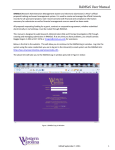
The menu links on the Dashboard do the following:
•
•
•
•
•
•
•
•
Start New Proposal – Where the PI goes to create a new proposal
My Proposals – List of all unsubmitted /submitted proposals that the user created or is
named on
Proposals in My Dept – Access for department heads/deans to all proposals
from/associated with faculty in their department or school/college
My Awards – List of all Active /Inactive awards for the PI logged in or
anyone listed as an Administrative Contact on the award
Awards In My Dept – Access for department heads/deans to all awards
for/associated with faculty in their department or school/college
ARRA Submissions – Used for accessing ARRA reports (only PIs who have an
ARRA-funded project will see information here)
PI Certification Inbox – Shows list of submissions that require the PI to electronically approve
Dept Approval Inbox – Shows list of submissions that require the
department head’s / dean’s electronic approval
The center of the screen provides information about both the Proposal and Award
Dashboards and provides links to the Frequently Asked Questions and Help files. The
Help file is also accessible from every page within a proposal.
An Adobe printable document of a proposal can be obtained by clicking on the adobe icon
at any time
. This icon is found on the far right of the row for each proposal shown
and under each menu option on the home page except for START NEW PROPOSAL and
ARRA SUBMISSIONS. Within a proposal, the Adobe icon is located in the top left right
NCAT Division of Research