1
3.2 Login
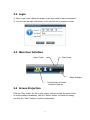
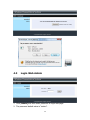
1) After “Login Code” dialog box shown, enter login code to start presentation.
2) You can see the login code shown in the top left of the projector screen.
3.3 Main User Interface
Login Coded
Menu Area
Status Indicator
Control Area for Screen
Projection Feature
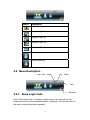
3.4 Screen Projection
Click the “Play” button for full or split screen, you can project the main screen
on to the display immediately, click the “Pause” button, to freeze the image,
and click the “Stop” button to end the presentation.
8