1
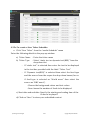
4.2.2a To create a New Ticker Schedule: Click “New Ticker” from the “media Schedule” menu Enter the following details in the pop-up window. a) Ticker Name : Enter the ticker name b) Ticker Type : Select “static text or dynamic text(RSS)” from the drop down list - If “static text” is selected then enter the text to be displayed in the text box provided with the label “Ticker Text” - If “Dynamic text(RSS)” is selected then select the feed type and the source from the respective drop down boxes.(for ex: if feed type is selected as “World news” then select the source as “BBC news”) -Choose the background colour and text colour -Now choose the number of feeds to be displayed c) Start date and end date: Specify the starting and ending time of the ticker to be played d) Click on “Save” to store your scheduled content SpotForge Technologies 12 Signage Play User Manual