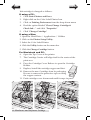
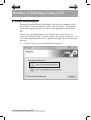
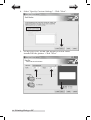
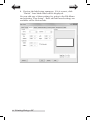
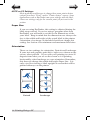
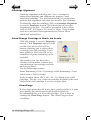
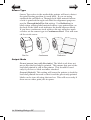
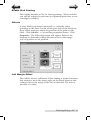
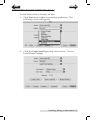
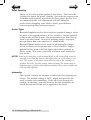
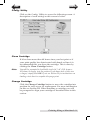
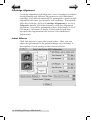
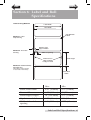
1
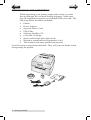
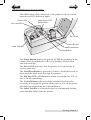
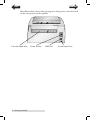
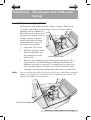
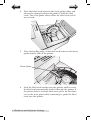
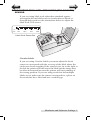
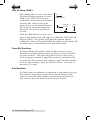
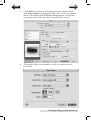
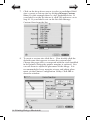
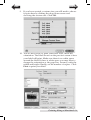
101813-510984-(05) (Color Label Printer 400) User's Manual © 2008 All rights reserved Notices: The information in this document is subject to change without notice. NO WARRANTY OF ANY KIND IS MADE WITH REGARD TO THIS MATERIAL, INCLUDING, BUT NOT LIMITED TO, THE IMPLIED WARRANTIES OF MERCHANTABILITY AND FITNESS FOR A PARTICULAR PURPOSE. No liability is assumed for errors contained herein or for incidental or consequential damages in connection with the furnishing, performance, or use of this material. This document contains proprietary information that is protected by copyright. All rights are reserved. No part of this document may be photocopied, reproduced, or translated into another language without prior written consent. Trademark Acknowledgments: Windows is a registered trademark of Microsoft Corporation. All other trademarks are the property of their respective owners. Printing History Edition 5.0, #101813, Copyright 2008, All rights reserved. FCC Compliance Statement: This device complies with part 15 of the FCC rules. Operation is subject to the following two conditions: (1) this device may not cause harmful interference, and (2) this device must accept any interference received, including interference that may cause undesired operation. For Users in the United States: This product is intended to be supplied by a UL listed Direct Plug-In Power Supply marked "Class 2"or a UL listed ITE Power Supply marked "LPS" with output rated 12VDC, 4.5A or higher. This equipment has been tested and found to comply with the limits for a Class A digital device, pursuant to Part 15 of the FCC Rules. In a domestic environment this product may cause radio interference, in which case the user may be required to take adequate measures. This equipment generates, uses, and can radiate radio frequency energy and, if not installed and used in accordance with the instructions, may cause harmful interference to radio communications. However, there is no guarantee that interference will not occur in a particular installation. If this equipment does cause harmful interference to radio or television reception, which can be determined by turning the equipment off and on, the user is encouraged to try to correct the interference by one or more of the following measures: • Re-orient or relocate the receiving antenna. • Increase the separation between the equipment and receiver. • Connect the equipment into an outlet on a circuit different from that to which the receiver is connected. • Consult the dealer or an experienced radio/TV technician for help. Use of shielded cables is required to comply with the Class A limits of Part 15 of the FCC Rules. You are cautioned that any changes or modifications not expressly approved in this manual could void your authority to operate and/or obtain warranty service for this equipment. For Users in Canada: This digital apparatus does not exceed the Class A limits for radio noise for digital apparatus set out on the Radio Interference Regulations of the Canadian Department of Communications. Le present appareil numerique n'emet pas de bruits radioelectriques depassant les limites applicables aux appareils numeriques de la class A prescrites dans le Reglement sur le brouillage radioelectrique edicte par le ministere des Communications du Canada. CAUTION! TO PREVENT FIRE OR SHOCK HAZARD, DO NOT EXPOSE THE UNIT TO RAIN OR MOISTURE. TO REDUCE THE RISK OF ELECTRIC SHOCK, DO NOT REMOVE EXTERIOR PANELS. NO USER-SERVICEABLE PARTS INSIDE. REFER SERVICING TO QUALIFIED SERVICE PERSONNEL. OPERATE THE UNIT WITH ONLY THE PROPER ELECTRICAL SPECIFICATIONS AS LABELED ON THE PRINTER AND AC ADAPTER. CAUTION! THIS PRODUCT CONTAINS A LASER DIODE OF A HIGHER CLASS THAN 1. TO ENSURE CONTINUED SAFETY, DO NOT REMOVE ANY COVERS OR ATTEMPT TO GAIN ACCESS TO THE INSIDE OF THIS PRODUCT. REFER ALL SERVICING TO QUALIFIED PERSONNEL. THE FOLLOWING LABEL APPEARS INSIDE YOUR UNIT: CLASS 1 LASER PRODUCT LASER KLASSE 1 CAUTION! USE OF CONTROLS OR ADJUSTMENTS OR PERFORMANCE OF PROCEDURES OTHER THAN THOSE SPECIFIED HEREIN MAY RESULT IN HAZARDOUS RADIATION. ii Table of Contents Section 1: Getting Started................................................................................1 A. Choosing a Good Location.................................................................1 B. Unpacking and Inspection.................................................................2 C. Identifying the Parts............................................................................ 3 Section 2: Hardware and Software Setup....................................................5 A. Installing Label Stock..........................................................................5 B. Adjusting the Stock Sensor................................................................7 C. Using Fan-fold Label Stock................................................................9 D. Installing the Ink Cartridge................................................................ 9 E. Aligning the Ink Cartridge............................................................... 11 Section 3: Printing Using a PC.....................................................................12 A. Using BarTender®.............................................................................12 B. Add Text, Barcodes and Graphics to BarTender Label................17 C. Printing from BarTender®................................................................18 D. Printer Driver Settings (PC)............................................................. 19 Section 4: Printing Using a Macintosh.......................................................27 A. Printing from Adobe Illustrator......................................................27 B. Creating Barcodes on a Mac............................................................32 C. Printing from other Applications....................................................32 D. Printer Driver Settings (Mac)........................................................... 33 Section 5: Troubleshooting............................................................................39 A. Solving Registration Problems........................................................39 B. Creating a Full Bleed Print............................................................... 42 C. Clearing a Label Jam.........................................................................43 D. Cleaning the Printer.......................................................................... 43 E. Cleaning the Ink Cartridge.............................................................. 44 F. Technical Support..............................................................................44 Section 6: Label and Roll Specifications....................................................45 Section 7: Technical Specifications..............................................................47 Index..................................................................................................................48 iii Interactive.qxd 9/6/2005 3:30 PM Page 1 Interactive Feature in this PDF Document There are interactive features that will allow you to jump to different locations within the document. Each listing in the Table of Contents is interactive. Place the cursor on either the words or the page number. A small hand with a pointing finger icon appears. Click on the line with the icon and the document will jump to that page. If you want to return to the Table of Contents, move the icon to the top of the page and click on the arrow marked TOC. Navigating through the Index is similar. Place the icon on one of the listings or page numbers, click on it, and it will move to that page. The text relating to the Index listing will appear in red. Returning to the Index can be done by clicking on the arrow marked Index. INDEX TOC Section 1: Getting Started THANK YOU… ...for choosing an LX400 Color Label Printer. The LX400 Printer will print razor-sharp text and barcodes, vibrant colors, and even stunning photo-realistic photographs directly onto rolls of labels, card stock and fan-fold stock. This User's Manual is your complete step-by-step guide to quickly and easily setting up and printing with your new Color Label Printer! A. CHOOSING A GOOD LOCATION • • • • Place the printer on a flat surface in a location with adequate air circulation to prevent internal heat build up. Do not place the printer near heat sources such as radiators or air ducts, or in a place subject to direct sun light, excessive dust, mechanical vibration or shock. Allow for adequate clearance in front of the printer to accommodate the printed label stock as it is leaving the printer to avoid the possibility of binding or jamming of the label stock. Allow for adequate overhead clearance for opening the top cover to allow easy access to the label stock and ink cartridge. Getting Started 1 INDEX TOC B. UNPACKING AND INSPECTION While unpacking your printer, inspect the carton to ensure that no damage has occurred during shipping. Make sure that all supplied accessories are included with your unit. The following items should be included: •Printer • Power Adapter • Separate Power Cord • USB Cable • Software Installer CD • Color Ink Cartridge • Starter roll of high gloss label stock • Warranty Statement and Registration Card • This manual and other printed information Save the carton and packing materials. They will come in handy when transporting the printer. 2 Getting Started INDEX TOC C. IDENTIFYING THE PARTS This illustration shows the front of the printer with its control buttons and LED indicator lights. Power LED Ink Low LED Label Stock TOF Sensor Bar Top Cover Pause Button Label Tear Bar Load/Feed Button Unload Button The Pause Button pauses the printer AFTER the printing of the current label has finished to allow for loading of label stock and ink cartridge. The Power LED indicates that the printer is on and ready to receive print jobs. The Load/Feed Button is pressed in order to load label stock or form feed the label stock through the printer. The Ink Low LED will illuminate when a cartridge has 10% or less of its ink remaining. The Unload Button will unload the installed label stock by reversing it through the printer. Make sure to tear off the printed labels before pressing the Unload Button. The Label Tear Bar is a serrated edge for conveniently tearing your finished labels from the printer. Getting Started 3 INDEX TOC This illustration shows the input ports and power switch found on the rear panel of the printer. Fan-fold Label Slot 4 Getting Started Power Switch USB Port Power Input Port INDEX TOC Section 2: Hardware and Software Setup a. Installing Label Stock Your printer will utilize a wide variety of paper label stock. As long as the label stock is paper and can receive ink jet printing and is within the allotted size, it will work in the printer. Primera carries a large variety of paper label stock that has been converted and ready for use with your printer. 1. Open the Top Cover. 2. Pull the spring loaded label stock guide out far enough to fit the label stock. Label Stock Guide 3. Remove any shipping tape from your label stock roll to ensure that it can unroll freely, making certain that no adhesive portion is exposed. It is important to note that any exposed adhesive surface can attach itself the inner workings of the print mechanism and cause a media jam. Note: If you are using fan-fold label stock or label stock other than standard square / rectangular die cut labels before continuing see Sections 2F and 2G for additional instructions. Stock Guide Rollers Hardware and Software Settings 5 INDEX TOC 4. Place the label stock between the stock guide rollers and release the spring loaded stock guide to hold the label stock. The stock guide rollers allow the label stock roll to move freely. 5. Place the leading edge of the label stock between the throat guide and the side of the printer. Throat Guide 6. Feed the label stock further into the printer until it senses the label and automatically feeds it through the printer. If the printer fails to feed the label stock, press the Feed button on the front panel while continuing to guide the label stock into the printer. 6 Hardware and Software Settings INDEX TOC b. Adjusting the Label Stock TOF (Top of Form) Sensor If you are using label stock other than standard square / rectangular die cut labels such as circular die-cut labels or through-hole stock use the instructions below to adjust the label stock TOF sensor. in. mm 0.5 12.7 1.0 25.4 1.5 38.1 2.0 50.8 Label Stock Sensor Bar Circular Labels If you are using Circular Labels you must adjust the Stock sensor to correspond with the very top of the label where the circles are closest together. If the sensor is too far to the right or the left the printer will still sense the label but the image may be offset downward because the printer will start printing at the wrong position. If you are using stock that has multiple labels across make sure the sensor corresponds to a place on the stock that has a label and not a vertical gap. Hardware and Software Settings 7 INDEX TOC Through Hole Labels If you are using card stock or label stock that has a hole punch or a notch to identify a transition from backing to label, you can adjust the Sensor Bar to position it over the identifying mark. The Sensor Bar has a guide in inches and milimeters that will help you identify where to set the bar to align the sensor over any identifying mark or top of a circular shape. To do this, measure the distance from the edge of the label stock to the correct position on the stock. Set the sensor bar to this measurement. For example, if you have a two inch circular die-cut label, measure from the edge of the label stock to the center of the circle. For this example it should be about 1 1/8 inches. Set the Sensor Bar to this value. 1/2” Center of Hole Through-Hole Labels 1 1/8” Center of Circle Circular Labels To adjust the sensor position use a pen to move the slide bar to the correct postion. 8 Hardware and Software Settings INDEX TOC c. Using Fan-fold Label Stock It is possible to use fan-fold label stock by feeding it through the fan-fold slot in the the back of the printer. Before feeding the fan-fold stock through the back of the printer, lock the stock guide in the out position so the stock guide rollers Unlocked Locked will not interfere with the label stock. The stock guide is spring loaded and under norStock Guide mal circumstances it will pinch any label stock roll inserted into the printer. To lock the stock guide push the tab located on the bottom of the moveable stock guide. d. INSTALLING the INK CARTRIDGE Your printer has a built-in ink tracking system. This system is designed to warn you if your ink cartridge is low on ink. This ensures your labels will print properly and that the printer can create large batches of labels unattended and worry-free. In order to make this system work properly, the cartridge must be changed using the procedure listed below. Failure to follow this procedure could result in inaccurate ink level tracking and could cause your print quality to suffer. Hardware and Software Settings 9 INDEX TOC Ink cartridge is changed as follows: If using a PC: 1.Click Start>Printers and Faxes 2. Right-click on the Color Label Printer Icon 3. Click on Printing Preferences from the drop-down menu 4. Find the option labeled "Clean/Change Cartridge & Check Ink…" and click "Properties" 5. Click "Change Cartridge" If using a Mac: 1. Open the Hard Drive \ Applications \ Utilities 2. Click on the Printer Setup Utility. 3. Select the Color Label Printer. 4. Click the Utility button on the menu bar. 5. Click the Change Cartridge button. For Macintosh and PC: 6. Open the Top Cover of the printer 7. The Cartridge Carrier will align itself to the center of the print area. 8. Press the Cartridge Cover Release to open the Cartridge Holder. 9. Replace/install the cartridge copper end first. 10. Remove the new Cartridge from its packaging. Be sure to remove the protective tape covering the copper contacts. 11. Push cartridge cover downward until it snaps in place. 10 Hardware and Software Settings INDEX TOC 12.Click OK on your screen to indicate the new cartridge is now installed. Once you click OK you will be prompted to align the cartridge. A warning will appear stating that you must have installed label stock that is equal to or larger than 4" x 4" (101.6 mm x 101.6 mm). If your label stock meets this requirement click OK to align the cartridge. If your stock does not meet this size requirement see Section 2I before clicking OK. e. Aligning the ink Cartridge Cartridge alignment will align the Color Cartridge for bidirectional printing and calibrate the printer to each individual cartridge. You will automatically be prompted to perform this alignment each time you install a new cartridge. You may also manually align the cartridge via the printer settings which are described in Section 3C (PC) and 4D (Mac). For Alignment you will need to have installed label stock that is equal to or larger than 4" x 4" (101.6 mm x 101.6 mm). If your stock does not meet this requirement follow the steps below: a. Unload your current stock by pressing the Unload button. The printer will reverse the label stock so that it can be removed from the printer. b Now click OK if you are continuing from Section H or Send the alignment via the printer settings area. It is important that you sent the alignment with no label stock installed. c. Cut or fold a 8.5" x 11" sheet of paper in half length wise so that it is no wider than 4.25 inches. Pull the the label stock guide all the way out and lock it in place using the instructions in Section 2G. Push the paper into the feed area. Once the printer senses the page it will pull it into place. You must feed the test sheet of paper into the printer after the alignment print has been sent to the printer otherwise it will feed the sheet right through the printer with out printing. d. The printer will print the alignment test and scan it into memory. Once the alignment is complete you will see a confirmation dialogue box on your monitor. Click OK. Hardware and Software Settings 11 INDEX TOC Section 3: Printing Using a PC A. Using Bartender® Primera Special Edition BarTender UltraLite is included with the LX400. Other programs can be used to print. If printing from other programs please follow the guidelines in Section 3D. When you open BarTender you will be given the choice to select an existing label or create a new one using a wizard. Use the following instructions as a guide through the wizard setup process. 1. Choose "Start a new BarTender document..." 12 Printing Using a PC INDEX TOC 2. Select "Blank Template". Click "Next". 3. Select "Color Label 400". Click "Next". Printing Using a PC 13 INDEX TOC 4. Select "Specify Custom Settings". Click "Next". 5. Set the page size, width and height to match labels installed in the printer. Click "Next". 14 Printing Using a PC INDEX TOC 6. Check the "Picture" box to add a background photo or graphic to your label. Click "Next". If you click "Finish", the remaining default wizard options will be set and no picture will be added. 7. Select "Embedded Picture". Click the "File" Button to browse to the location of your photo/graphic file. Set the Size Method to "Stretch". Note the preview to the right. Click "Next" if you are satisfied with the layout of the photo or graphic. Printing Using a PC 15 INDEX TOC 8. Review the label setup summary. If it is correct, click "Finish". Your blank label will be displayed. You can edit any of these settings by going to the File Menu and selecting "Page Setup". Basic and advanced settings are available on the various tabs. 16 Printing Using a PC INDEX TOC B. Add Text, Barcodes and Graphics to a Bartender label Once you have created your label size you will need to add text, a barcode and/or graphics. This can be done using one of buttons on the button bar at the top of the screen. Add Text. Click the Text button. Add Graphic. Click the Image Add Barcode. Click the Barcode button. Now click anywhere on your label. A barcode settings window will appear. Here you can choose any type of barcode and enter the value. Print. Click the Print button to Page Setup. Click the Page Setup button to change your label size, adjust corner radius or change the shape. Lines. Click the Line button to button. Now click anywhere on your label. An Image icon will appear. Double-click it to open up image settings and browse to the image/graphic that you would like to insert. Now click anywhere on your label. "Sample Text" will appear. Edit the text on screen or double click it to open up text settings to change font, size and other settings. start printing. add a horizontal or vertical line. Tip! Double-click any object to open settings for that object. Tip! Go to the Help menu to access the BarTender Manual and Tutorials. Printing Using a PC 17 INDEX TOC C. Printing from Bartender 1. To print, click the Print button or go to the File Menu and select "Print". The Print Dialog window will appear. 2. Select the Color Label 400. 3. Set the number of copies. 4. Click "Print". 18 Printing Using a PC INDEX TOC d. PRINTER DRIVER SETTINGS (PC) Once the printer driver has been successfully installed, you will need to setup the driver with the appropriate print options. Refer to the following steps to change or verify your default printer driver preferences. These settings will apply to all new designs created in BarTender or other programs after the preferences were changed. Existing labels saved in BarTender will not be affected since the preferences are saved with the label. To change these preferences you will have to change printer preferences through BarTender. (File Menu Printer Settings) To find Driver Settings: Click the Start button, choose Printers and Faxes. Right-click on the Color Label 400 Icon and select Printing Preferences from the drop-down menu. The preferences screen will appear. Printing Using a PC 19 INDEX TOC NOTE on PC Settings: Most applications allow you to change these same printer driver options from their "Print" and/or "Printer Setup" screens. Some applications such as BarTender save your settings with the label, others use settings only for the current print job just sent to the printer. Paper Size If you are using BarTender, this setting is adjusted during the label setup wizard. If you are using a program other than BarTender you will need to set this to the dimensions of the your label. Keep in mind that the dimensions are always relative to the width and height of the actual label in the printer. Orientation of an image on the label should not change this setting. See Section 6 for minimum and maximum label sizes. Orientation There are two settings for orientation, Portrait and Landscape. If your text and graphics print left to right or as shown on the screen, select portrait . If you wish your printing to rotate 90 degrees from what you see on the screen so it is printing horizontally, select landscape as your orientation. Remember, this does not change the width and height Paper Size. It is only a tool for viewing a label upright on screen that will be printed sideways on the printer. PortraitLandscape 20 Printing Using a PC INDEX TOC Print Quality There are 4 levels of print quality in the driver. The lower the Quality, the faster the print. Quality 1 provides the fastest print available while Quality 4 provides the best quality. It is recommended that you experiment with the different levels when designing your label to find a good balance between print quality and print speed. Color Matching Best for Graphics mode is best used for graphical images where accurate color reproduction is not as essential. Images printed in this mode will look more vibrant because more ink is being used to produce them. However, printing images of people may produce skin tones that have a reddish tint. Best for Photos mode is best used for photographic images where accurate color reproduction is very essential. Images printed in this mode will look lighter than those printed in Photo mode. Skin tones especially will look more natural in this mode. NOTE: Exact color matching of the printed labels to the screen may never be possible since there are factors that affect this out of the drivers control. The surface of the label reacts with the ink in the cartridge to produce the color. For this reason, when printing the same image to different types of labels with different surfaces the printed output can look entirely different. Ink Saturation This option controls the amount of ink used when printing an image. The default setting is 100%, which will provide the most accurate color matching. If the ink is not drying fast enough or bleeding, you can decrease the Ink Saturation to lessen the amount of ink that is applied to the label. Printing Using a PC 21 INDEX TOC Cartridge Alignment Cartridge alignment will align the Color Cartridge for bidirectional printing and calibrate the printer to each individual cartridge. You will automatically be prompted to perform this alignment each time you install a new cartridge. To manually align the cartridge, click on Cartridge Alignment to reveal a Properties button. Click this button to start the Alignment procedure. You will be prompted to have label stock of 4"x4" (101.6mm x 101.6mm) or larger. If the loaded stock does not meet this requirement see Section 2E for additional instructions. Clean/Change Cartridge & Check Ink Levels Click this setting to reveal a Properties button. Click Properties and you will see the color ink level as well as buttons allowing you to either clean or change your ink cartridge. If you have printed a label you will see an estimation of prints remaining of the last label. This number can also be used to calculate total number of labels you can print from one cartridge and also ink cost per label. Use the following formula: Prints Remaining X 100 / Percentage of Ink Remaining = Total Labels from a Full Cartridge. In the example above 300 X 100 / 83 = 361 labels from a full cartridge. Use the cost of the ink cartridge divided by the total labels from a full cartridge to receive cost per label. Clean/Purge If it has been more than 48 hours since your last print or if your print quality has deteriorated with bands or lines it is recommended that you clean the cartridge. This is done by clicking the Clean/Purge button. The Clean Purge is done as follows: 22 Printing Using a PC INDEX TOC Note: You will be prompted to load label stock of 4"x 4" (101.6 mm x 101.6mm) or larger, into the printer. If you have stock of this size or larger, simply click OK. If not see Section 2I for instructions on loading a test sheet to complete the purge print. The printer will print a purge pattern where swaths of each color are printed to clean the jets of the cartridge. A series of diagonal lines are printed in each color of the cartridge. By examining this pattern you can tell if the cartridge is firing all jets or if the cartridge is dirty and requires further cleaning. While the blocks of color may not print solidly, it is important that the diagonal lines be continuous. Repeat this process until all diagonal lines print without breaks. Change Cartridge Click the Change Cartridge button to move the cartridge into position for easy access for replacement. For more information on this see Section 2D. When installing cartridge you will be prompted to align your cartridge as described earlier in this section. Details/Print Counter Clicking on the Details button will allow you to view information about printer settings stored on the printer. There is also a print counter in the details window to help you count the number of labels printed since the last time it was reset. Click Reset Counter to set the counter to zero. The Restore Factory Defaults button will restore the printer settings displayed on the details window to factory calibrated defaults. Printing Using a PC 23 INDEX TOC Sensor Type Sensor Type refers to the method the printer will use to detect the print starting position for each label. If you are using standard die-cut labels or Through-hole label material where a hole is punched through each label for alignment purposes use the Through-hole/Die-Cut setting. Use Reflective for black stripe sensing label material where a pre-printed line on the back of the label stock indicates the break between labels. If you have continuous stock with no die-cut, reflective mark or holes set the sensor type to Continuous Feed. This will turn off the stock sensor. Die Cut Continuous Reflective Output Mode Do not present (use with Rewinder). The label stock does not move after the last label is printed. This means that part of the last label printed is still in the printer. This should be used only if you have a label rewinder attached. Present (Default). This setting will cause the printer to feed the last label printed forward so that it and the previously printed labels can be torn off using the tear bar. This will occur only if there are no other print jobs in queue. 24 Printing Using a PC INDEX TOC Enable Bi-di Printing This setting defaults to Yes for fastest printing. When enabled you will be required to perform an alignment print after a new cartridge is installed. Offsets If your label is printing horizontally or vertically offset (printing on the liner or with white space left on the label) use these offset setting to adjust the position of the print on the label. Click Offsets... to reveal the properties button. Click Properties. The following screen will appear. Refer to the diagram to determine which direction to move the image, tear off position or cut position. Left Margin Offset This will be factory calibrated. If fine tuning is needed, increase this setting to move the image right on the label; decrease this setting to move the image to the left on the label. The unit of measure is 0.1mm. Printing Using a PC 25 INDEX TOC Top of Form (TOF) This setting allows you to fine tune the print starting position on your label stock. This will be factory calibrated. If fine tuning is needed, increase this value to move the image down on the label. Decrease this value to move the image up the label. The unit of measure is 0.1mm. + - LEFT OFFSET (10 units) 1.0 mm TOF + - Click the Test button to send a test print to the printer that will help you adjust the TOF and Left Margin Offset. The printer will print the pattern shown. Adjust the values so that both black bars print on the label with no white space on the label and no ink on the liner. Tear Off Position If Output Mode (described earlier in this section) is set to Present, the printer will present your labels over the Tear Bar for easy removal. This tear off position is set at the factory. If fine tuning is needed to align the break in your label stock over the Tear Bar, increase this setting to eject the label further; decrease this setting to eject the label stock less. The unit of measure is 0.1 mm. Cut Position If a label cutter attachment is connected to the printer you can fine tune the cut position between the labels. Increase this value to move the label further out before the cut; decrease this value to eject the label stock less before the cut. 26 Printing Using a PC INDEX TOC Section 4: Printing Using a Macintosh NOTE: You must set the Printer and Page Setup by clicking on these buttons each time you print. You must perform these steps each time you print even if what you see on the preview screen appears correct. a. Printing on a MAC from Adobe Illustrator 1. Create your document using the File - New command. Set your Width and Height to correspond with the label stock installed in the Printer. 2. Once your document is created and ready to print go to File - Print. The following screen will appear. Before doing anything else, click the Printer button to change the print quality settings for this print. Printing Using a Macintosh 27 INDEX TOC 3. The printer settings screen defaults to Copies and Pages. Click the drop down arrow to change the screen to Label Printer Settings. 4. Change your printer settings to the desired quality. 28 Printing Using a Macintosh INDEX TOC 5. Click Print to return to the print preview screen. Now click Page Setup to change the label size set in the printer driver. You must click the Page Setup button every time you print even if the preview screen looks correct. 6. The paper/label size defaults to 4x4 or whatever was last used. Printing Using a Macintosh 29 INDEX TOC 7. Click on the drop down arrow to select a predefined label size or create a custom size by clicking Manage Custom Sizes. For this example there is a 4x3 predefined size. If your label is on the list choose it, click OK and move on to step 10. If your label is not on the list click Manage Custom Sizes from the list. 8. To create a custom size click the +. Now double click the default name that appears to name the custom label. Change the page size to correspond with the stock installed in the printer. Setting the printer margins is optional. You can use them to adjust the placement of the image. It is recommended to leave margins at zero and adjust placement via the Printer Configuration Utility. Click OK to close the window. 30 Printing Using a Macintosh INDEX TOC 9. If you have created a custom size you will need to choose it again here by clicking the drop down arrow and choosing the custom size. Click OK. 10. You are now ready to print your label. First, check the orientation. The label shown on the preview screen is how your label will print. Make sure there is no white space around the label. If there is white space you may have to change the orientation or the page size. Second, verify the width and height. Finally, set the number of copies. Click Print to print your label. Printing Using a Macintosh 31 INDEX TOC b. Creating Barcodes on a Mac You can integrate barcode printing into any application that can print to the printer by using Mac Barcode Maker. Mac Barcode Maker can be purchased from their website at www. barcodeformac.com This application was tested using Adobe Illustrator. Follow the instructions that are included with the application to use it with your program. Their website does offer a fully functional trial version which integrates an "EVAL" stamp into all of the barcodes it produces. Buying the application will cause the "EVAL" stamp to be removed. Other barcode integration software is available but was not tested for compatibility with the printer. c. PRINTING FROM OTHER APPLICATIONS Because the printer installs as a standard Macintosh printer driver, it will print from virtually any Macintosh OS 10.x application. First, go the the File Menu. Choose Page Setup. Set Format For to Color Label 400. Set the Paper Size to the equivalent of your label stock size. If your label size is not on the predefined list, create a custom size using the instruction in section 4A steps 7-9. Click OK. Now click File - Print. Select the number of copies. Click OK and your printer will print your labels. 32 Printing Using a Macintosh INDEX TOC D. printer Driver Settings (Mac) To find Printer Driver Settings on Mac: 1. Click Print from within any printing application. The following screen will appear: 2. Click the Copies and Pages drop down arrow. Choose Label Printer Settings. Printing Using a Macintosh 33 INDEX TOC Print Quality There are 4 levels of print quality in the driver. The lower the Quality, the faster the print. Quality 1 provides the fastest print available while Quality 4 provides the best photo quality. It is recommended that you experiment with the different levels when designing your label to find a good balance between print quality and print speed. Color Type Best for Graphics mode is best used for graphical images where accurate color reproduction is not as essential. Images printed in this mode will look more vibrant because more ink is being used to produce them. However, printing images of people may produce skin tones that have a reddish tint. Best for Photos mode is best used for photographic images where accurate color reproduction is very essential. Images printed in this mode will look lighter than those printed in Photo mode. Skin tones especially will look more natural in this mode. NOTE: Exact color matching of the printed labels to the screen may never be possible since there are factors that affect this out of the drivers control. The surface of the label reacts with the ink in the cartridge to produce the color. For this reason, when printing the same image to different types of labels with different surfaces the printed output can look entirely different. Intensity This option controls the amount of ink used when printing an image. The default setting is 100%, which will provide the most accurate color matching. If the ink is not drying fast enough or bleeding, you can decrease the Ink Saturation to lessen the amount of ink that is applied to the label. 34 Printing Using a Macintosh INDEX TOC Config. Utility Click on the Config. Utility to access the following screen. A description of each setting on this screen is below. Clean Cartridge If it has been more than 48 hours since your last print or if your print quality has deteriorated with bands or lines it is recommended that you clean the cartridge. This is done by clicking the Clean Cartridge button. Note: You will be prompted to load label stock of 4"x 4" (101.6 mm x 101.6mm) or larger, into the printer. If you have stock of this size or larger, simply click OK. If not see Section 2I for instructions on loading a test sheet to complete the purge print. Change Cartridge Click the Change Cartridge button to move the cartridge into position for easy access for replacement. For more information on this see Section 2H. When installing a cartridge you will be prompted to align your cartridge as described later in this section. Printing Using a Macintosh 35 INDEX TOC Cartridge Alignment Cartridge alignment will align the Color Cartridge for bidirectional printing and calibrate the printer to each individual cartridge. You will automatically be prompted to perform this alignment each time you install a new cartridge. To manually align the cartridge, click on Cartridge Alignment to reveal a Properties button. Click this button to start the Alignment procedure. You will be prompted to have label stock of 4"x4" (101.6mm x 101.6mm) or larger. If the loaded stock does not meet this requirement see Section 2I for additional instructions. Label Offsets Click this button to open the screen below. Here you can adjust the placement of the printed image on your label. A description of each setting on this screen is below. 36 Printing Using a Macintosh INDEX TOC Tear Position If Output Mode (described later in this section) is set to Present, the printer will present your labels over the Tear Bar for easy removal. This tear off position is set at the factory. If fine tuning is needed to align the break in your label stock over the Tear Bar, increase this setting to eject the label further; decrease this setting to eject the label stock less. The unit of measure is 0.1 mm. Cut Position If a label cutter attachment is connected to the printer you can fine tune the cut position between the labels. Increase this value to move the label further out before the cut; decrease this value to eject the label stock less before the cut. Left Margin Offset This will be factory calibrated. If fine tuning is needed, increase this setting to move the image right on the label; decrease this setting to move the image to the left on the label. The unit of measure is 0.1mm. Top of Form (TOF) This setting allows you to fine tune the print starting position on your label stock. This will be factory calibrated. If fine tuning is needed, increase this value to move the image down on the label. Decrease this value to move the image up the label. The unit of measure is 0.1mm. Click the Test Offsets button to send a test print to the printer that will help you adjust the TOF and Left Margin Offset. The printer will print the pattern shown. Adjust the values so that both black bars print on the label with no white space on the label and no ink on the liner. + - LEFT OFFSET (10 units) 1.0 mm TOF + - Printing Using a Macintosh 37 INDEX TOC Sensor Type Sensor Type refers to the method the printer will use to detect the print starting position for each label. If you are using standard die-cut labels or Through-hole label material where a hole is punched through each label for alignment purposes use the Through-hole/Die-Cut setting. Use Reflective for black stripe sensing label material where a pre-printed line on the back of the label stock indicates the break between labels. If you have continuous stock with no die-cut, reflective mark or holes set the sensor type to Continuous Feed. This will turn off the stock sensor. Die Cut Continuous Reflective Output Mode Do not present (use with Rewinder). The label stock does not move after the last label is printed. This means that part of the last label printed is still in the printer. This should be used only if you have a label rewinder attached. Present (Default). This setting will cause the printer to feed the last label printed forward so that it and the previously printed labels can be torn off using the tear bar. This will occur only if there are no other print jobs in queue. Cut (using optional cutter). Use this setting only if you have the label cutter attachment (Primera Part # 074263) 38 Printing Using a Macintosh INDEX TOC Section 5: Troubleshooting A. Solving registration problems Image is Vertically Offset The LX400 decides where to start printing by detecting the start of die-cut label, detecting a black mark on the back or detecting a thru-hole that corresponds to the start of the label. The following items can cause the label sensor to improperly detect the start of a label: 1. TOF Offset. TOF stands for Top of Form and this setting allows you to fine tune the alignment of your printing on your label stock. This will be factory calibrated. If fine tuning is needed, increase this setting to move the image down on the label; decrease this setting to move the image up on the label. The unit of measure is 0.1mm. To access go to Start - Control Panel - Printers and Faxes - Right click "Color Label 400" - Choose Printing Preferences Select Offsets. See image in the dialog below for graphical example. Troubleshooting 39 INDEX TOC 2. Nonstandard / Non-translucent Backing Material. Test the unit with the label sample material that came with the unit. If it prints correctly, your label stock may not be compatible. The label sensor needs to see the difference between a label and a backing material by seeing through the label stock for light variations. If it can not see through the label, problems will arise. If you must use this type of backing, try label stock that has a black mark on the back to show where the label begins. You will need to change the Sensor Type setting in the driver preferences to Reflective. 3. Improper Label Gap Distance. See Section 6 for label specifications. 4. Page Size is Bigger than Label Stock Size. If the page size set in the driver is larger than the actual label stock, ink will be printed on the gaps and the sensor will start looking for a gap too late. This can cause label skipping or inconsistent print starting points. 5. Portrait / Landscape. If the Portrait / Landscape setting does not correspond to the label stock installed this will also cause the printer to print over the gap and onto the next label. Make sure this is set correctly. 6. Sensor Position. Circular, nonstandard label shapes or multiple labels across will require precise adjustment of the label sensor. If you are using circular or other non rectangular die-cut labels see Section 2F for instructions. The image is printing horizontally offset Two printer driver settings can affect this issue. Left Margin Offset. This adjustment is found in the printer preferences area of the printer driver. If you see white space on the right (printers left) side of the label and overlap on the opposite side, decrease the number (negative numbers are allowed). If you see white space on the left (printers right) side of the label and overlap on the opposite side increase the number. 40 Troubleshooting INDEX TOC Note: Often times a space on the right (printers left) side indicates a margin around the label that is not being accounted for. The printer is factory calibrated for a 2mm margin. A larger margin around the label will cause a right (printers left) side space. Page Size. Often the page size is not large enough for the label. If this is the case you may see white space on the right (printers left) side of the the label and no image over lap on the opposite side. This indicates that the page size needs to be increased. Increase the page size through the printer preferences enough to cover the label. Troubleshooting 41 INDEX TOC B. Creating a full bleed print 1. If you are having trouble making the image cover the entire label, first make sure the image is printing at least as big as the label size you have selected. To accomplish this using BarTender, make the image a few millimeters larger than the label by dragging the image over the edge of the label on all sides. The bounding box around the image will turn red when it is over the edge of the label. Try printing again to see if it covers the entire label. If not, move on to step two. 2. Adjust these settings in the printer driver preferences: Page Size. Increase the page size width in the driver preferences by .1 inches. Increase the height by .1 inches. If you are using BarTender, simply change the size under the File Menu - Label Setup. Increase the size of the image to fit the new larger page size. If you are using other graphics programs you will need to change the page size in the application and in the printer driver preferences. Left Margin Offset. Decrease the Left margin offset by half the increase of the page size width. In this case you would decrease the value by 12 (which corresponds to .05 inches). This will center the page size increase so there is a .05 inch over bleed on both left and right sides. TOF. Decrease the Top of form by 10. This will cause the printer to start printing before the label and ensure a fully printed label. 1 Decrease TOF by 10 Actual Label Stock Size = 2” x 2” 2 Decrease Left Margin Offset by 12 3 Over Bleed Page Size 2.1” x 2.1” (.1 Inch) Note: It is best to over bleed as little as possible to avoid excess ink on the label backing. Also, over bleeding too much will cause the printer to skip labels. This is because the printer stops printing too late to sense the next label. 42 Troubleshooting INDEX TOC c. Clearing a Label Jam If there is a label jam in the printer mechanism first attempt to remove the jam by opening the cover and removing the jam from the printer feed output area. If the jam can not be located, it is possible to remove a cover over the feed input area. Pull on the center of the cover as shown below to release the tabs on the sides. To prevent future jams, use rubbing alcohol to remove an adhesive left in the printer feed area. PULL d. Cleaning the printer The case of the printer can be cleaned with an ammonia based window cleaner and a lint-free cloth. Over time, ink overspray may gather at the base of the printer. The printer is designed using a vacuum system to gather most of this ink on a series of saturation pads. Eventually, these pads may need to be replaced. Contact tech support to determine if pad replacement is necessary. Troubleshooting 43 INDEX TOC e. CLEANING THE INK CARTRIDGE It may be necessary to clean the ink cartridge nozzles if you notice reduced print quality, or if you suspect an cartridge nozzle has become slightly dried out or clogged. If you are having print quality problems, follow the steps below: 1. Remove the print cartridge. 2. Moisten a lint-free cloth with water. 3. Hold the cloth against the nozzles for three seconds. This will “wick” some additional ink onto the damp cloth. 4. Wipe in one direction only. 5. Repeat the process. f. Technical Support If you have difficulties operating your Printer, contact technical support using one of the methods listed below. SourceLocation Primera Knowledge Base www.primera.com/kb BarTender Software Help files Open the software. Click on the Help Menu - BarTender Help Email Support www.primera.com/contact_tech_support.cfm Phone Support 763-475-6669 (Mon - Fri 8 a.m. - 7 p.m CST) 44 Troubleshooting INDEX TOC Section 6: Label and Roll Specifications Label Sensing Methods Label Width Liner Width Gap Between Labels Method 1: Label Gap Sensing Method 2: Thru-Hole Sensing Distance from edge of Media Width of Opening Label Height Distance from edge of Media to edge of Label Method 3: Reflective/Black Mark Sensing (Black Mark must be printed on back side of label stock) Black Mark Width Note: See table below for Max and Min values in inches and mm.. Max Min Label/Print width 4.25" (108mm) 0.75" (19mm) Liner width 4.25" (108mm) 1" (25.4mm) Label height/length 24" (609.6mm) 0.75" (19mm) Gap between labels 0.75" (19mm) 0.10 (2.5mm) Width of thru-hole opening 0.5" (12.7mm) 0.375 (9.5mm) Label and Roll Specifications 45 INDEX TOC MaxMin Distance from edge of media to edge of thru-hole 1.90" (48.3mm) Reflective/Black Mark Width* Equal to distance 0.10" (2.5mm) between labels 0.20" (5.1mm) Max Outer Diameter (OD) 5.0"(127mm) N/A Inner Core Diameter (ID) see roll specifications below Stock Thickness .006” (152 micron) N/A Distance from edge of media to edge of label Printer driver assumes 2 mm gap. However, this is adjustable via the left margin offset. * The Reflective/Black Mark should be opaque to infared light. The mark should be between the labels. The end of the mark should correspond with the beginning of the label. Roll Specifications Label Side Out Roll O.D. Label Stock 2” 5” Core I.D. Core O.D. Notes: 1. Label height <1.5” requires a 2.00” I.D. x 3.00” O.D. core. Label height >1.5” requires a 2.00” I.D. x 2.25” O.D. core. 2. Turret glue or 1/2”-wide 3M 928 double-sided removable tape must be used to attach stock to core. Removable tape must be positioned across full width of core. Other types of tape are not allowed. 3. End face of liner must align with end of core on both sides within 0.030”. (Core width should be the same as liner width.) 4. Masking tape or equivalent may be used to secure label stock to outside of roll. 46 Label and Roll Specifications INDEX TOC Section 7: Technical Specifications Print Method: Inkjet Print Resolutions: 4800 x 1200 dpi, 1200 x 1200 dpi, 600 x 600 dpi Ink Cartridge: #53376 Color (CMY) Colors: 16.7 million Media Types: Roll-fed pressure-sensitive labels, roll-fed tags Media Sensing: Moveable see-through sensor for die-cut labels and reflective for tags with black stripe sensing Ink Level Warning: Calculates actual number of prints remaining based upon ink usage of graphics being printed (patent-pending) Indicator Lights: Power, Ink Controls: Pause, Load/Feed, Unload Operating Systems: Windows XP/Vista/7/8, Macintosh OS X Data Interface: USB 1.1 Minimum System: Pentium® IV computer or better, 512MB RAM, 5GB free hard drive space, USB 1.1/2.0 port Label Design BarTender Ultralite Edition. Software: Can also be used with most other popular Windows and Macintosh label design software programs Electrical Rating: 12VDC, 5.0A Power Requirements: 100-240VAC, 50/60 Hz, 60 watts Certifications: UL, UL-C, CE, FCC Class A Weight: 7 lbs. Dimensions: 10.4" wide X 15.3" deep X 7.1" high (closed) 17.4" high (open) Warranty: One year, parts and labor Technical Specifications 47 TOC Index Cartridge Alignment...........................................................11, 22, 36 Cleaning Ink Cartridge...................................................................44 High Gloss Label Stock.....................................................................2 Ink Low LED......................................................................................3 Ink Saturation...................................................................................21 Installing the Ink Cartridge.............................................................. 9 Installing Label Stock........................................................................5 Label Size..........................................................................................17 Label Tear Bar.....................................................................................3 Left Margin Offset.........................................................25, 37, 40, 42 Load/Feed Button.............................................................................3 Offsets................................................................................................25 Orientation........................................................................................20 Power LED..........................................................................................3 Print Counter.................................................................................... 23 Print Quality...............................................................................21, 34 Printer Driver Settings..............................................................19, 33 Printing..................................................................................12, 27, 32 Sensor Type.................................................................................24, 38 Roll Specifications............................................................................46 Tear Off Position...............................................................................26 TOF Offset........................................................................................39 Troubleshooting...............................................................................39 Unload Button....................................................................................3 Using BarTender..............................................................................20 48 Index Printed in the United States of America P/N 510984