1
INDEX
TOC
e. CLEANING THE INK CARTRIDGE
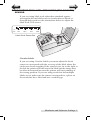
It may be necessary to clean the ink cartridge nozzles if you
notice reduced print quality, or if you suspect an cartridge
nozzle has become slightly dried out or clogged. If you are
having print quality problems, follow the steps below:
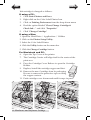
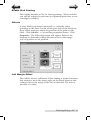
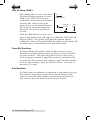
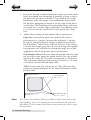
1. Remove the print cartridge.
2. Moisten a lint-free cloth with water.
3. Hold the cloth against the nozzles
for three seconds. This will
“wick” some additional ink
onto the damp cloth.
4. Wipe in one direction only.
5. Repeat the process.
f. Technical Support
If you have difficulties operating your Printer, contact technical
support using one of the methods listed below.
SourceLocation
Primera Knowledge Base
www.primera.com/kb
BarTender Software Help files
Open the software. Click on the Help
Menu - BarTender Help
Email Support
www.primera.com/contact_tech_support.cfm
Phone Support
763-475-6669 (Mon - Fri 8 a.m. - 7 p.m CST)
44 Troubleshooting