1
Ordering Information
LG2 -
100
-
1
480
-
2
Code 1: Load Amperage (Choose One)
Code
Load Amperage
20
20 A
40
40 A
60
60 A
80
80 A
100
100 A
Higher load ampere ratings available upon request. Contact
Bender for more information.
Code 2: System Voltage (Choose One)
Code
120
208
240
277
480
575
600
Voltage
120 VAC
208 VAC
240 VAC
277 VAC
480 VAC
575 VAC
600 VAC
Other voltages available upon request. Contact Bender for more
information.
Code 3: Phases (Choose One)
Code
1/2
2/2
2/3
3/3
3/4
Quantity of poles / phases
Single-phase, two-wire (L1, N)
Single-phase, two-wire (L1, L2)
Single-phase, three-wire (L1, L2, N)
Three-phase, three-wire (L1, L2, L3)
Three-phase, four-wire (L1, L2, L3, N)
3/3
3
-
A
-
4X - P
-
D
5
4
6
Code 4: Trip Level (Choose One)
Code
A
B
C
D
E
Trip Level
System
Type
Timing
6 mA, fixed
20 mA, fixed
6 - 30 mA, factory adjusted
10 - 500 mA, field adjustable
10 mA - 10 A, field adjustable
AC / DC
AC / DC
AC / DC
AC / DC
AC only
Inverse time curve
Inverse time curve
Inverse time curve
0 - 10 s (adjustable)
0 - 10 s (adjustable)
Code 5: Enclosure (Choose One)
Code
Enclosure Type
4X-P
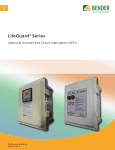
NEMA 4X polycarbonate enclosure with clamp and lockable option (recommended)
4X-SS
N
NEMA 4X stainless steel enclosure
No enclosure (backplate only)
Code 6: Additional Options (Choose One)
Code
Enclosure Type
Nothing (blank)
No additional options
S
Emergency stop button
D
Door-mounted remote with digital display**
** Digital remote option is only available with options A, B, or C
under Code 4. The digital display replaces the test/reset buttons
on the front of the panel on the standard version. Test and reset
pushbuttons are built into the digital display module.
5