1
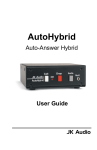
AutoHybrid
Auto-Answer Hybrid
User Guide
JK Audio
Introduction
The JK Audio AutoHybrid is a simple, passive, auto-answer /
disconnect telephone line hybrid. AutoHybrid allows
simultaneous send and receive audio through analog
telephone lines. Not just another half duplex auto-coupler,
this is a full duplex AutoHybrid. Perfect for remote monitoring,
IFB feeds, and many simple studio, conferencing, and PA
telephone interface applications.
AutoHybrid's dual transformer hybrid circuit provides a
nominal 20 dB separation of send and receive audio. This
means that the level of your send audio on the caller output
jack will be approximately 20 dB less than your transmit level.
Balanced XLR input and output jacks provide easy connection
to your professional audio equipment and the detachable
screw terminal block provides easy access to remote
features.
2
Features
This small desktop unit easily converts to a rack-mount unit using
the optional RA4 Rack Panel.
The RA4 holds four AutoHybrids in a 1U rack space.
3
Features (cont)
1.
Call Button - Press this button to answer or place a
telephone call (takes the line off-hook).
2.
OH LED - Lit when you are on line with a call (Off-Hook)
3.
Drop Button - Press this button to drop (hang up) a call.
4.
Auto-Answer - Press this switch to enable the
AutoHybrid to automatically answer an incoming call and
then disconnect after the caller hangs up. Auto answer
will occur on the first ring.
5.
Null Adjust - Used to adjust the level of Send audio that is
present on the Caller output jack.
6.
Line Jack - Connect to a standard, single line, analog
telephone line.
7.
Phone Jack - Connect a single line analog telephone for
call setup and dialing.
8.
Remote Screw Terminals Call - Momentary + 5 VDC to sieze phone line.
Drop - Momentary + 5 VDC to release phone line.
OH pulled to ground for OH LED.
9.
Caller Output - Male balanced line level XLR output
contains audio from the phone line.
10. Send Input - Female balanced line level XLR input for
signals going into the phone line.
4
Features (cont)
1
6
7
2
3
8
4
9
5
5
10
Operation
Connecting Cables
Phone Line - Connect the supplied RJ-11 phone line cable
between the jack marked "Line" and your wall jack. Be sure this
phone line can support standard analog telephone operation.
Send Audio - Connect audio you wish to send into the phone line
to the balanced line level XLR Send jack.
Caller Audio - Connect the balanced line level Caller XLR jack to
a line level input on your audio equipment. The Caller output
contains audio coming from the phone line. This audio signal will
contain the caller's voice and any audio you send into the phone
line at approximately 20 dB less than your transmit level.
Auxiliary Telephone
Connect an auxiliary telephone to this jack to dial calls. After
connecting a call, press the Call button on the AutoHybrid and
you may then hang up the telephone. When you are finished
with the call, press the Drop button to release the phone line
(place the line on hook).
Please note: When you drop a call, any audio delivered to the
Send jack of AutoHybrid will still appear on the Caller output
jack. AutoHybrid does not mute your Send audio when the
phone line is On Hook.
6
Operation (cont)
Auto-Answer
When the Auto-Answer button is in the "in" position, AutoHybrid
will answer on the first ring. AutoHybrid will look for a CPC
disconnect signal from the phone company to determine when
a call has disconnected. This will generally take only several
seconds but can take up to a minute. If you are using a
simulated analog phone line provided by a PBX system, the
system must be configured to send a disconnect signal for the
AutoHybrid's auto-disconnect function to operate.
Detachable Remote Screw Terminal
The detachable remote control screw terminal block on the
back of the AutoHybrid provides connection to switch contacts
for remote operation.
A momentary + 5 VDC applied to Pin 1 takes the phone line offhook. Another momentary + 5 VDC applied to Pin 2 will drop
the call.
Pin 3 is an open collector opto-isolator terminal that is pulled to
ground while AutoHybrid is off-hook. This terminal is protected
by a 220 ohm series resistor. You can light a remote LED by
simply connecting your LED from +5 VDC to pin 3.
Screw Terminal Pinout:
Pin 1:
Pin 2:
Pin 3:
Pin 4:
Call
Drop
OH LED
Ground
7
Operation (cont)
Null Adjust
The Null Adjust is a 15 turn pot used to determine how much of
your Send audio is delivered to the Caller output jack. Use a
small flatblade screwdriver to make adjustments to this control.
To find the absolute nu.. for any telephone line, follow this
procedure:
1. Place a call to a quiet location.
2. Send a signal into the AutoHybrid Send jack at a moderate
level. A test signal or tone works best.
3. Connect the Caller output jack to a meter or scope, or listen
to this signal through your external audio equipment.
4. Try to remember the position of the adjustment screwdriver
blade and the number of turns you are making as your first
adjust clockwise, then back to the original position, then counter
clockwise.
When the level of this signal is at a minimum, you have
achieved the maximum null for the phone line. The maximum
null you can achieve is approximately 20 dB.
8
Specifications
Input:
Transmit XLR:
Balanced Female XLR, 800 ohms, 500 mV
RMS (+4 dBv max)
Insertion Loss: 9dB Send XLR to Phone Line
Output:
Receive XLR:
Phone Line
Connector:
Aux Phone
Connector:
Balanced Male XLR, 600 ohms, 200 mV RMS
(-15 dBm nom)
RJ11C
1500 VAC Isolation
0.8B REN
RJ11C
Screw
Terminals:
Off-Hook
Control:
+5 VDC momentary
Release
Control:
+5 VDC momentary
OH LED
Signal:
pulled to ground on OH
Size:
4" x 5" x 1.5" (10.5 x 13 x 4 cm)
Weight:
11 ounces
9
FCC Registration
Your new JK Audio product has been registered with the Federal
Communications Commission (FCC). This product complies with the
standards in Part 68 of the FCC rules.
1. Connection and use with the nationwide telephone network
The FCC requires that you connect this telephone equipment to the
national telephone network through a USOC RJ-11C modular
telephone jack.
This equipment may not be used with Party Line Service or Coin
Telephone Lines.
This equipment is hearing aid compatible.
2. Information for the telephone company
Upon request from your local telephone company, you are required
to provide the following information:
a) The "line" to which you will connect the telephone equipment
(that is, your telephone number), and
b) The telephone equipment's FCC registration number. This
can be found on the bottom of your telephone equipment, and,
c) the ringer equivalence number (REN) for this equipment.
The REN is used to determine the quantity of devices which will
be connected to the telephone line. Excessive RENs on the
telephone line may result in the devices not ringing in response to
an incoming call. In most, but not all areas, the sum of the RENs
should not exceed 5.0. To be certain of the number of devices that
may be connected to the line, as determined by the total RENs,
contact the local telephone company.
3. Repair Instructions
f it is determined that your telephone equipment is malfunctioning,
the FCC requires that it not be used and that it be unplugged from
the modular outlet until the problem has been corrected. Repairs to
this telephone equipment can only be made by the manufacturer or
its authorized agents or by others who may be authorized by the
FCC. For repair procedures, follow the instructions outlined under
the warranty section of the manual
10
FCC Registration (cont)
4. Rights of the telephone company
If telephone equipment is causing harm to the network, the
telephone company may temporarily discontinue your telephone
service. If possible, they'll notify you before they interrupt service. If
advanced notice isn't practical, you'll be notified as soon as possible.
You'll be given the opportunity to correct the problem, and you'll be
informed of your right to file a complaint with the FCC.
11
Warranty
AutoHybrid is covered by a 2-year warranty to be free from
defective workmanship and materials. In the event that the
AutoHybrid needs repair, you must call us to get an authorization,
and then carefully pack and ship it to us. You will pay for shipping
to us and we will pay for return back to you, UPS ground. No free
repairs will be made if the defect was caused by misuse, weather
conditions, or other cause, except for defective workmanship or
materials. THERE ARE NO EXPRESS OR IMPLIED
WARRANTIES WHICH EXTEND BEYOND THE WARRANTY
HERE MADE.
3/04
JK Audio
800-JK-Audio
(815) 786-2929
www.jkaudio.com
[email protected]