1
(8) To ensure the quality and lifetime of printer, we recommend using
high-quality thermal paper and ribbon.
(9) Make sure the printer power is turned off when Pull or plug connection
lines.
(10) When pull or plug power cord, please hold at the cord end, which is
marked with arrow (do not pull the soft part of the cord).
(11) Please keep this manual for reference.
2.SUMMARISATION
2.1、Main Features
●Low noise, bidirectional and high speed printing
●Support cash drawer driver, support double color printing (black and red)
●Compact and attractive appearance
●Reasonable structure, easy operation and maintenance
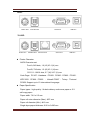
●Interface optional : USB, parallel, serial,Ethernet
●Paper source sensor, automatic paper loading, and automatic detection of
paper loading
●Character can be enlarged, bold, underlined print; character line spacing
and left &right print spacing could be adjusted.
●Support different densities bitmap and download graphics print
●Support black mark detection position printing.
●Less power consumption and low running costs
●Compatible with ESC / POS
2.2.TECHNICAL SPECIFICATIONS
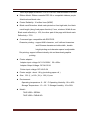
●Print Method: 9-pin Impact Dot Matrix
●Print head performance:
Print head pins: 9-pin impact Diameter: 0.305 mm
Print density : 210 dots,can print 420 positions
4