1
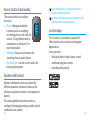
Pausing playback
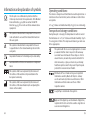
Using uStream with uMic
If you want to temporarily stop streaming to
hear a conversation, press the ( ) button to
pause the streaming. Press the ( ) button
again to resume streaming.
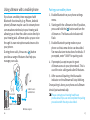
If you have a uMic, you can:
• Stream audio from a person or device.
hearing aid wearer
speaker
Stopping playback
To stop playback on your device and switch
back to regular hearing programs, press and
hold the access ( ) button for two seconds.
uStream is capable of streaming up to four
hours with a fully charged battery.
32
audio
To listen to stereo music from your device,
it must support the A2DP/”Stereo Headset”
profile.
er
Please contact your hearing healthcare
professional if you can not complete the pairing
procedure with the steps described.
pow
Changing hearing aid programs is not possible
while streaming.
up to 20 meters
(65 ft)
uStream
uMic
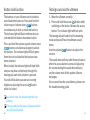
Pairing uMic to uStream
1.Starting with the uMic in the off position,
press and hold the ( ) button and turn the
uMic on. Continue to hold the ( ) button
until the blue audio indicator flashes.
2.Starting with the uStream in the off position,
press and hold the ( ) button and turn the
uStream on. The blue audio indicator will
flash.
33