1
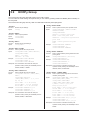
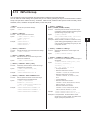
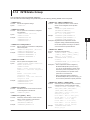
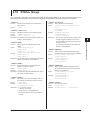
5.11 HSPeed Group
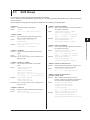
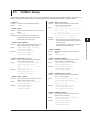
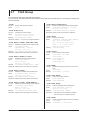
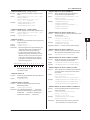
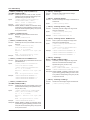
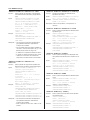
:HSPeed:RECord:FILE:DRIVe
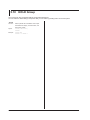
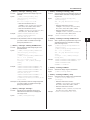
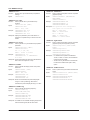
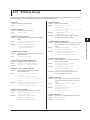
:HSPeed:RECord:ITEM:AUX<x>
Syntax
Syntax
Function
Example
Sets the drive that acquired numeric data is
saved to.
:HSPeed:RECord:FILE:DRIVe {RAM|
USB[,<NRf>]|NETWork}
RAM = Internal RAM drive
USB = USB memory device drive;
<NRf> = 0 or 1 (drive number)
NETWork = Network drive
:HSPEED:RECORD:FILE:DRIVE RAM
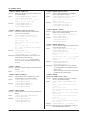
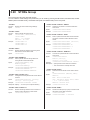
:HSPeed:RECord:FILE:FREE?
Function
Syntax
Example
Queries the free space (in bytes) on the drive that
the acquired numeric data will be saved to.
:HSPeed:RECord:FILE:FREE?
:HSPEED:RECORD:FILE:FREE? -> 20912128
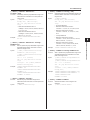
:HSPeed:RECord:FILE:NAME
Function
Syntax
Example
Sets or queries the name of the file that acquired
numeric data will be saved to.
:HSPeed:RECord:FILE:NAME {<String>}
:HSPeed:RECord:FILE:NAME?
<String> = File name
:HSPEED:RECORD:FILE:NAME “ RECORD1”
:HSPEED:RECORD:FILE:NAME? ->
:HSPEED:RECORD:FILE:NAME “ RECORD1”
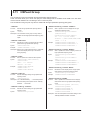
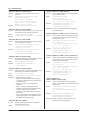
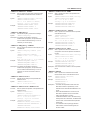
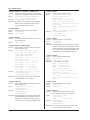
:HSPeed:RECord:FILE:PATH?
Function
Syntax
Example
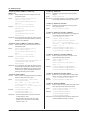
Queries the absolute path of the directory that the
acquired numeric data will be saved to.
:HSPeed:RECord:FILE:PATH?
:HSPEED:RECORD:FILE:PATH? ->
“ USB-0/RECORD”
:HSPeed:RECord:FILE:STATe?
Function
Queries the status of the file save operation being
performed on the acquired numeric data.
:HSPeed:RECord:FILE:STATe?
:HSPEED:RECORD:FILE:STATE? -> READY
Syntax
Example
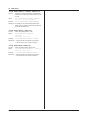
Description • The response is as follows:
• READy = The file is closed (data capturing is
in standby or the data has been captured and
saved to the file).
• RECord = The file is open (data is being
captured).
• STOP = The file is closed (data is being
captured, but the file save operation has been
stopped because an error occurred).
• CONVert = Stored data is being converted to
CSV format.
• OFF = The WT1800 is not configured to save
captured data to files, or the WT1800 is not in
high speed data capturing mode.
:HSPeed:RECord:ITEM?
Function
Syntax
5-52
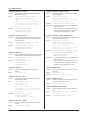
Function
Example
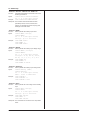
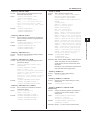
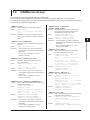
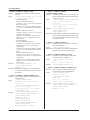
Sets or queries whether numeric data (auxiliary
input) is saved to a file.
:HSPeed:RECord:ITEM:
AUX<x> {<Boolean>}
:HSPeed:RECord:ITEM:AUX<x>?
<x> = 1 or 2 (AUX input channel)
:HSPEED:RECORD:ITEM:AUX1 ON
:HSPEED:RECORD:ITEM:AUX1? ->
:HSPEED:RECORD:ITEM:AUX1 1
Description This is only valid on models with the auxiliary
input (/AUX) option.
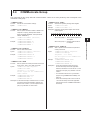
:HSPeed:RECord:ITEM:{I<x>|IA|IB|IC}
Function
Syntax
Example
Sets or queries whether the specified element or
wiring unit (ΣA, ΣB, or ΣC) of the numeric data
(current) will be saved.
:HSPeed:RECord:ITEM:{I<x>|IA|IB|
IC} {<Boolean>}
:HSPeed:RECord:ITEM:{I<x>|IA|IB|IC}?
<x> = 1 to 6 (element)
IA, IB, IC = IΣA, IΣB, IΣC
:HSPEED:RECORD:ITEM:I1 ON
:HSPEED:RECORD:ITEM:I1? ->
:HSPEED:RECORD:ITEM:I1 1
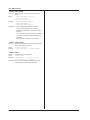
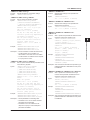
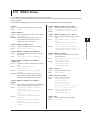
:HSPeed:RECord:ITEM:{P<x>|PA|PB|PC}
Function
Syntax
Example
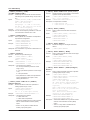
Sets or queries whether the specified element or
wiring unit (ΣA, ΣB, or ΣC) of the numeric data
(active power) will be saved.
:HSPeed:RECord:ITEM:{P<x>|PA|PB|
PC} {<Boolean>}
:HSPeed:RECord:ITEM:{P<x>|PA|PB|PC}?
<x> = 1 to 6 (element)
PA, PB, PC = PΣA, PΣB, PΣC
:HSPEED:RECORD:ITEM:P1 ON
:HSPEED:RECORD:ITEM:P1? ->
:HSPEED:RECORD:ITEM:P1 1
:HSPeed:RECord:
ITEM:{SPEed|TORQue|PM}
Function
Syntax
Example
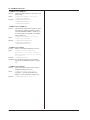
Sets or queries whether the rotating speed,
torque, or motor output of the numeric data (motor)
will be saved.
:HSPeed:RECord:ITEM:{SPEed|TORQue|
PM} {<Boolean>}
:HSPeed:RECord:ITEM:{SPEed|TORQue|
PM}?
:HSPEED:RECORD:ITEM:SPEED ON
:HSPEED:RECORD:ITEM:SPEED? ->
:HSPEED:RECORD:ITEM:SPEED 1
Description This is only valid on models with the motor
evaluation function (/MTR) option.
Queries all settings for the numeric data items
that will be saved to a file.
:HSPeed:RECord:ITEM?
IM WT1801-17EN