1
User’s Manual of High-Speed Dome Video Camera
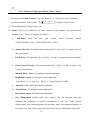
12. If camera lens adheres with dust, please use special lens paper to clean up.
13. When disassemble the Acrylic DOME shield, please wear cotton gloves to
process in order to avoid surface of the product being scraped.
II. Installation Instruction of Video Camera
1.
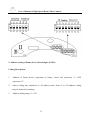
Remove Acrylic DOME shield (Please do not scrape the Acrylic shield. It is
recommended to wear cotton gloves when operate).
2.
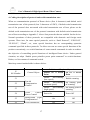
As shown in the figure below, first take the flexible flat cable through connector
above the base plate and buckle it on the connector. Then buckle the cable on the
connection below the CAMERA.
3.
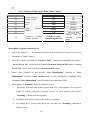
Lock the CAMERA up and fix the screws
Note: ① When install the CAMERA, please do not scrape the lens.
② After installed the camera and before being turned on, please test by manual to
confirm that the camera doesn’t touch the Acrylic or other parts. If touch,
please adjust the camera until it doesn’t touch anything then you can turn on.
3