1
EN Index
Index ................................................................................................2
Front panel.....................................................................................2
Rear panel ......................................................................................2
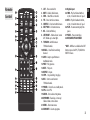
Remote ...........................................................................................3
Control.............................................................................................3
Installing the Batteries ...............................................................4
Using the Remote Control........................................................4
Connections ..................................................................................4
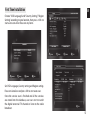
First Time Installation .................................................................5
Menu ................................................................................................6
SETUP&MORE................................................................................6
Setup/Installation........................................................................6
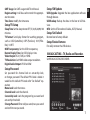
BROADCASTING – TV, Radio and Recorder. .......................7
MULTIMEDIA..................................................................................8
NAVI Bar ..........................................................................................8
TimeShift ......................................................................................10
Troubleshooting ........................................................................11
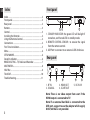
Front panel
3
1 2
1. STANDBY INDICATOR: the green LED will be light if
turned on, and the red LED in standby mode.
2. REMOTE CONTROL SENSOR: to receive the signal
from the remote control.
3. USB Port: to connect to an external USB 2.0 device.
Rear panel
1
1. RF IN
2. COAXIAL
2
3
3. HDMI OUT
4. SCART OUT
4
5
5. DC IN 5V
Note! There is no video output from scart if the
HDMI output is connected to TV.
Note! If an external hard disk is connected to the
USB port, suggest to use the adapter which supply
DC5V/2A that is not provided.
2