1
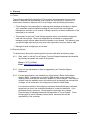
7.2 Reading and Calibration Issues
Please use this guide to address some common Reading / Calibration Issues.
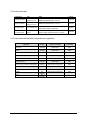
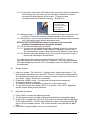
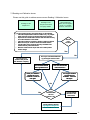
When reading the
blank, there is negative
result <-2 or positive
result >2, and never 0.
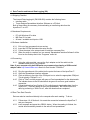
Readings for the
sample and or blank
are highly variable.
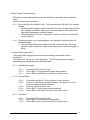
Readings for the
sample are 0.
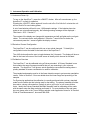
If you are experiencing any of the issues above, try the following:
• Check the sample well and make sure that it is dry. Dry sample
well if necessary using a non-abrasive wipe or lint-free cloth.
• Wipe down the cuvettes with a lint-free cloth and make sure they
do not have moisture on the outside.
• Check the cuvettes for scratches. Replace cuvette if scratched.
• Make sure that your cuvette is at least 2/3 full with solution.
• Tap the bottom of the cuvette to purge any air bubbles from
solution that may cause interference.
• Mark the cuvette near the top to make sure cuvette position
doesn’t change.
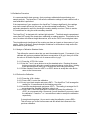
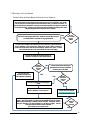
Was the
issue
resolved?
Yes
No
Check your %FS std:%FS blk ratio
by pressing the <DIAG> button.
You may use your
AquaFluor and proceed
with calibration / sampling.
Your %FS std:%FS blk
ratio is greater than 30.
Your %FS std:%FS blk
ratio is less than 5.
Dilute your calibration
standard by 2x and
recalibrate. Check the
ratio again.
Use a higher standard
concentration and
recalibrate. Check the
ratio again.
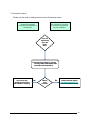
No
Yes
Is your
%FSstd:%FSblk
ratio now
between 5-30?
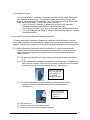
I’ve tried multiple
times and I can’t
make it work.
Contact Customer Support
[email protected]
to receive a RMA# for service.
AquaFluor™ User’s Manual
21