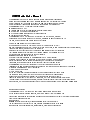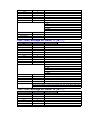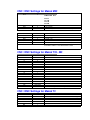
1
5112
5120
5121
5122
5130
5131
5132
9
4
2
9
4
2
9
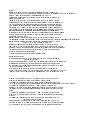
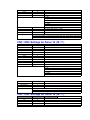
TV Check
ISO
Input Device
Output Device
0
0
1
1
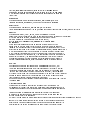
* Baud rate - see table below for valid options.
* Baud rate - see table below for valid options.
* Baud rate - see table below for valid options.
6 = 300
7 = 600
8 = 1200
9 = 2400 * (recommended)
10 = 4800
11 = 9600
0 = TV Check OFF (1= TV Check ON - Never enable TV
0 = ISO (1=EIA Never use EIA)
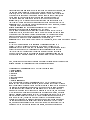
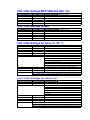
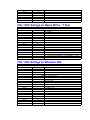
CNC / DNC Settings for Fanuc 11 ( M / T )
Parameter
5001
5002
5003
5110
5111
5112
5120
5121
5122
5130
5131
5132
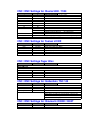
Value
1
2
3
4
2
9
4
2
9
4
2
9
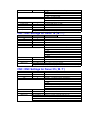
TV Check
ISO
Input Device
Output Device
0
0
1
1
Drip Feed ?
Comments
* Baud rate - see table below for valid options.
* Baud rate - see table below for valid options.
* Baud rate - see table below for valid options.
6 = 300
7 = 600
8 = 1200
9 = 2400 * (recommended)
10 = 4800
11 = 9600
0 = TV Check OFF (1= TV Check ON - Never enable TV
0 = ISO (1=EIA Never use EIA)
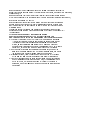
Select Tape mode on the control - Press Cycle Start.
Then go to the computer, prepare the program and click 'Send'. When data begins
Note: Not all fanuc of this type can drip feed - must be enabled in the control.
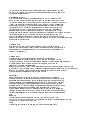
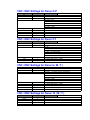
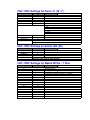
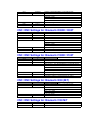
CNC / DNC Settings for Fanuc 12 ( M / T )
Parameter
5001
5002
5003
5110
5111
5112
5120
5121
Value
1
2
3
4
2
9
4
2
Comments
* Baud rate - see table below for valid options.