1
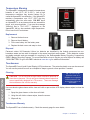
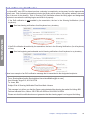
find the corresponding MLS number. If there are several
possibilities, an email is sent to you asking you to select
the link of the correct address for the listing. If a match is
made, you will receive an email telling you the assignment
has been made. If no match is found, the keybox remains
unassigned.
Tip: Assign a listing ID or address
to the keybox when you place it on
property to make sure your reports and
email notices are more complete.
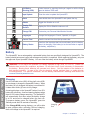
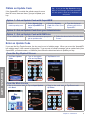
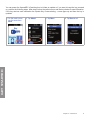
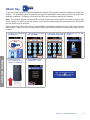
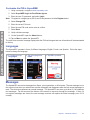
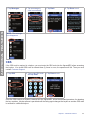
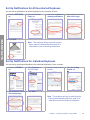
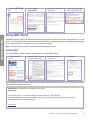
1.On the main screen tap 2.Type in the shackle
the Shackle icon.
code and tap Enter.
3. Select a reason, press 4.Add the property
Enter, and follow the
address and tap
prompts.
Enter.
5.Point the key at the
keybox.
7. Then pull up to
remove the shackle.
6. Push down on the
shackle.
8. Tap Done to exit.
OPERATIONS
PRESS
FIRMLY
PULL UP
TO RELEASE
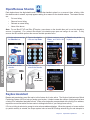
Flashlight
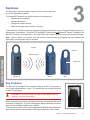
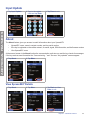
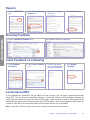
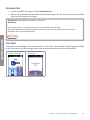
Tap the Flashlight button to activate the LED flashlight. Tap it again to turn it off.
1.Tap the Flashlight icon
to turn it ON.
2.Tap the Flashlight icon
to turn it OFF.
Chapter 3 XpressKEY Operations
15