1
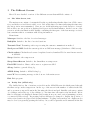
APRS comment Comments to be attached to the position report.
Filter Filter command to pass to the APRS-IS server, must start with a keyword filter, for
instance “filter b/la3nma*”.
Services Check the different check boxes to enable APRS (position reporting in general) and
GPS respectively.
Transmit.. Select the appropriate method for position transmission, either APRS-IS, HTTP
post, or SMS post. The appropriate address must be set in the server:port field.
Powersave If checked every service is shot down between position transmissions, typically used
with a long TX interval (not tested).
3.5
Setup SmartBeacon
Capi follows a list of the field in the smartBeacon setup screen:
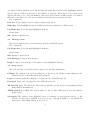
Interval/SmartBeacon Switch between transmitting positions at specific intervals given by TX
interval in the setup screen, or using SmartBeacon configured with the values of the field is
below. SmartBeacon cannot be used with powersaving.
Low speed The low speed limit below which positions are transmitted at the low speed interval.
Low speed interval The number of seconds between each position report when the speed is
below the low speed limit.
High speed The high the limit above which positions are transmitted at the high-speed interval.
High-speed interval The number of seconds between each position report when the speed is
above the high-speed limit.
Minimum turn The minimum number of degrees direction of travel must shift before a position
is transmitted when the speed is between the high and low speed limits.
Turn slope A figure determining the speed of the turn which must be reached before a position
is transmitted.
Turn Time Another figure determining the speed of the turn in seconds.
For more information on SmartBeaconing we refer to
http://www.hamhud.net/hh2/smartbeacon.html.
4
Some Notes on HTTP Post
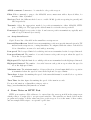
HTTP post requires a Web address to be entered into the server:port field in the setup screen
which points to a script able to accept several variables. The variables are hardcoded from the
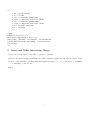
program and consists of all the values used in a position report. Low is the name of these values,
and an example PHP script to accept and log the data.
4