1
4
4.1
TESTING READER AND TAGS BEFORE INSTALLATION
INTRODUCTION
Careful preparation is important for successful installation of AWID’s long-range readers and credentials. Simple bench-testing
gives the installer confidence in the performance of the reader and the credentials, before the products are taken to the site.
This testing isolates the reader and credentials from all other factors that contribute to performance of the final assembly.
4.2
ITEMS FOR BENCH TESTING
AWID’s long-range reader and credentials are tested easily using only the items listed below. It is not necessary to interface the reader
to a controller panel or reader-input module while conducting this test.
•
•
•
4.3
LR-3000 reader (It does not contain an LED.)
HT-UHF hangtag (26-bit code), or other tag *
SP-6820-LR test unit, cable with 3 clips *
•
•
PS-12-3.3A power module, cable with 2 clips *
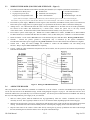
Wiring diagram, Figure 2 (below)
* A component of the LR-3000KIT Test & Set-up Kit
SUPPORTING THE READER
The reader’s effective RF field, in which the long-range credentials can be detected, is maximized when there is no material in front
of the reader or immediately to the sides of the reader. See the LR-3000 Effective RF Field diagram (Figure 1 on page 4).
•
Cut off the connector from the LR-3000 reader’s cable.
unused wires separated from each other.
•
Hang the reader on a clear vertical surface in an open space, about 4 feet above the bench top, 4 feet from a side wall,
and 4 feet below the ceiling.
4.4
Prepare the pigtails for the planned installation.
Keep the
WIRING FOR QUICK TEST
•
Connect the wires as shown in the wiring diagram, Figure 2 (below).
•
Be sure that unused wires are touching nothing. Do not cut off unused wires yet.
•
The first connection made is the reader’s black (negative power) wire. The last step is to plug in the DC power module.
Figure 2. Wiring for quick test.
4.5
HOLDING THE TAG
•
Hold the test tag by the fingertips, with the hand behind the tag. Hold the tag at arm’s length, to the side of your body. Or …
•
Attach the test tag to a non-metal stick. Stand to the side of the reader’s RF field, and extend the tag into the reader’s field.
•
Hold the tag so that the face of the tag is approximately parallel with the reader’s face. (The reader is circular-polarized,
so the credentials may be held at any angle – up-and-down, or side-to-side, or diagonal.)
•
Move the tag slowly though the effective RF field in front of the reader. Observe the edges of the zone and the point
of maximum read range. The widest part of the zone is at about half of the maximum range.
LR-3000 Manual
V1.6
Page 7 of 21