1
Setup
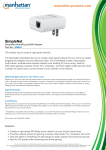
The SimpleNet adapter is a Plug and Play device. By
simply pressing a button, you can securely connect to
the Internet or to other devices (computers, Blu-ray
players, game consoles, etc.) on a network.
1. Use the included Ethernet cable to connect the
adapter to your modem or router. If you’re setting up
Security /
Ethernet port
Reset button
with the Starter Kit, connect one of the two included
adapters to your modem or router.
2. Plug each adapter into an AC power outlet near the device which you’ll be
connecting to that particular adapter. Caution: Don’t plug SimpleNet adapters
into a power strip or outlet that uses surge protection, as this may prevent them
from working properly.
3. Once a SimpleNet adapter is
SimpleNet
Powerline
connected and powered, it will
AV Ethernet
Adapter
search for other SimpleNet
adapters (bridges) connected to
SimpleNet /
Powerline
the same wiring system in your
building. When another adapter
is found, the PL (Powerline)
LED on the front panel will light.
Remember that you need at
least two SimpleNet adapters
SimpleNet
SimpleNet
connected to the building’s
Powerline
Powerline
AV Ethernet
AV Ethernet
Adapter
wiring system for this to work.
Adapter
Note: If the PL LED lights red,
it means that a connection’s
been established, though not
necessarily at optimum speed.
The connection speed should
still be fast enough for online
gaming and video streaming.
Security/Reset button: This button has two functions:
•As a Security button, it’s part of the procedure for generating an individual
Powerline network group under a multiple-nodes environment. Refer to the
Network Setup instructions below.
•As a Reset button, it’s used to clear all data and restore all settings to the factory
default values. Note: The adapter must be plugged in to restore it to factory
defaults. Press the Reset button until the LEDs begin to flash.
4