1
SETTING THE DAYLIGHT SAVING TIME
Automatic DST correction (recommended)
By default, the daylight saving time is already set to start on the first Sunday of April and to end
on the last Sunday of October. However, if you once disabled this function and want to set it
again or change starting and/or ending date, please change dates as follows.
Once you reset the unit, setting of daylight saving time will return to the default value.
Example: Start date Sunday, April 2, 2006.
End date Sunday, October 29, 2006.
If you set as the above, the time clock remembers the start date as the first Sunday of April
and the end date as the last Sunday of October. Once set, the time clock automatically
updates the settings every year thereafter. No further manual setting is necessary.
DST correction via WWVB radio
If you want to disable automatic daylight saving time function and adjust time just by received
radio wave (WWVB), please see the following page for "DELETING THE DAYLIGHT
SAVING TIME SETTING" and cancel the setting.
Disable DST correction
If you are located in an area that does not observe Daylight Saving Time, you may disable
automatic correction, and bypass correction from the WWVB radio, by setting the STARTING
DATE and ENDING DATE to the same date.
Example: Start date Sunday April 2, 2006
End date Sunday April 2, 2006
SETTING THE STARTING DATE OF DAYLIGHT SAVING TIME
Example: Daylight saving time starts on Sunday, April 2, 2006.
Year
18
Month
Date
SELECT
D.S.T.
START
CHANGE SET
SELECT
D.S.T.
START
CHANGE SET
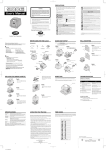
Step 1
Press the SELECT button and position
the " " mark at the "D.S.T. START".
At that moment, the "Year" flashes.
(The flashing means it can be changed.)
Change the "Year".
In case of the example, press the
CHANGE button to set at "06". And then
press the SET button.
At that moment, the flashing changes
from "Year" to "Month".