1
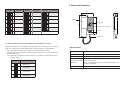
1. Parts and Functions
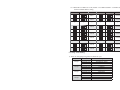
Code=6
Bit state
ON
1 2 3 4 5 6
1 2 3 4 5 6
ON
ON
Code=7
1 2 3 4 5 6
User Code
Code=17
Code=8
ON
1 2 3 4 5 6
1 2 3 4 5 6
ON
ON
Code=9
1 2 3 4 5 6
Code=18
Code=10
ON
1 2 3 4 5 6
1 2 3 4 5 6
ON
ON
Code=11
1 2 3 4 5 6
97
Code=28
33
ON
Code=29
1 2 3 4 5 6
Code=19
ON
Code=30
Handset
1 2 3 4 5 6
Code=20
1 2 3 4 5 6
ON
User Code
1 2 3 4 5 6
1 2 3 4 5 6
ON
Bit state
ON
ON
Unlock button
Code=31
1 2 3 4 5 6
Code=21
ON
2
150
User Code
ON
187
Bit state
Call button/Unlock 2nd button
Code=32
1 2 3 4 5 6
Speaker
Code=22
1 2 3 4 5 6
handset curve
Side View
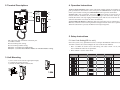
5.2 Slave Address Or Extended Address Setting(DIP2 to set it)
When multi Monitors are installed in one apartment, these Monitors have to use the
same User Code setting, and the Master/Slave mode should be set on the Monitor.
Bit-1~2 of DIP2 are used to slave address or extended address setting.
Bit-3 of DIP2 is used to monitor matched setting, When Bit-3 set to ON / OFF, there
are different usages.
5.2.1 When Bit-3 of DIP2 set to OFF, the Bit-1~2 of DIP2 are used to master/slave
address setting:
DIP2 state
Master/Slave type
ON
1 2 3
Master monitor
Slave monitor 1
ON
1 2 3
Slave monitor 2
ON
1 2 3
Handset
Pick up to communicate with visitor.
Handset curve
Connect handset with monitor.
Unlock button
Press to release the door.
In standby mode, pick up handset, then press Call button to
Call button/Unlock activate the inner call;
2nd button
During calling/talking state, press Unlock 2nd button to release the second door.
Speaker
ON
1 2 3
Key functions
Slave monitor 3
Send out voice from the visitor.