1
MSC CXC-GS45 User's Manual
BIOS
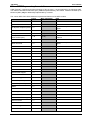
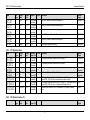
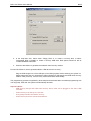
If you need to change your drive settings, select one of the Master or Slave drives on the Main Menu.
This will display a menu like this:
Note: The capacity is displayed in ‘real’ Mbytes (1MB=1024*1024 Bytes) Drives with a total capacity
greater than 8Gbyte operate in LBA format only.
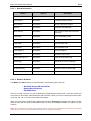
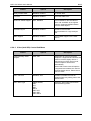
Feature
Options
Description
Type
None,
Auto,
User,
ATAPI Removable,
Other ATAPI,
CD-ROM
None = Autotyping is not able to
supply the drive type or end user has
selected None, disabling any drive that
may be installed.
Auto = Autotyping, the drive itself
supplies the information.
User = You supply the hard-disk drive
information in the following fields.
ATAPI Removable = Removable Disk
Drive
Other ATAPI = non-specific ATAPI
Device
CD-ROM = CD-ROM drive.
Cylinders
1 to 65536
Number of Cylinders
Heads
1 to 16
Number of read/write heads
Sectors
1 to 63
Number of sectors per track
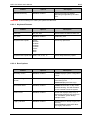
Multi-Sector Transfers
Disabled, 2 sectors,
4 sectors, 8 sectors,
16 sectors
Any selection except Disabled
determines the number of sectors
transferred per block.
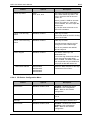
LBA Mode Control
Disabled, Enabled
Enabling LBA causes Logical Block
Addressing to be used in place of
Cylinders, Heads, & Sectors.
32 Bit I/O
Disabled, Enabled
Enables 32-bit communication
between CPU and IDE card. Requires
PCI or local bus.
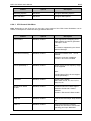
Transfer Mode
Standard
Fast PIO 1
Fast PIO 2
Fast PIO 3
Fast PIO 4
FPIO 3 / DMA 1
FPIO 4 / DMA 2
Selects the method for transferring the
data between the hard disk and
system memory.
The Setup menu only lists those
options supported by the drive and
platform.
Ultra DMA Mode
Disabled
Mode 0
Mode 1
Mode 2
Mode 3
Mode 4
Mode 5
Mode 6
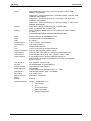
Ultra DMA Mode supports 33/66/100
MB/sec transfer rate for fixed disk
drives.
40