1
MSC CXC-GS45 User's Manual
BIOS
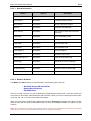
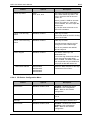
Feature
SMART Monitoring
Options
Disabled, Enabled
Description
Displays the status of SMART
Monitoring if supported by the used
drive.
WARNING: Incorrect settings can cause your system to malfunction.
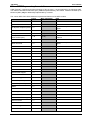
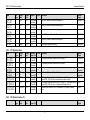
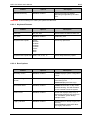
6.2.3.3 Keyboard Features
Feature
Options
Description
NumLock
On, Off, Auto
Selects Power-on state for NumLock
Key Click
Disabled, Enabled
Enables key click
Keyboard auto-repeat
30/sec
26.7/sec
21.8/sec
18.5/sec
13.3/sec
10/sec
6/sec
2/sec
Selects key repeat rate
Keyboard auto-repeat rate 0.25s, 0.5s, 0.75s, 1s
Selects delay before key repeat
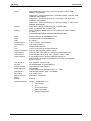
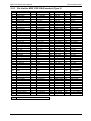
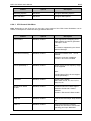
6.2.3.4 Boot Options
Feature
Options
Description
Summary screen
Disabled, Enabled
Enabled displays system configuration
on boot.
Boot-time Diagnostic
Screen
Disabled, Enabled
Enabled displays the diagnostic
screen during boot.
Disabled displays the Boot Logo.
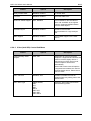
Quick Boot Mode
Disabled, Enabled
Enabled allows POST to skip certain
test while booting. This will decrease
the time needed to boot the system.
POST Errors
Disabled, Enabled
Pauses and displays Setup entry or
resume boot prompt if error occurs on
boot. If disabled, system always
attempts to boot
Legacy OS Boot
Disabled, Enabled
Select Enabled to attempt Legacy OS
Boot only.
Select Disabled to attempt EFI Boot
first, Legacy OS second.
41